

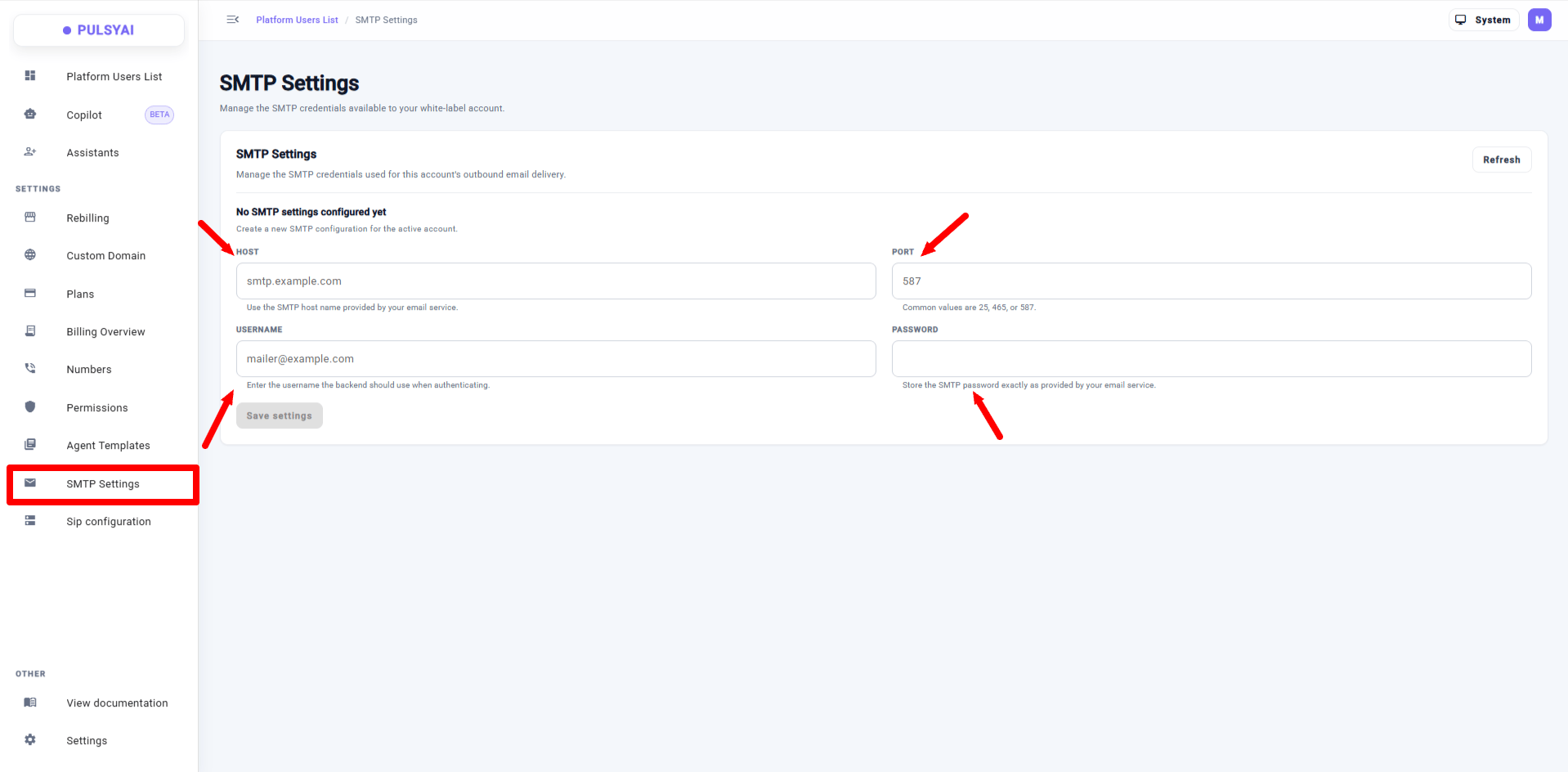
SMTP Settings — connect your own outbound email server so clients receive emails from your address.
Why use your own SMTP server?
By default, PulsyAI sends system emails from a generic sender. When you configure SMTP, those emails are delivered through your own mail server instead. For a reseller running a white-label platform, this means your clients never see the PulsyAI name in their inbox — the experience feels 100% yours, from the dashboard to the emails.SMTP credentials
The SMTP Settings section asks for the four standard SMTP credentials from your email provider:You can find these four values in your email provider’s settings (Google Workspace, Microsoft 365, Amazon SES, Postmark, SendGrid, or any standard SMTP provider). If you’re unsure, check your provider’s “SMTP” or “outbound email” documentation.
How to set up SMTP
1
Open SMTP Settings
Go to the SMTP Settings section in the sidebar.
2
Enter your credentials
Fill in the Host, Port, Username, and Password provided by your email provider.
3
Save
Save your settings. From now on, PulsyAI’s outbound emails are delivered through your own SMTP server.
Which emails are sent from your address?
Once SMTP is configured, your own email address is used for the system emails PulsyAI sends to your clients, including:- Account emails — sent when clients interact with their account.
- Invitations — sent when you invite a client to the platform.
- Notifications — platform notifications delivered to your clients.
Frequently asked questions
What are SMTP Settings in PulsyAI?
What are SMTP Settings in PulsyAI?
SMTP Settings let resellers connect their own outbound email server to PulsyAI. Once configured, account emails, invitations, and notifications are sent from your own email address instead of a generic PulsyAI sender.
Which credentials do I need to set up SMTP?
Which credentials do I need to set up SMTP?
Four standard SMTP credentials from your email provider: host, port, username, and password.
Will my clients still see the PulsyAI email address?
Will my clients still see the PulsyAI email address?
No. Once you configure SMTP, your clients receive system emails from your own email address, keeping the platform fully white-labeled.
Who is SMTP Settings for?
Who is SMTP Settings for?
Resellers and agencies who want their white-labeled PulsyAI platform to feel entirely their own — including the emails their end-clients receive.
Next step
Custom Domain
Run your platform at your own branded URL.
Custom Logo
Replace PulsyAI’s branding with your own logo.