


Latest release
Roadmap
RSS feed
Documentation
PulsyAI website
Platform & Infrastructure
01 · Compliance tab
A brand new Compliance tab lets you manage retention and privacy controls per agent — a big step toward enterprise-grade data governance.Data Retention — enable a retention policy on the agent and choose from supported retention windows (in days). An automated scheduled cleanup job enforces the policy in the background, designed to keep running reliably even if individual cleanup runs hit issues.PII Retention — an independent per-agent toggle to control whether personally identifiable information collected during calls is retained. When enabled, PII redaction now covers both text transcripts AND audio — redacted versions of call recordings are stored alongside the originals, so sensitive audio segments are automatically masked.All settings are per-agent and can be enabled or disabled independently.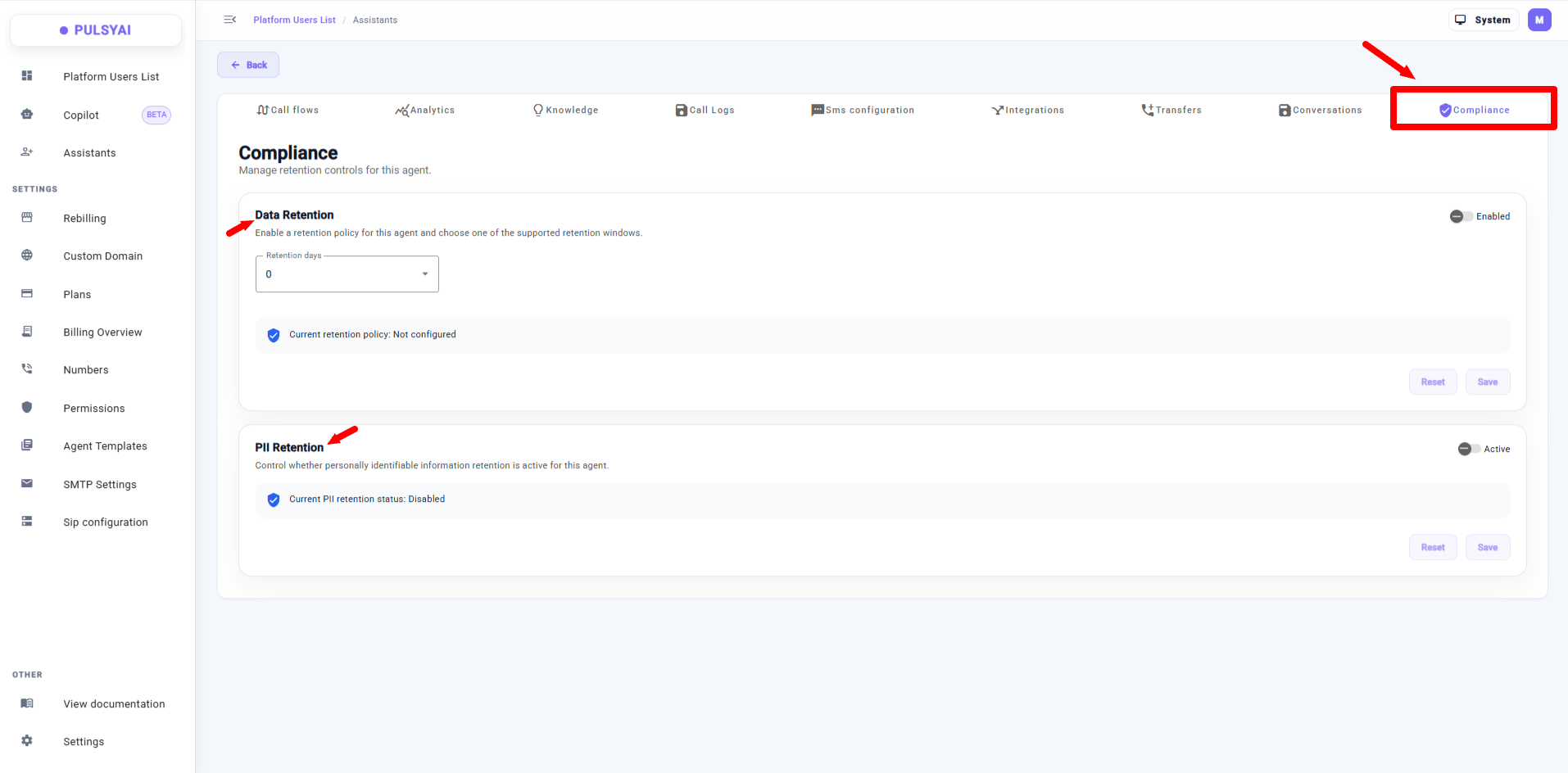
Compliance tab — per-agent Data Retention and PII Retention controls, with PII redaction now covering both transcripts and audio recordings.
02 · Copilot (BETA)
Meet Copilot — a new in-platform AI assistant that helps you manage your PulsyAI workspace using natural language.Copilot can help you manage agents, integrations, phone numbers, SIP settings, call logs, and search the PulsyAI documentation. Ask it to create an agent, update a prompt, look up a call log, or find something in the docs — all in plain English.Copilot is currently in beta and only makes changes when you explicitly ask it to. We’re actively improving it — this is our first step toward a done-for-you experience inside PulsyAI.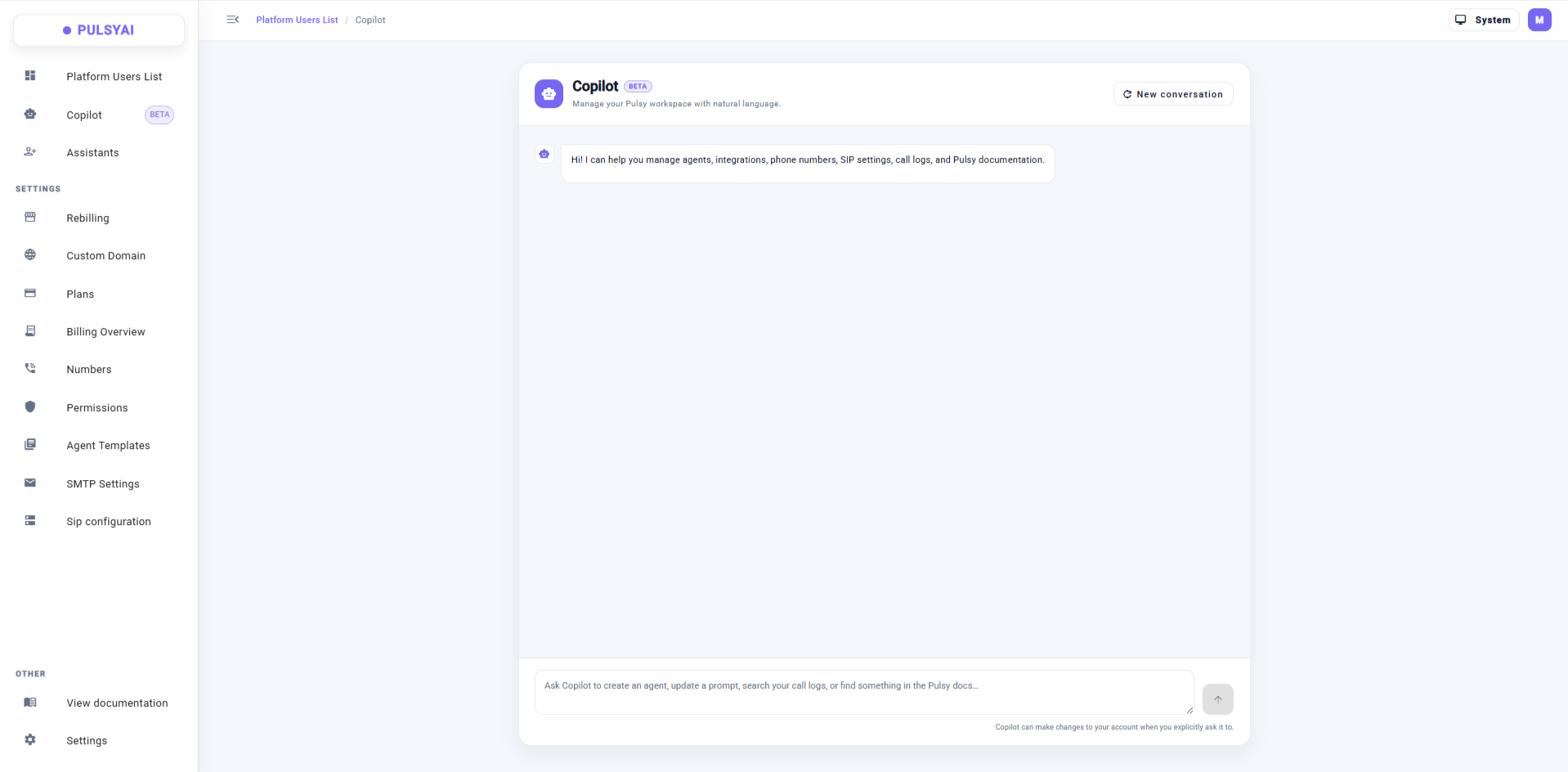
Copilot (beta) — an in-platform AI assistant that manages your PulsyAI workspace via natural language.
Building Agents
03 · Hang Up Tool
A new Hang Up Tool in the Integrations tab lets your AI agent end the call at the right moment based on a directive you configure. Describe in natural language the situations where the LLM can safely hang up (for example: “when the caller confirms the appointment is booked and says goodbye”), and the agent will handle it — no more calls hanging on longer than they need to.We also tightened up the underlying timeout and hang-up handling so calls terminate cleanly in every scenario.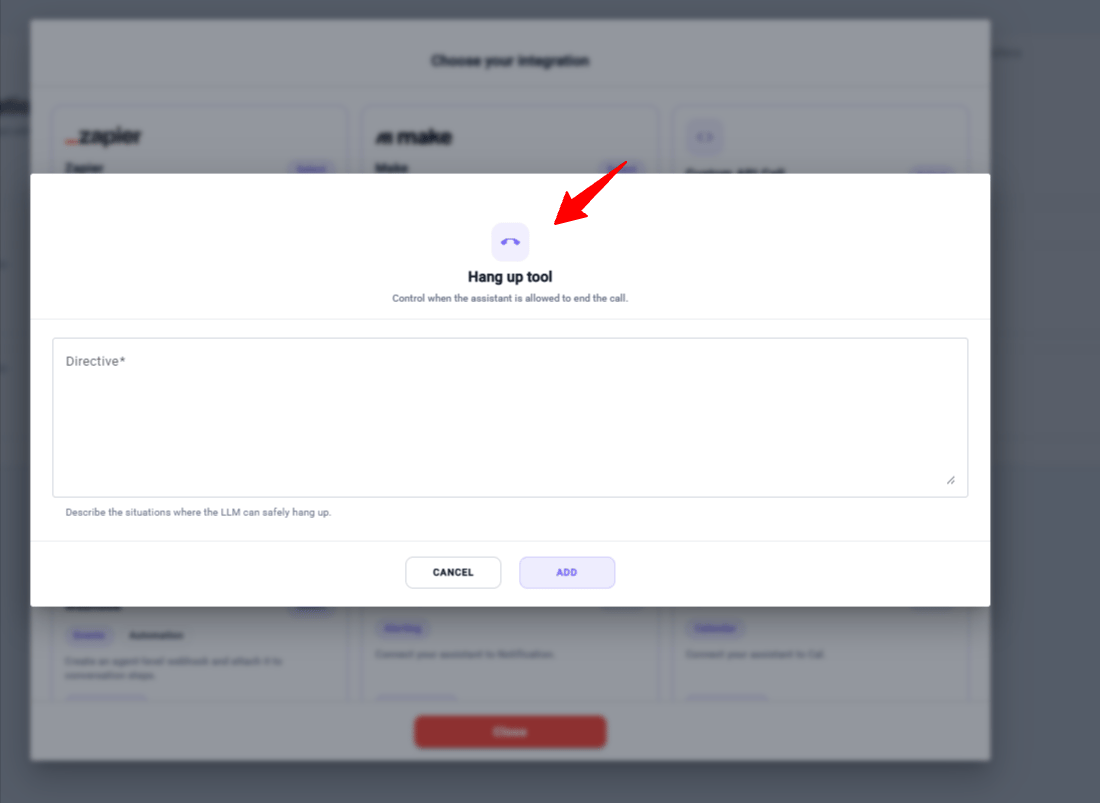
Hang Up Tool — configure a natural-language directive so the agent ends the call at the right moment.
Outbound & Call Management
04 · Concurrent Calls + Pause/Resume in Campaigns
Outbound campaigns just leveled up.Concurrent calls — when creating a campaign, set the number of calls the AI should launch every 40 seconds. Batches of 1 to 5 concurrent calls are now supported for higher-throughput campaigns.Pause / Resume — you can now pause a running campaign at any time. The paused state is persisted, and resume activity is tracked. When you resume, you can also change the concurrent call count on the fly.Calls already in progress continue regardless — the concurrent value only controls new calls started every 40 seconds.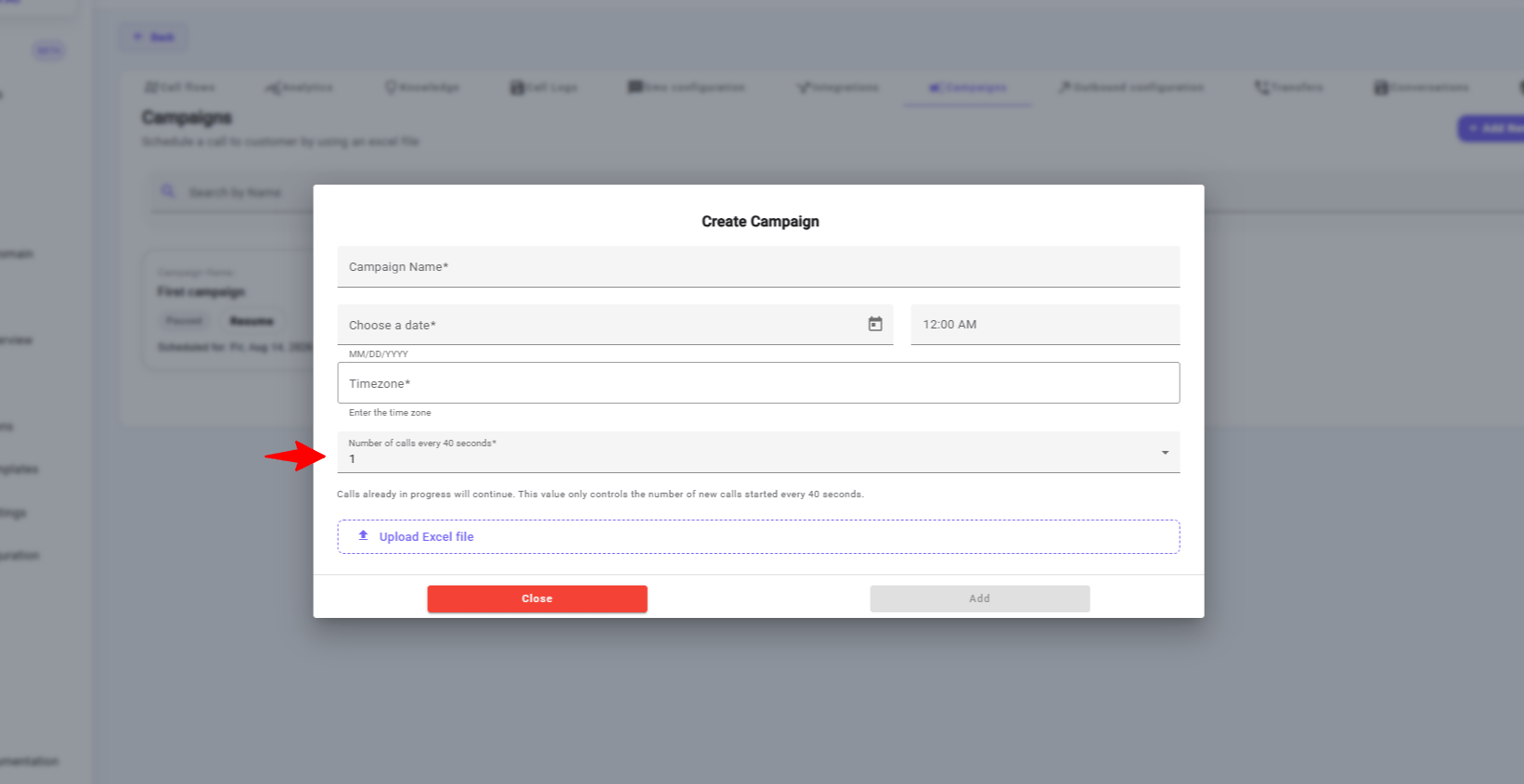
Campaign creation — set the number of concurrent calls launched every 40 seconds.
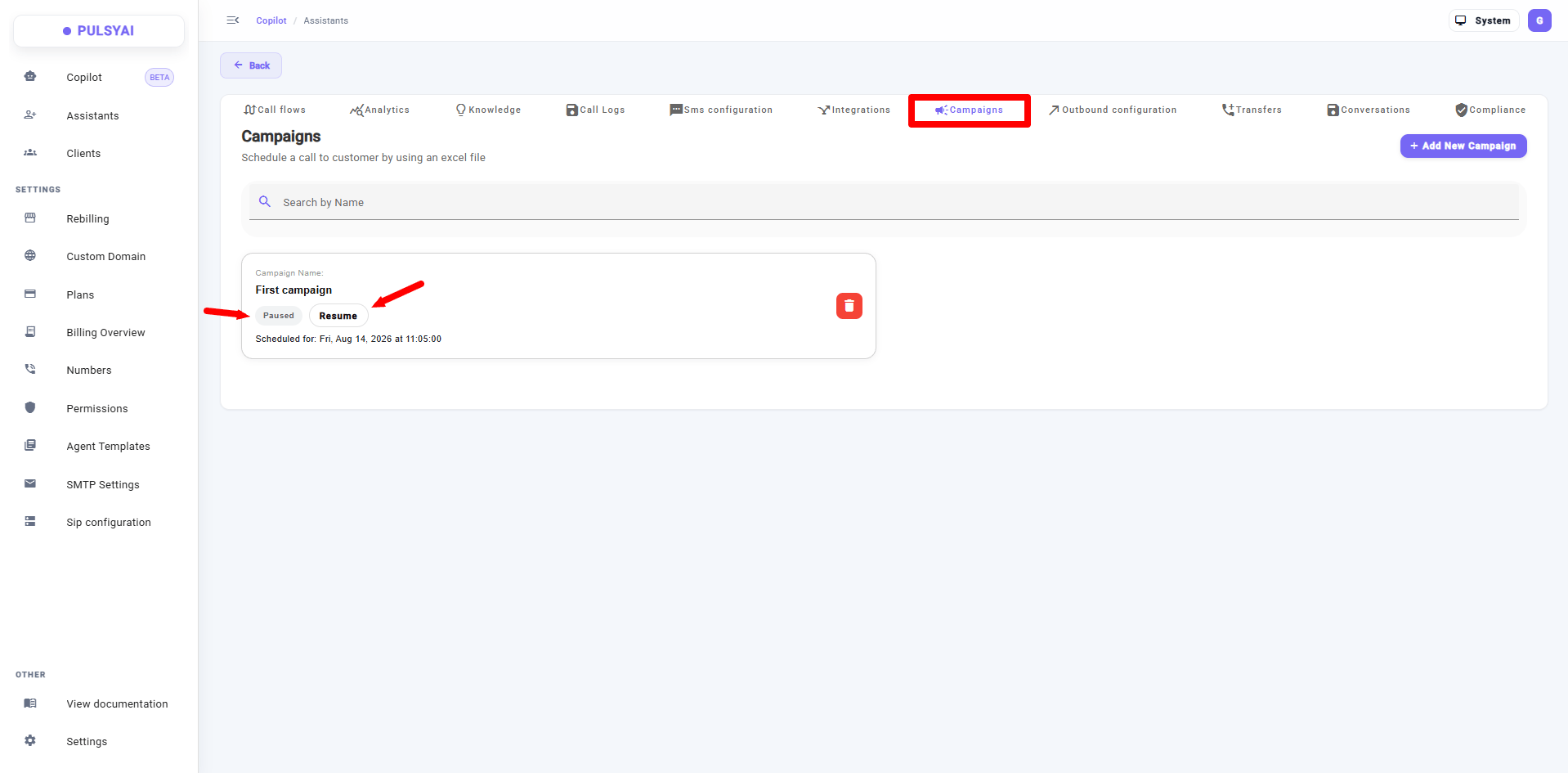
Pause and Resume a running campaign at any time, with the option to adjust the concurrent call count on resume.
Reseller (Admin) Features
05 · SMTP Settings — send from your own email
A new SMTP Settings section in the sidebar lets you configure your own outbound email delivery. Host, port, username, password — all the standard SMTP credentials.The upshot: your clients now receive account emails, invitations, and notifications from your own email address instead of a generic PulsyAI sender. Another layer of white-label polish for resellers who want the platform to feel 100% theirs.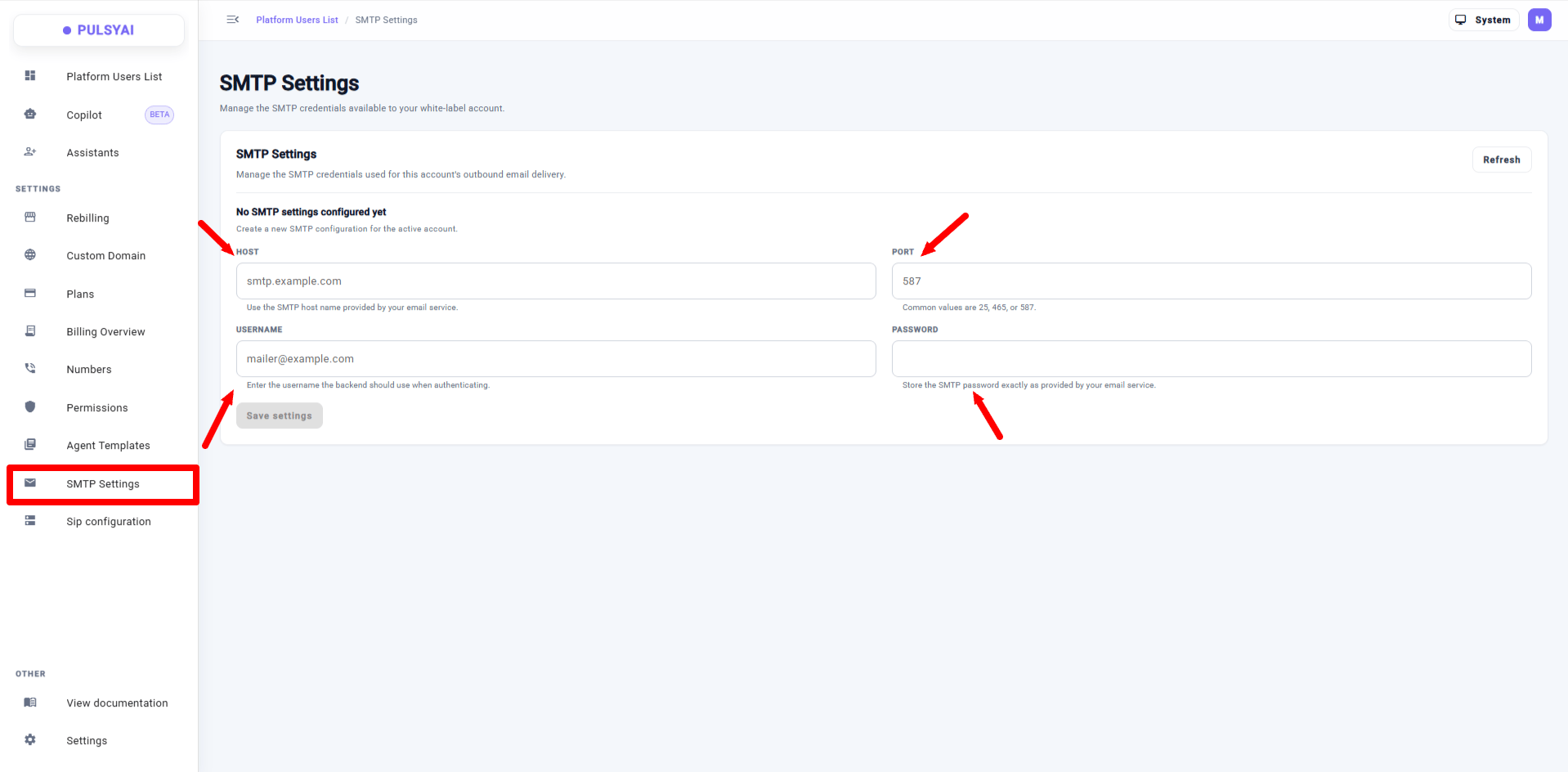
SMTP Settings — configure your own outbound email delivery so clients receive emails from your address.
06 · Multi-currency plan pricing
When creating a plan, you can now choose the currency you want to bill in. USD, CAD, GBP, EUR, AUD, NZD, and more are supported — no more being locked into USD only. Custom plans and rebilling plans can both be created in the currency that matches your local market.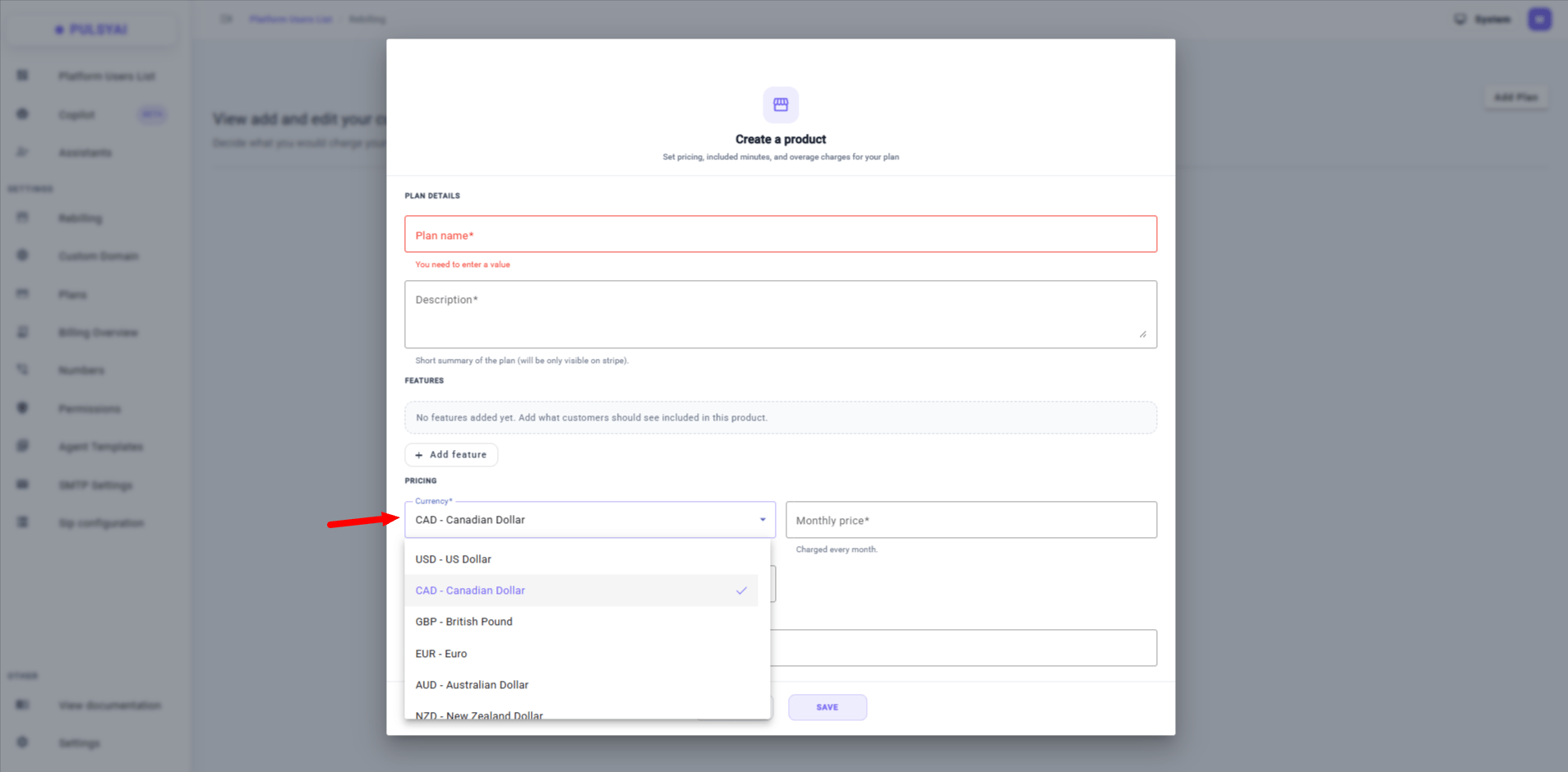
Multi-currency plan creation — choose the currency you want to bill your clients in.
07 · Company Name on client creation
When manually creating a client account (or editing an existing one), you can now add the Company Name alongside first name, last name, and email. Small addition, big impact — helps you keep your reseller client roster properly labeled and organized.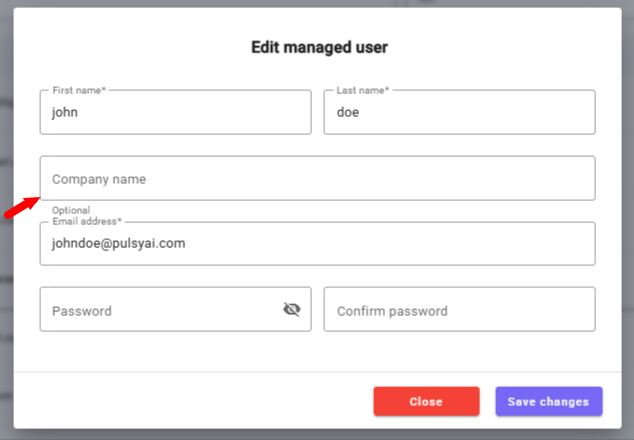
Company Name field added to client creation and editing forms.
08 · Native Twilio phone number store + Twilio Scoped Keys
Finally live: you can now buy phone numbers directly inside PulsyAI. No more creating a Twilio account elsewhere and importing the number manually — the whole flow lives in the platform.Currently available: US and Canadian phone numbers.Coming next: UK and France numbers are next in the pipeline.Twilio Scoped Keys — when importing an existing Twilio number, you’ll now see an optional Key SID field. This adds support for Twilio scoped API keys, which restrict credential access to only the permissions the platform actually needs — much tighter security than sharing a full-access account SID and token. Scoped keys are supported across phone settings, telephony functionality, and onboarding flows.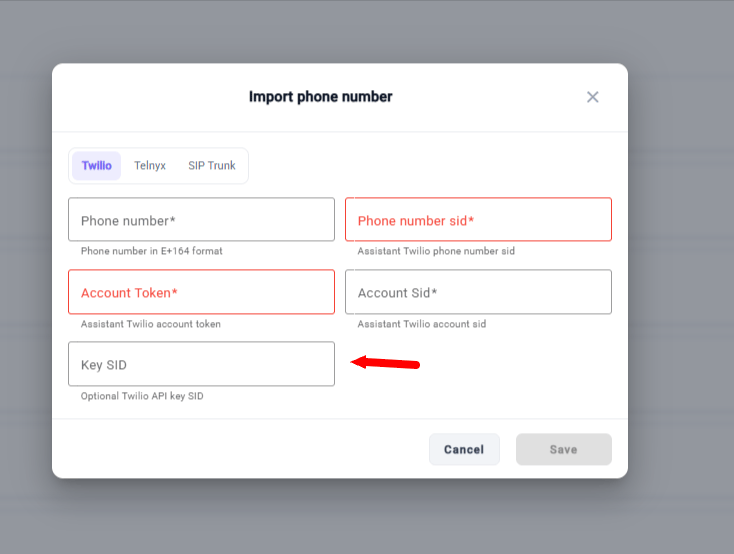
Native Twilio phone number store — buy US and Canadian numbers directly inside PulsyAI, with optional Key SID for scoped API keys on imports.
Improvements & Fixes
- Expanded call end reasons — Call Logs and webhooks now distinguish between more granular end scenarios including TRANSFER, timeout, and hang-up in addition to the existing reasons. Better visibility into exactly how each call ended.
- Richer webhook payloads —
call_endwebhooks now include the call end reason and the call SID, giving your downstream integrations more context for processing. - Max call duration limits — you can now cap the maximum duration of a call at the agent level, useful for controlling costs on outbound campaigns or limiting handle time.
- Trigger SMS agents by texting the number directly — previously, SMS capabilities on a voice AI agent required the first message to be triggered from within the voice AI agent. Now, if someone texts the phone number directly, the SMS agent responds automatically. Much smoother SMS-first workflows.
- Delete a client — you can now delete a client from the Clients section when needed (for cleanup, offboarding, or account management).
- Self-service account deletion — new backend APIs and services support full account deletion, including cleanup of associated phone settings and configuration. Users can now fully offboard themselves when needed.
- New API endpoints — several new endpoints added to the PulsyAI API to support additional workflows and integrations. The API reference is being updated in the docs.
Coming very soon
Simplified Platform — a brand new alternative interface for resellers to offer their clients, launching within the next week. Instead of the current default platform (great for technical users), resellers will soon be able to offer a Simplified Platform — a guided, prefilled experience where SMB owners can build an AI agent in under 5 minutes just by answering a few questions about their business (or connecting their Google Business Profile). Both platforms are connected under the hood, so agents created in the Simplified Platform show up in the default platform too. Resellers will be able to choose which interface template to present to each client. More details when it goes live.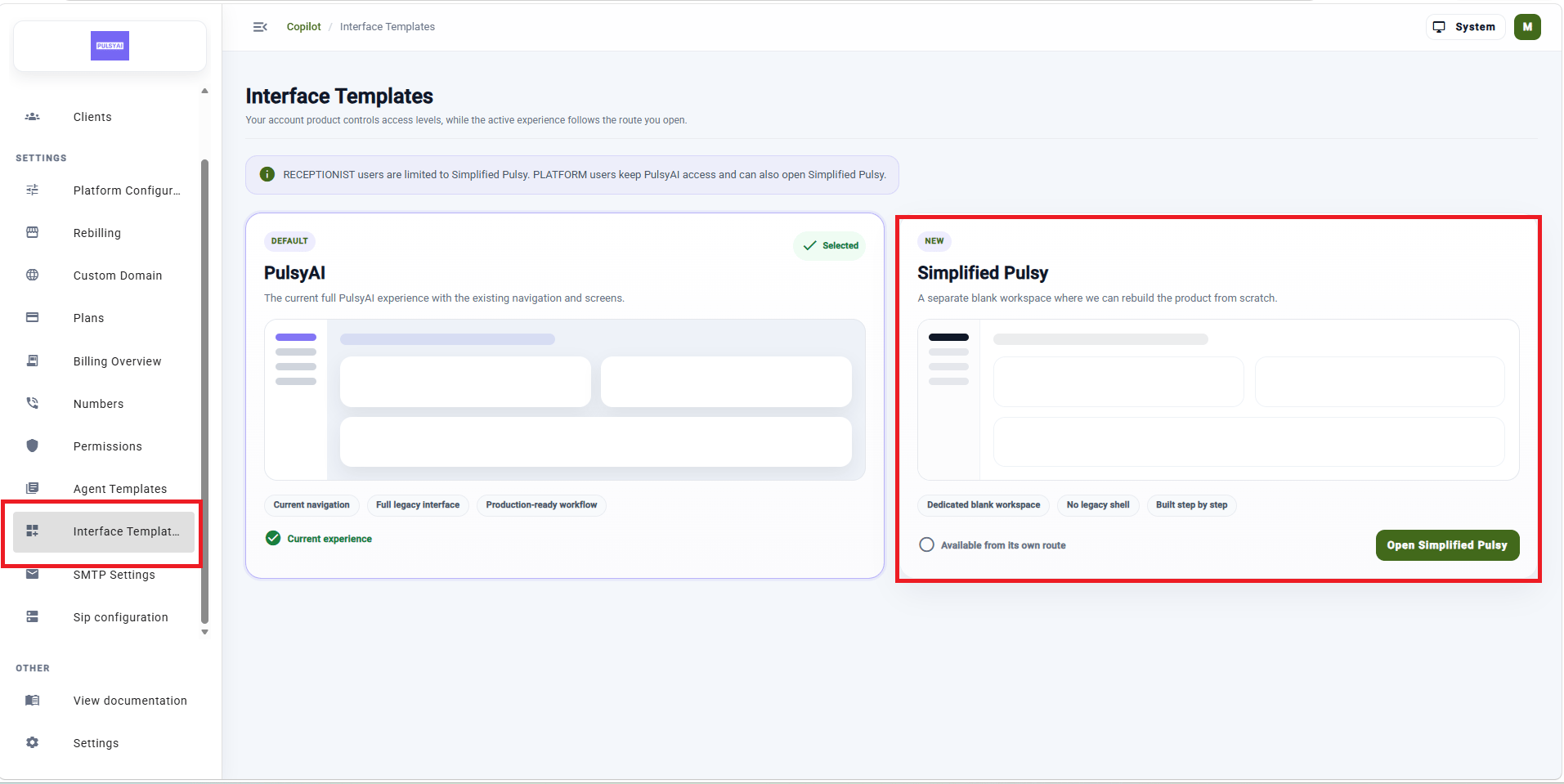
Updates will keep landing weekly. Subscribe via RSS at docs.pulsyai.com/changelog to catch every release.More soon 🚀— The PulsyAI Team
Platform & Infrastructure
01 · SIP Configuration
A brand new SIP configuration page lets you connect your SIP gateway and route calls directly to PulsyAI. Configure provider routing, add your SIP trunk credentials (Static IP, gateway domain/IP, outbound gateway record), and set your transfer strategy (Dial or Refer). Manage multiple SIP trunks from a single view.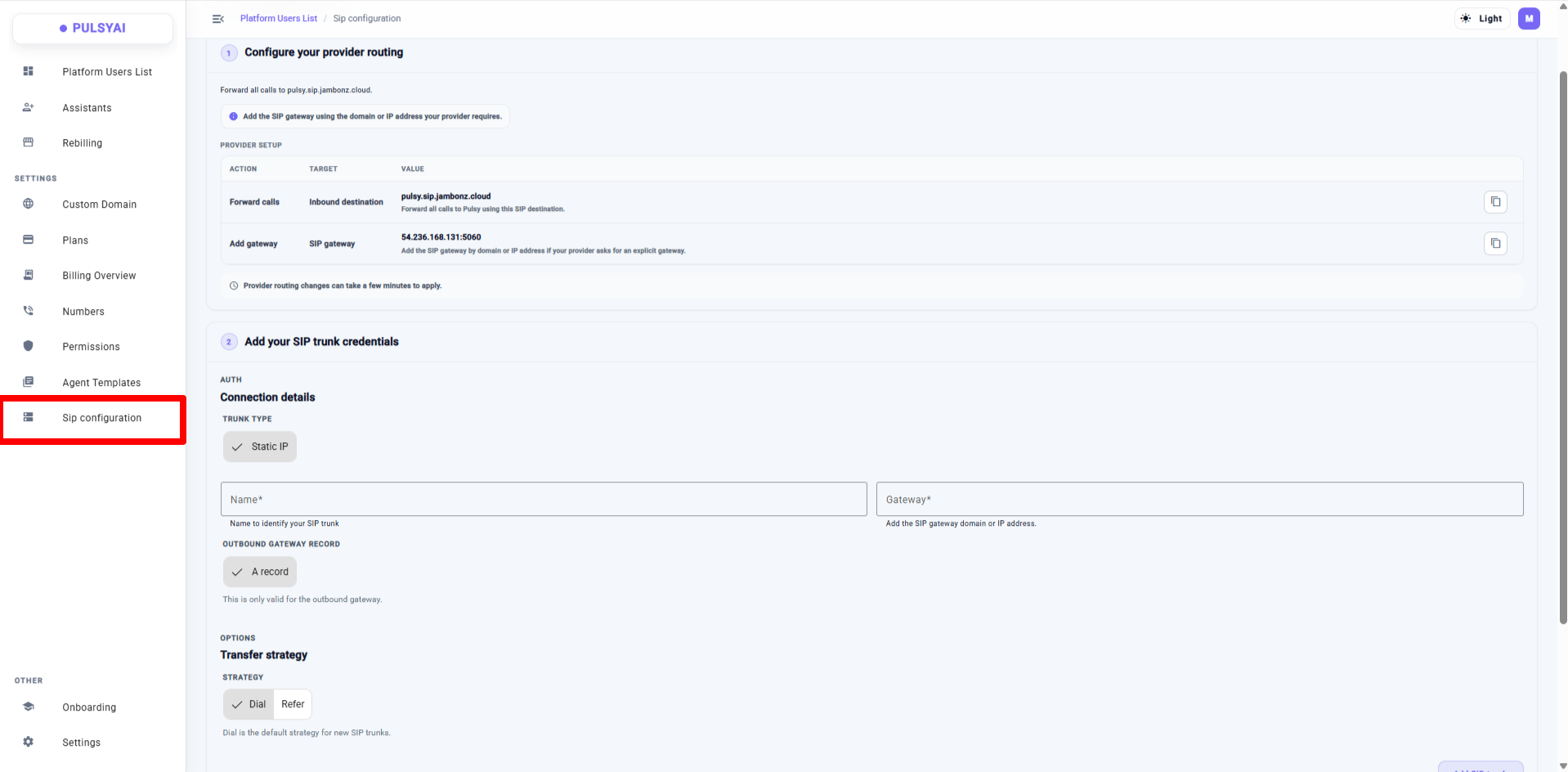
SIP Configuration — connect your SIP gateway, add trunk credentials, and choose your transfer strategy.
02 · Dark / Light / System theme
Personalize your workspace with three theme modes: Dark, Light, or System (matches your OS setting). Toggle from the top-right menu.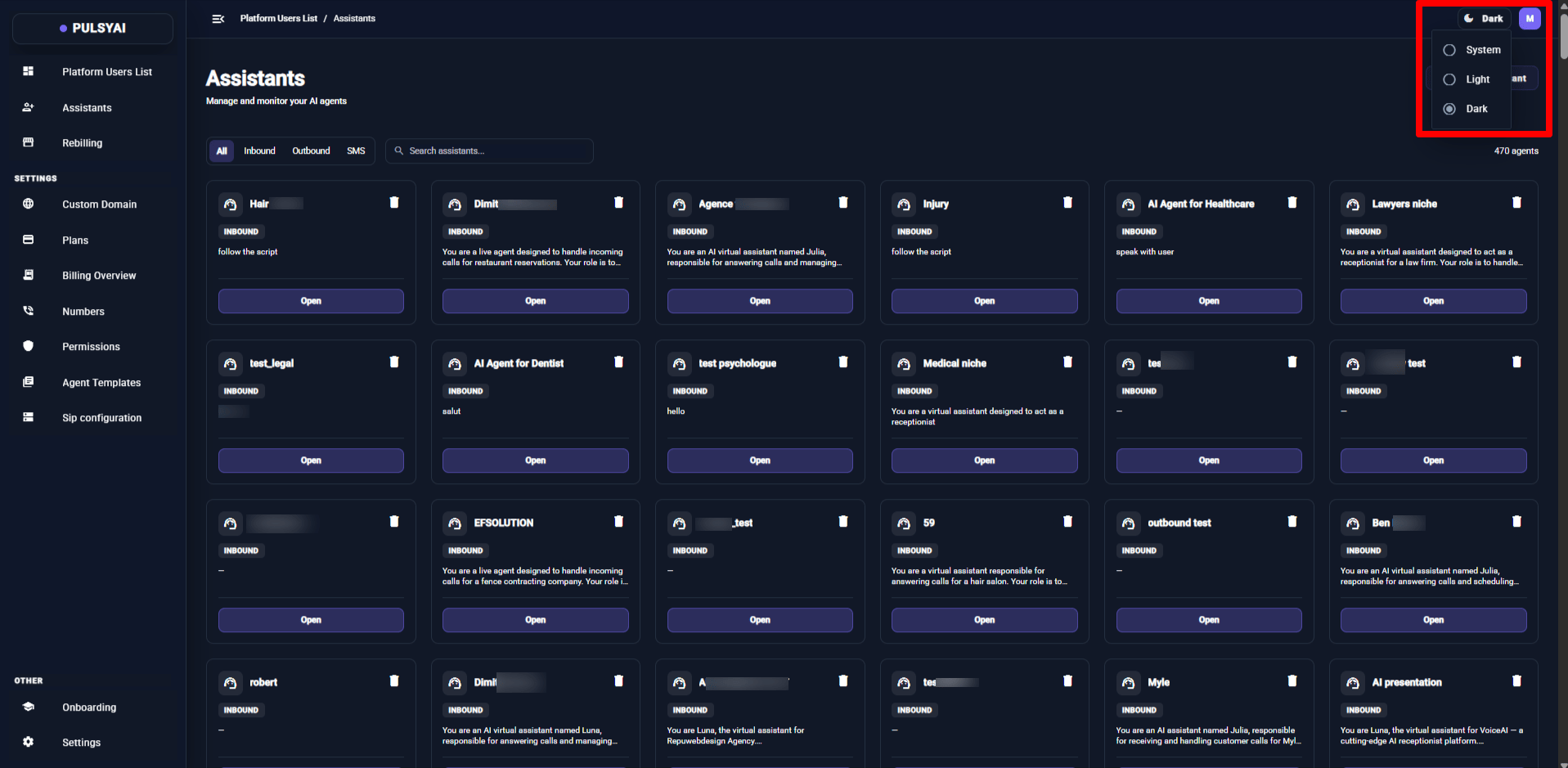
Three theme modes — Dark, Light, and System — available from the top-right menu.
Outbound & Call Management
03 · Outbound Configuration (formerly Auto Call Back)
The Auto Call Back tab has been renamed and upgraded to Outbound Configuration. It keeps all the previous callback settings and adds a new Voicemail Detection Strategy selector — choose between Wave2Vec (recommended default for outbound) or LLM (LLM-based classifier).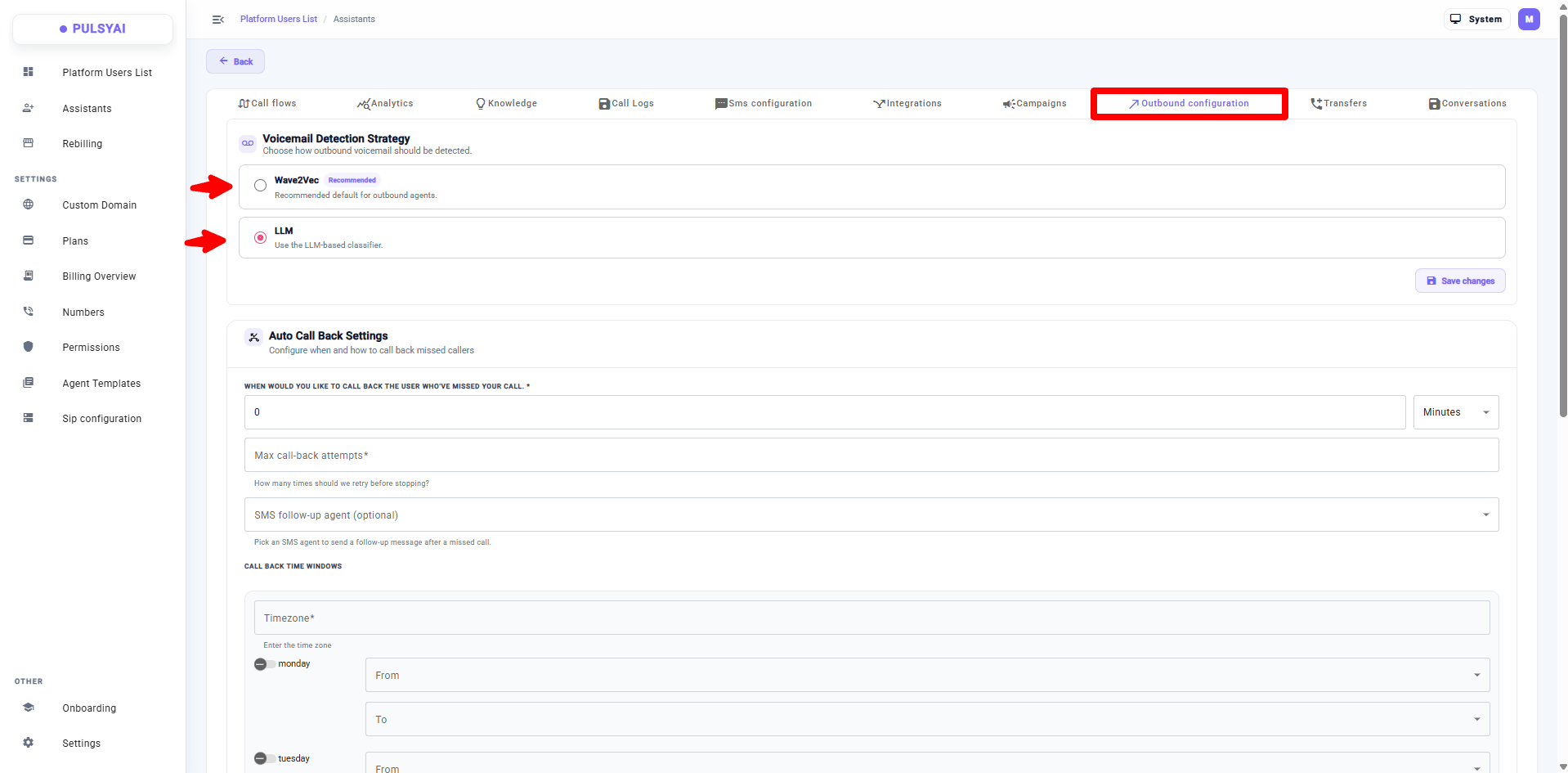
Outbound Configuration — all previous callback settings plus a new Voicemail Detection Strategy selector.
04 · End Reason field in Call Logs
Call Logs now include an End Reason column, so outbound campaigners can immediately see whether a call was answered by a human, hit voicemail, or ended for another reason. No more wondering why a 100-lead campaign only shows 30 answered calls — you can now see the 70 that went to voicemail.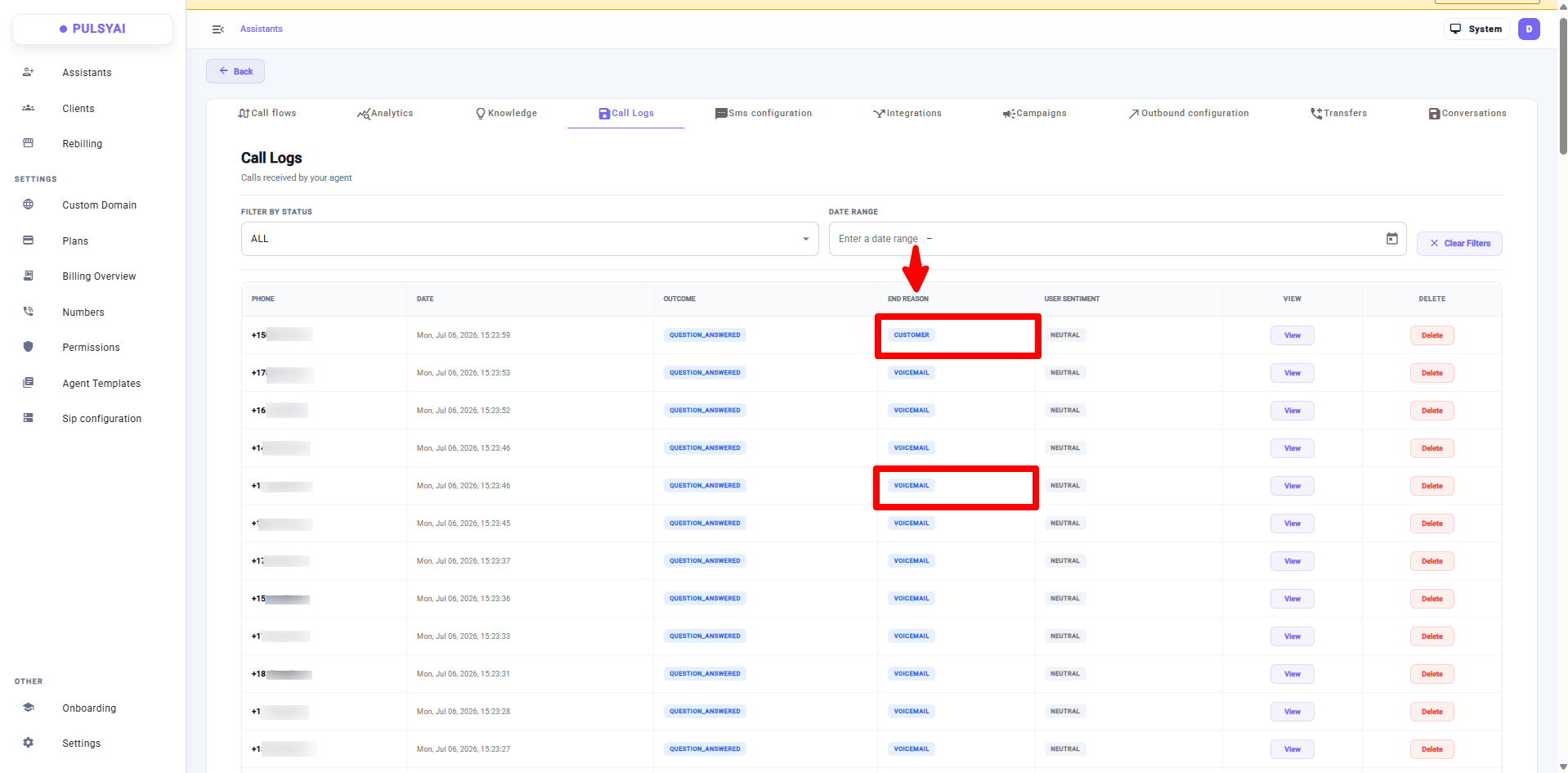
Call Logs now show an End Reason column for every call.
05 · Bulk upload for Transfer recipients
Add transfer recipients in bulk from a.csv or .xlsx file. Use the expected columns (name, phoneNumber or phone number), download the starter template if needed, and optionally replace all existing recipients in one go.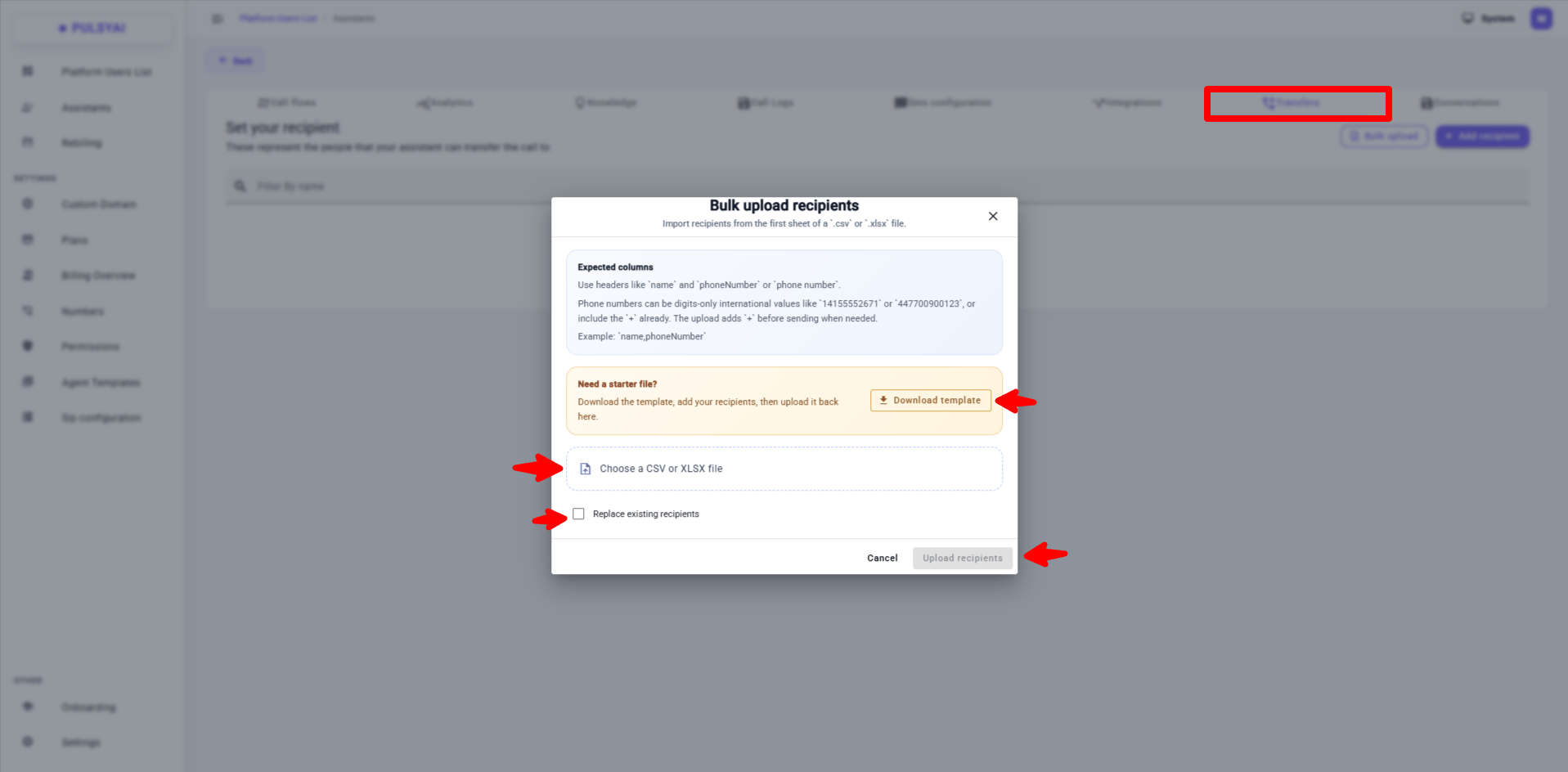
Bulk upload Transfer recipients from a .csv or .xlsx file, with an optional replace-all mode.
Reseller (Admin) Features
06 · Full-account impersonation
Impersonation used to let you view a client dashboard and create agents on their behalf. Now you can do everything inside a client’s account: manage phone numbers, settings, subscriptions (including cancellations), and every reseller-controlled surface. A persistent banner at the top shows the impersonated client’s name and email, with an Exit impersonation button always visible.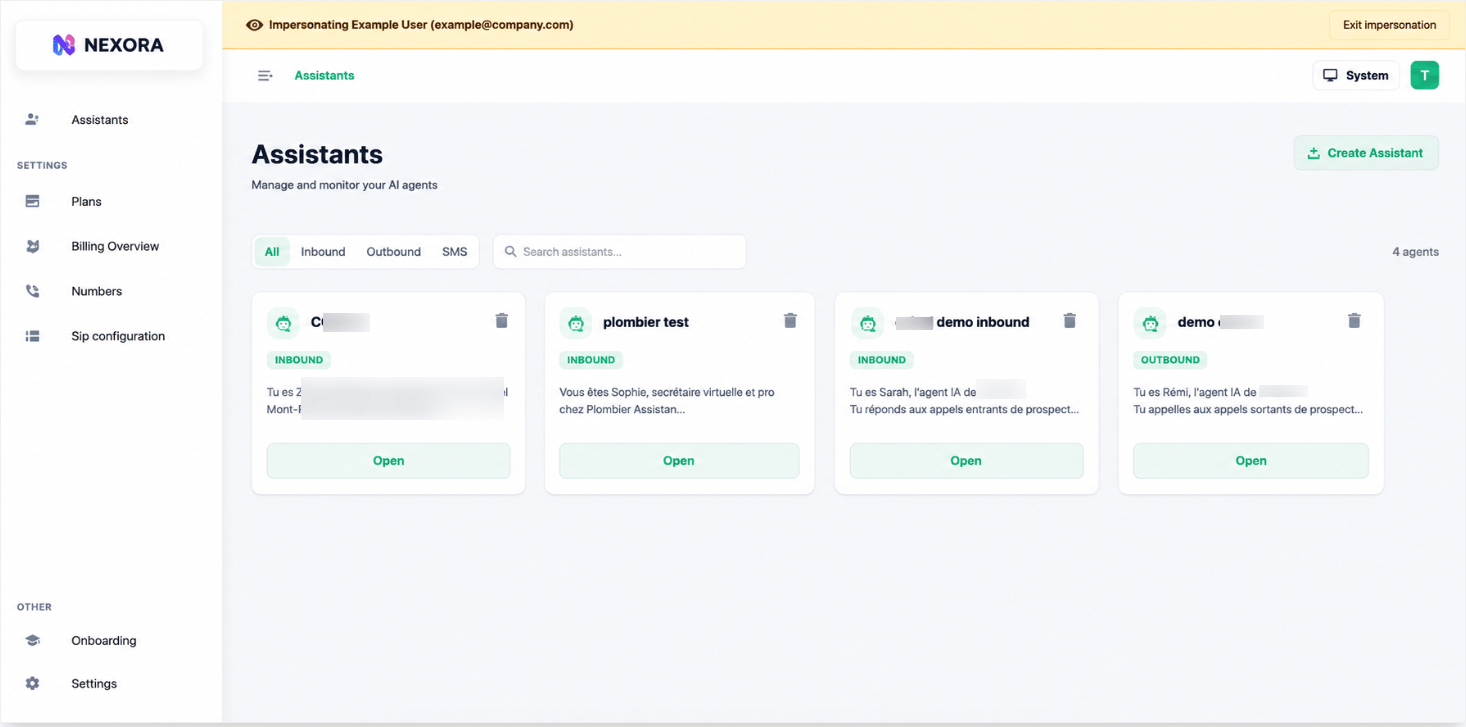
Full-account impersonation — persistent banner with client name/email and an always-visible Exit impersonation button.
07 · ElevenLabs voice community import
When browsing voices in the ElevenLabs library, you can now import any public/shared ElevenLabs voice directly into your workspace by pasting its Public Voice ID. The voice is imported into the workspace and selected for the agent in one click.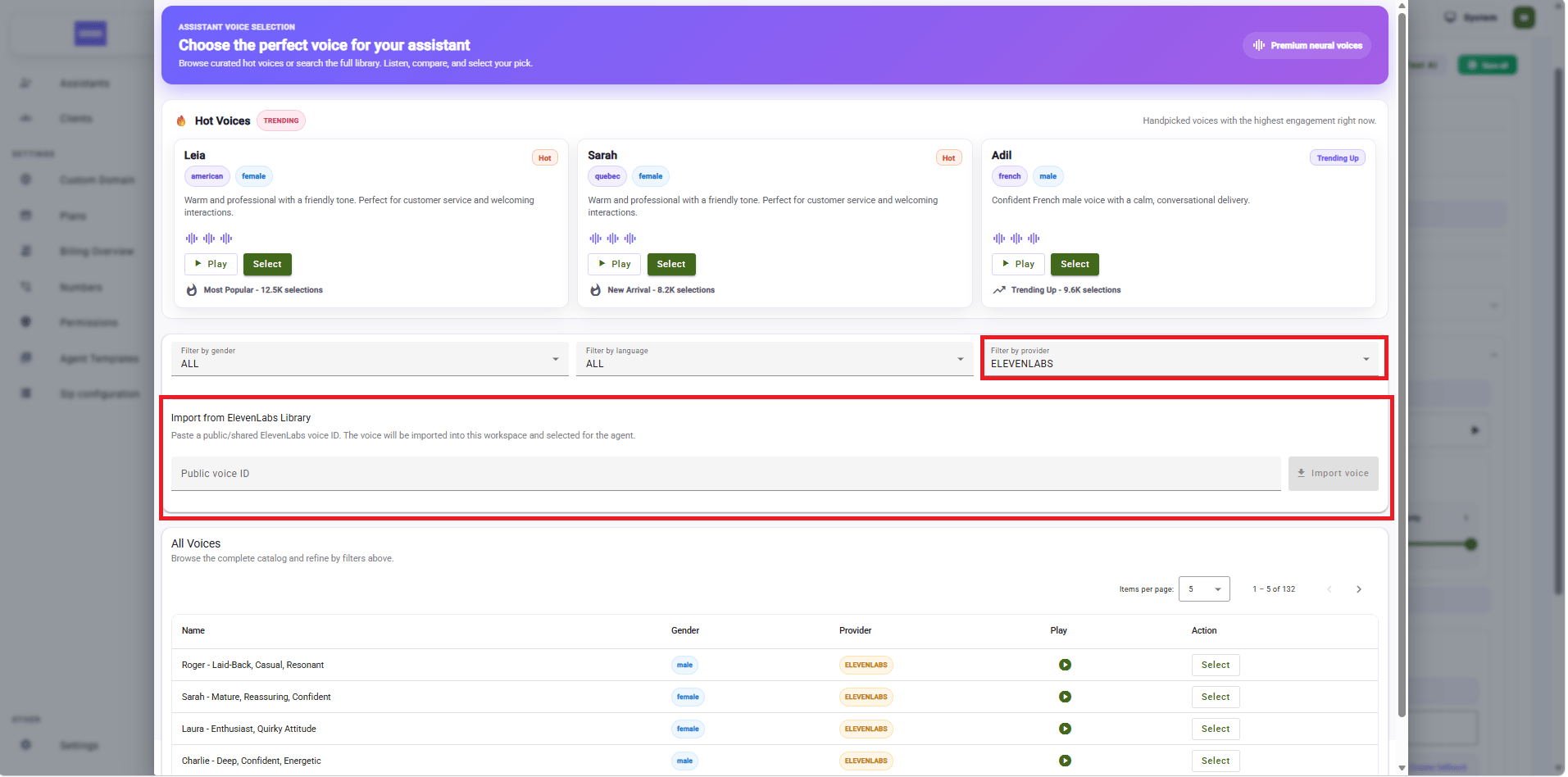
Import any public ElevenLabs voice into your workspace with a Public Voice ID.
Improvements & Fixes
- Silero VAD — latency improvement. Replaced the OpenAI-based Voice Activity Detection with Silero VAD. Noticeably lower latency on every call, and no more dependency on an external API for VAD.
- UI/UX refresh. Refreshed layouts, tighter spacing, and improved visual consistency across the entire platform. A smoother, more polished experience end-to-end.
- Transfer announcement. When an agent triggers a transfer, it now announces to the caller that the transfer is happening while the function call runs in the background — no more 2–3 seconds of awkward silence before the caller gets handed off.
Documentation
Official docs launch at docs.pulsyai.com. The PulsyAI documentation is now officially live at docs.pulsyai.com. A large portion is complete — including the most important sections — and we’ll continue expanding it in the coming weeks with more guides, integration deep-dives, and walkthroughs.Updates will keep landing at a regular cadence. Subscribe via RSS to catch every release.
Part 1 — Reseller (Admin) features
01 · Quick phone number reassignment
From the Numbers tab, reassign a phone number to another agent using a dropdown. No more removing the number and re-searching for the new agent — pick the agent and hit Save.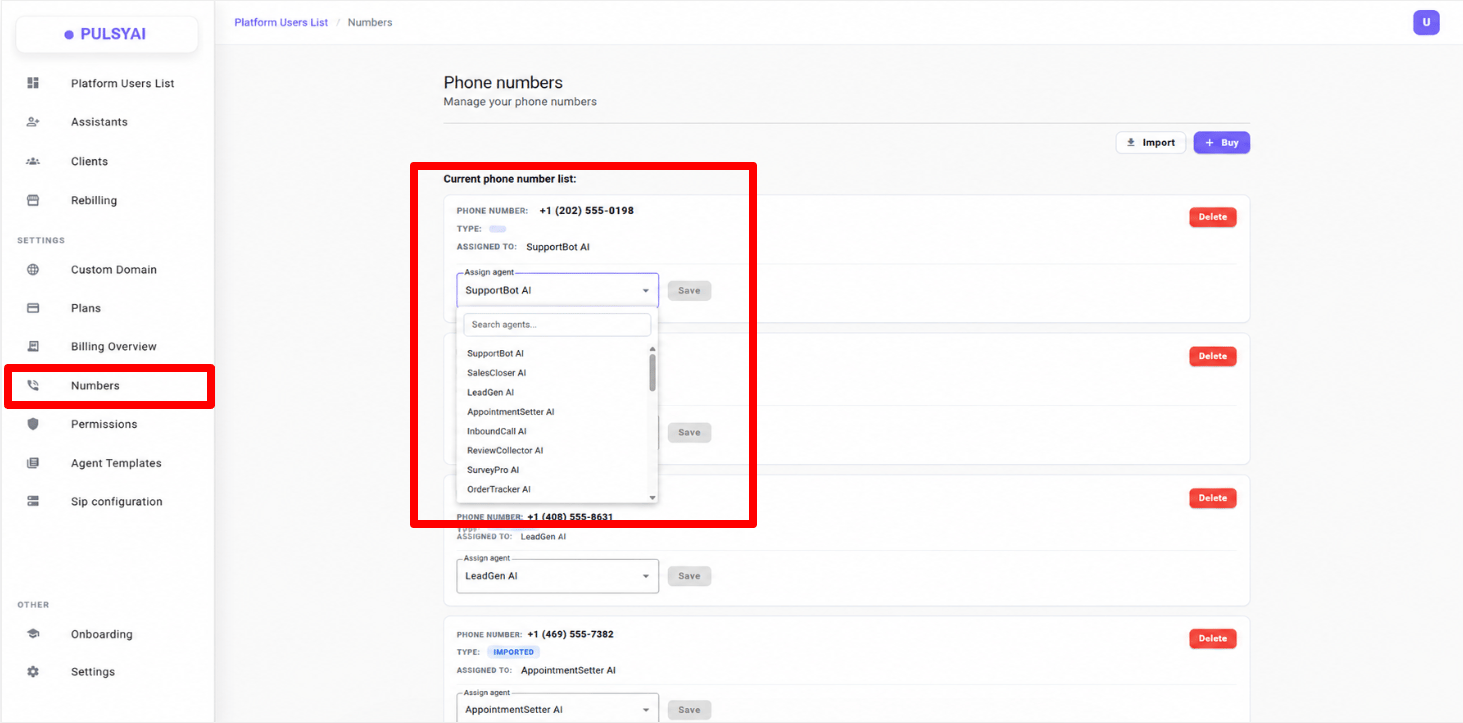
Reassign a phone number to another agent in one click.
02 · Flexible plan creation + free trial days
- Add your own custom features to a plan, displayed directly to clients
- Enable a free trial period (trial days) on any plan you create
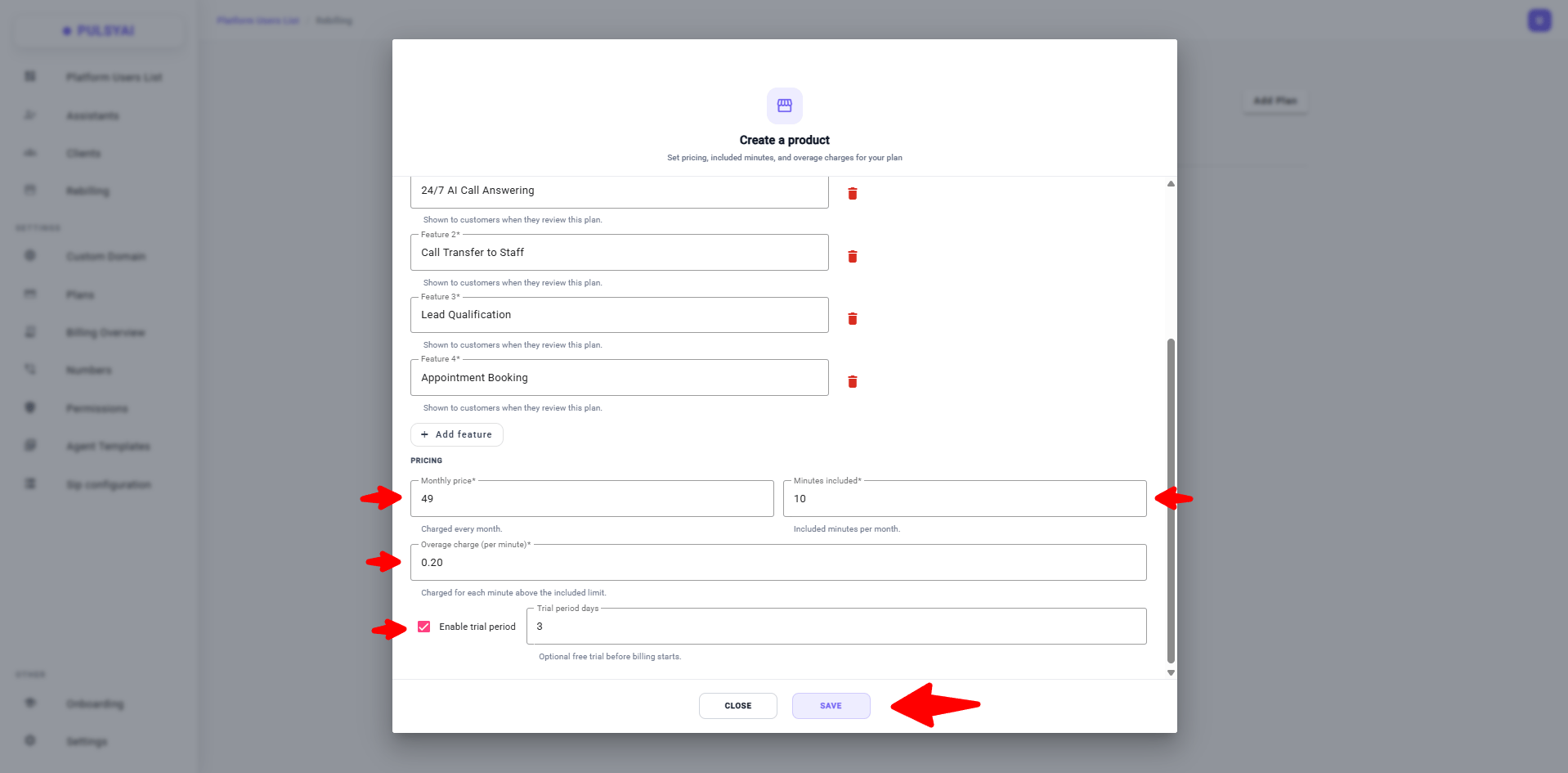
Custom features and trial days on every plan you create.
03 · Plan visibility per client (special offers)
For each plan, choose:- All subaccounts — visible to all clients (default)
- Selected subaccounts — visible only to specific clients
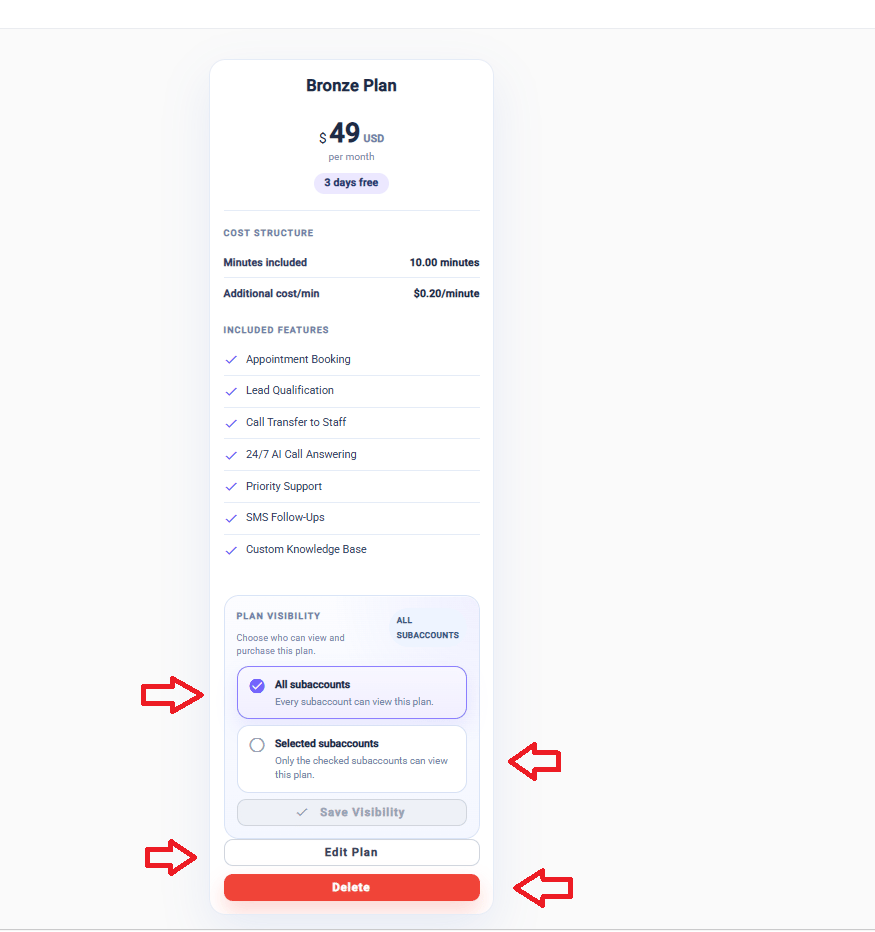
Restrict a plan to specific subaccounts for negotiated deals.
04 · Billing Overview
A new Billing Overview page with real-time visibility:- Total minutes and seconds consumed
- Total number of users
- Your current rate
- Minutes/seconds consumed
- All active AI agents (including top consumer)
- Revenue generated per client based on your rate
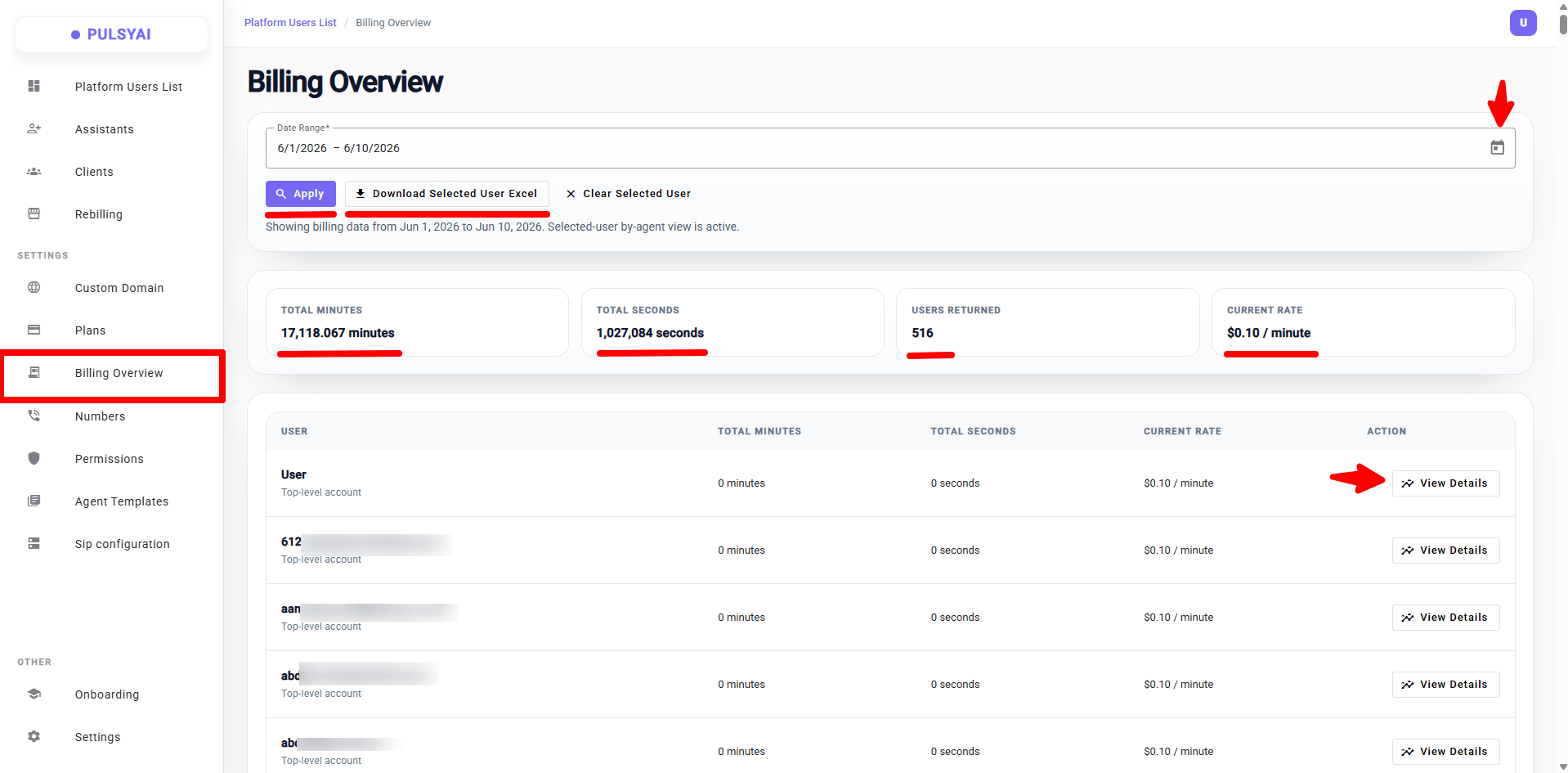
Billing Overview — global usage and revenue at a glance.
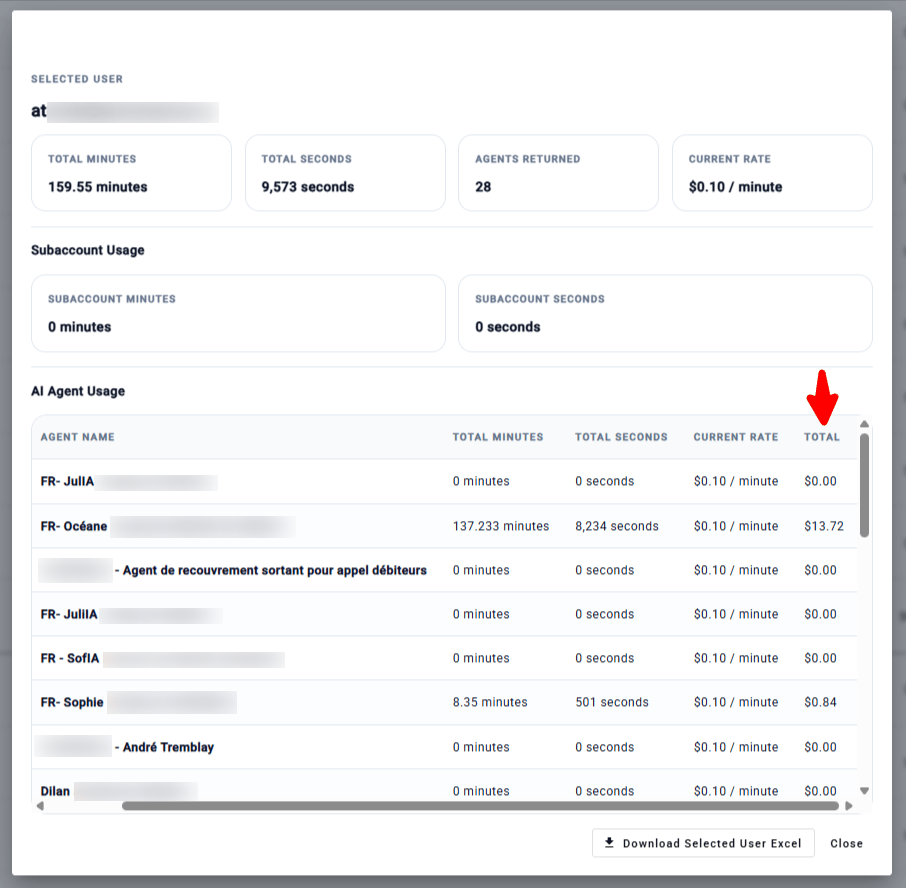
Per-client detail — minutes consumed, top agent, revenue generated.
05 · Per-client permissions — Read only / Read & write
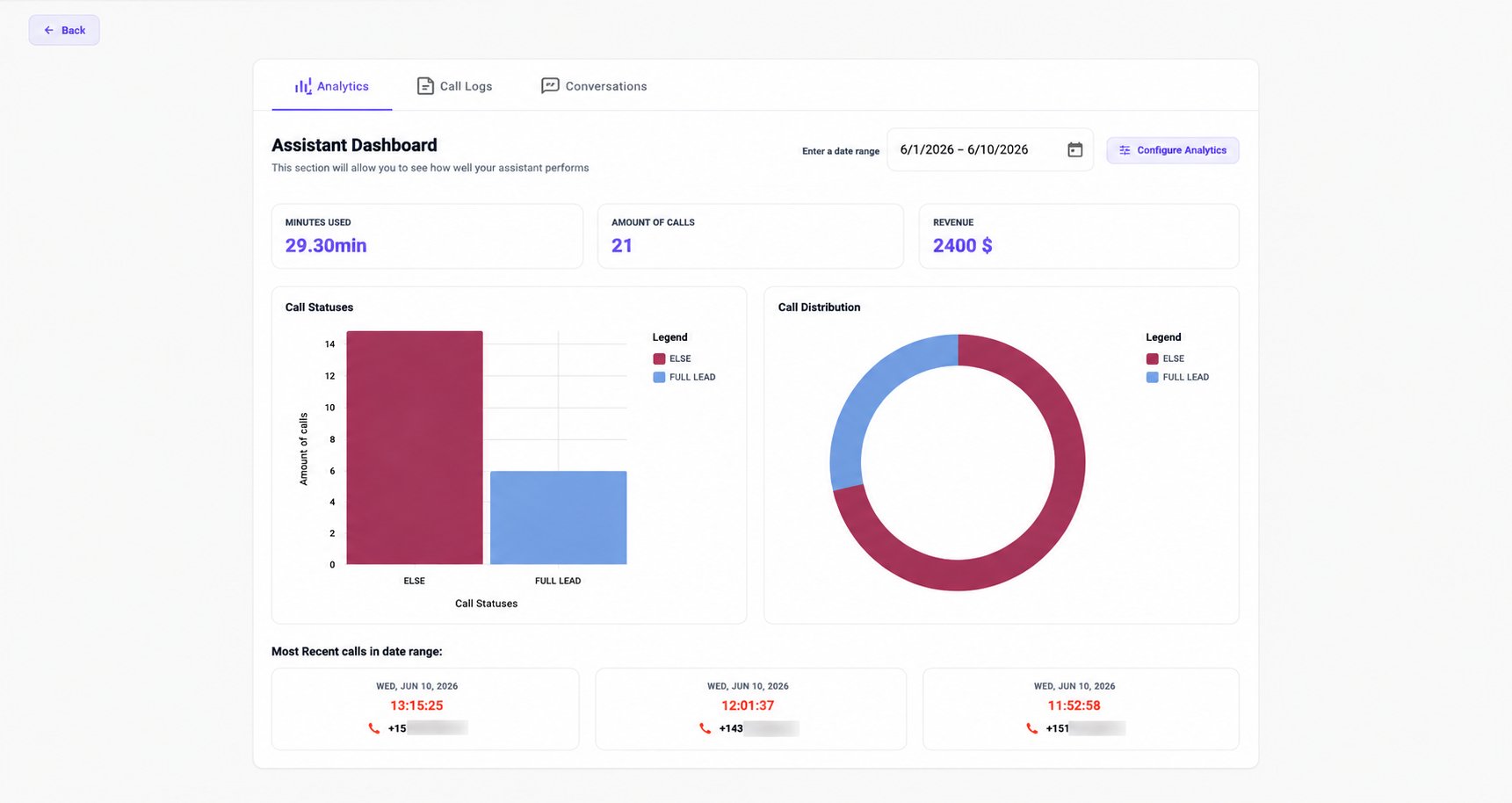
Control exactly what your clients can see and edit. Two access levels:- Read only — Client sees only 3 tabs: Analytics, Call Logs, Conversations. They can review stats, listen to call recordings, read SMS conversations — but can’t change anything: prompts, call flows, knowledge base, integrations, phone numbers, SMS config — all hidden. API Keys section in Settings is also hidden. Profile and password remain accessible.
- Read & write — Full platform access, as before.
- Default permissions — access level applied automatically to every new client
- Client permissions — override the default for specific clients
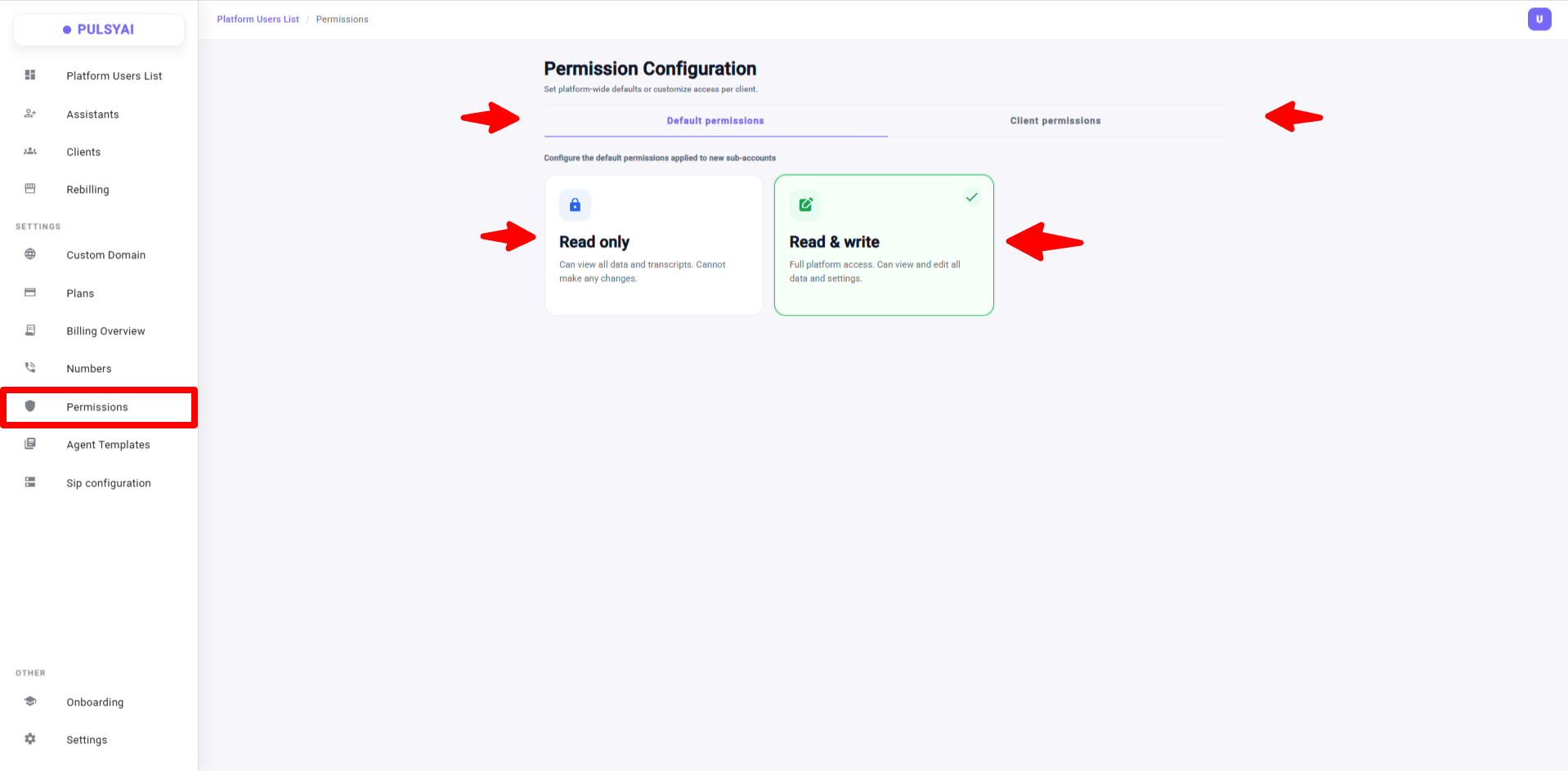
Set default permissions or override them per client.
06 · Agent Templates — deploy agents to all your clients in one click
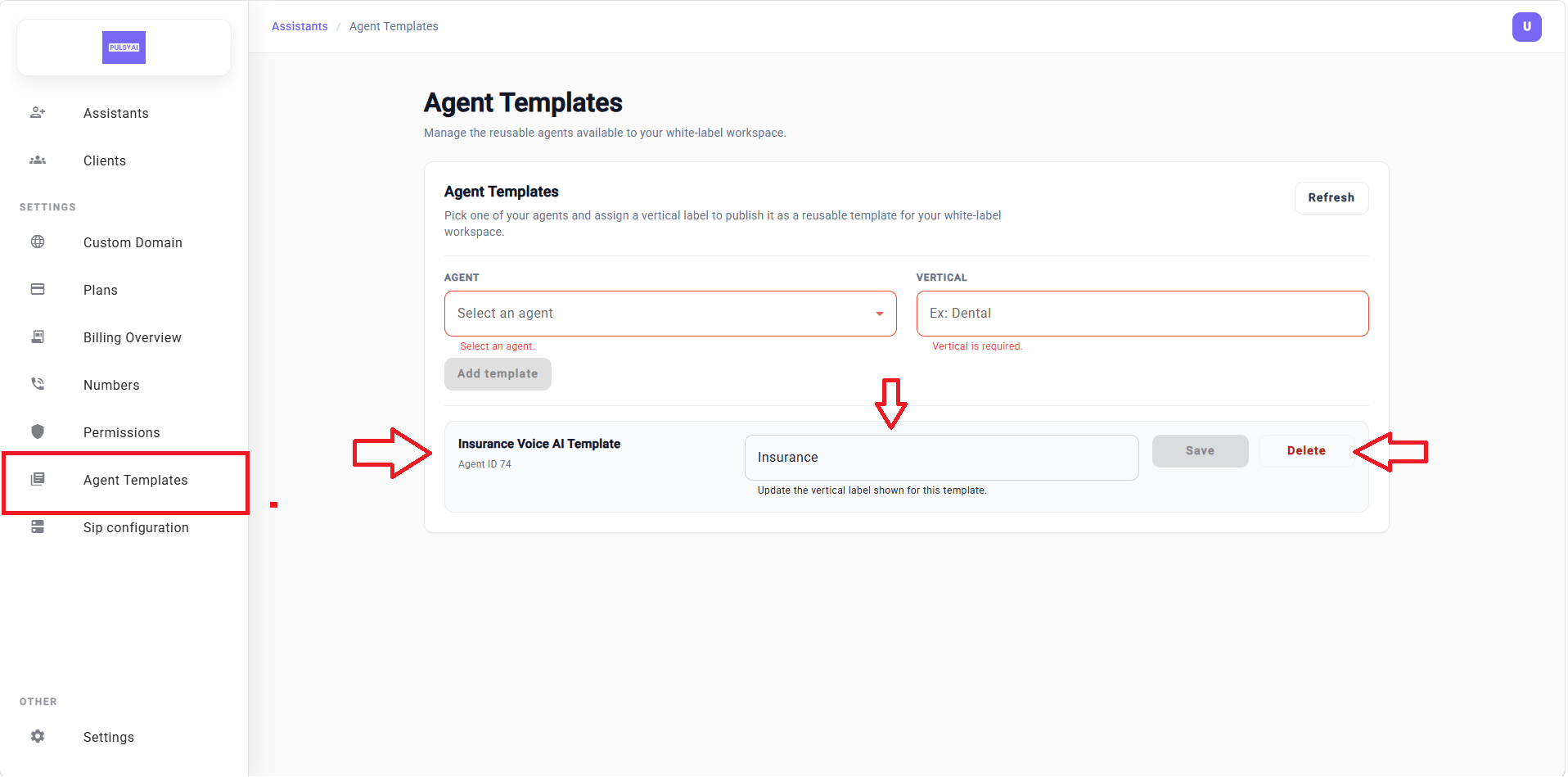
A major feature for anyone working in a vertical (insurance, dental, real estate, plumbing, restaurants).How it works: Configure an agent perfectly once in your own account — prompt, voice, call flow, integrations — then publish it as a template under a vertical label (e.g., “Dental”, “Insurance”). Every client (existing and new) sees this template as a 1-click starting point.What gets cloned automatically: full prompt, voice/provider, call flow logic, general settings.What the client adds afterward: their Knowledge Base, integrations (rewired to the new agent ID), SMS config if applicable.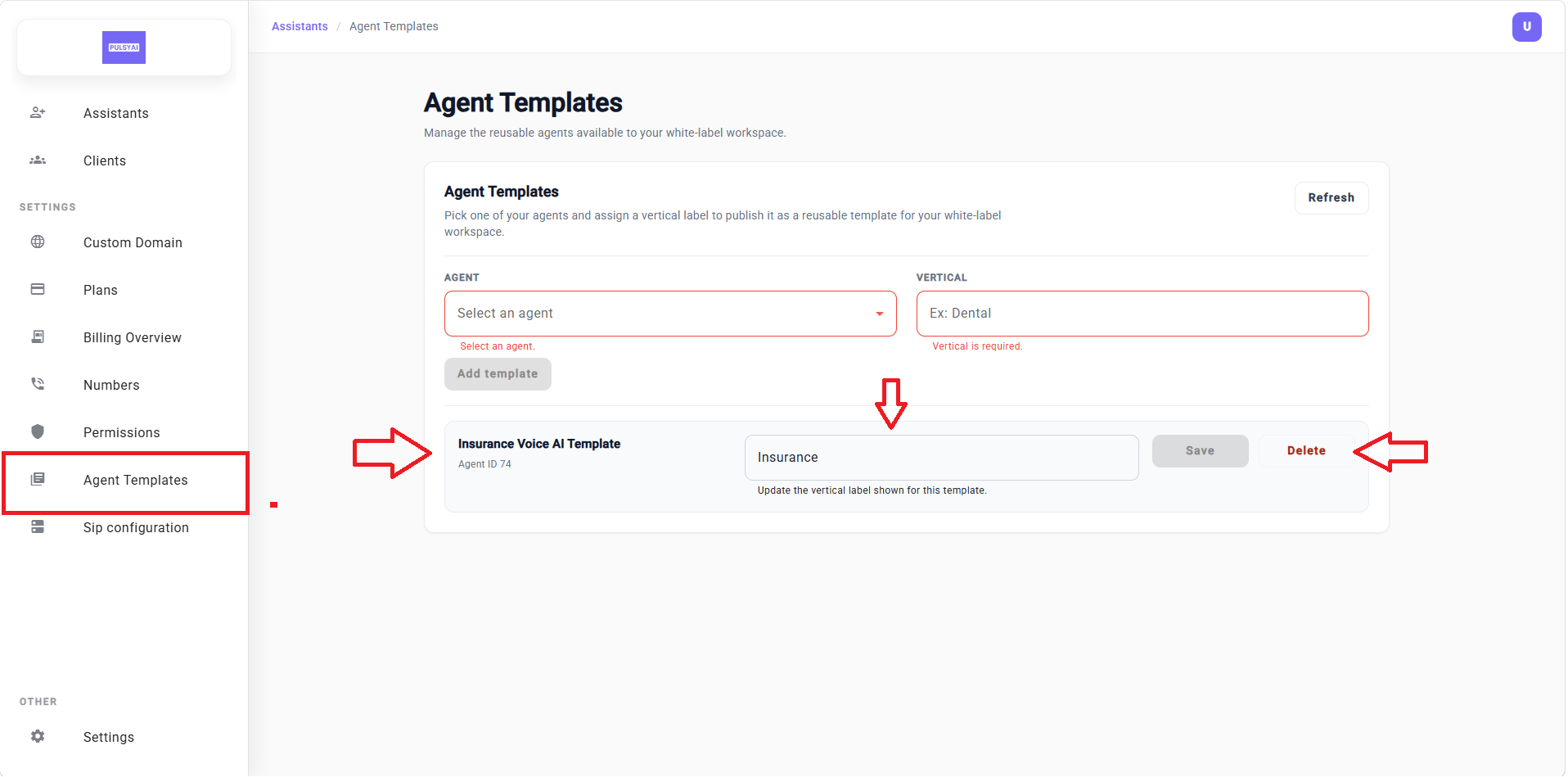
Publish an agent as a vertical template — clients get a 1-click starting point.
07 · Manual subaccount creation — no more emails lost in spam
In the Clients section, when manually creating a subaccount, you now set the email and password yourself, then share credentials with your client however you prefer (email, SMS, in person). No more relying on an automated email that gets caught in spam.yourdomain.com/signup) still works exactly as before — this only applies to manual account creation.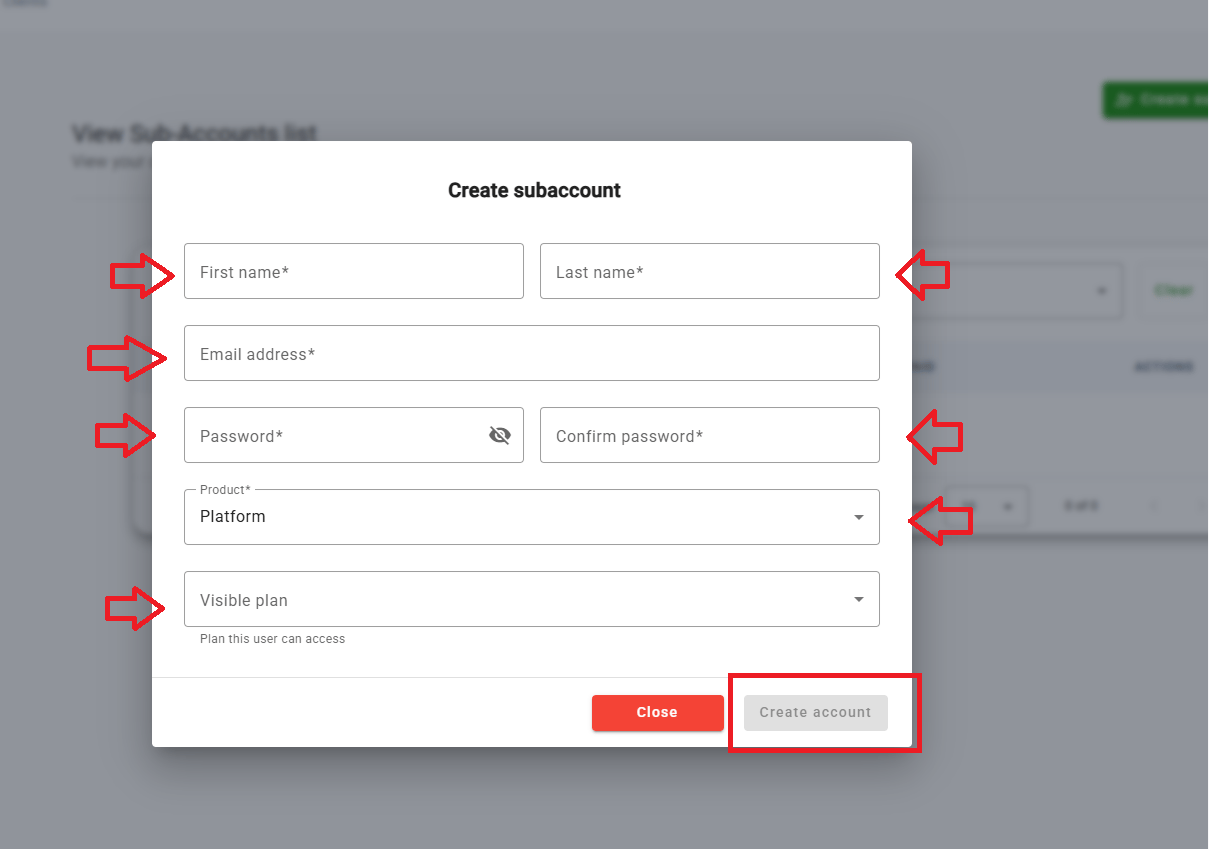
Set your client's email and password directly, then share them your way.
08 · Manual “Paid” toggle
In the Clients tab, the Billing button lets you manually mark a subaccount as Paid — useful if:- You handle payment outside the platform (Stripe link, wire transfer, external invoicing)
- You create your own internal subaccounts (testing, demos)
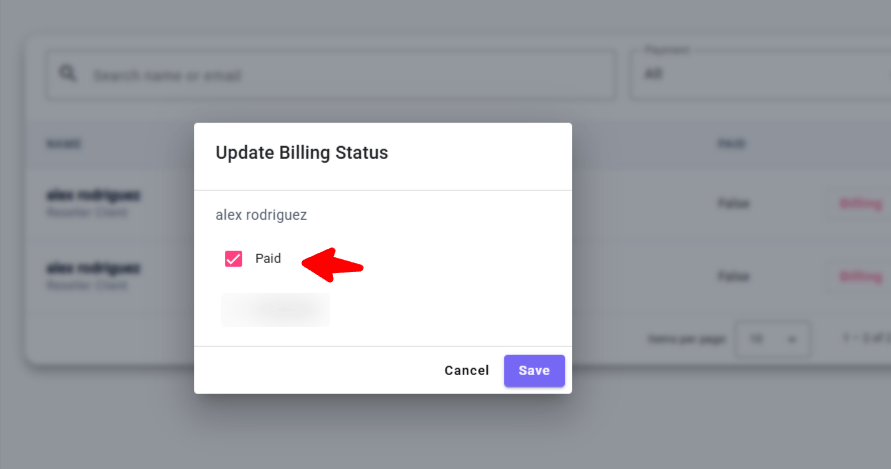
Manually mark a subaccount as Paid.
09 · Impersonation — white-glove support without a client password
Click Select on any client to access their account exactly as they see it — without their password. You can edit their agents, call flows, knowledge base, integrations, view their logs, and even access their Settings.A visual indicator in the top right shows the client’s name/email while impersonating. To exit, head back to Clients or click any other admin nav item.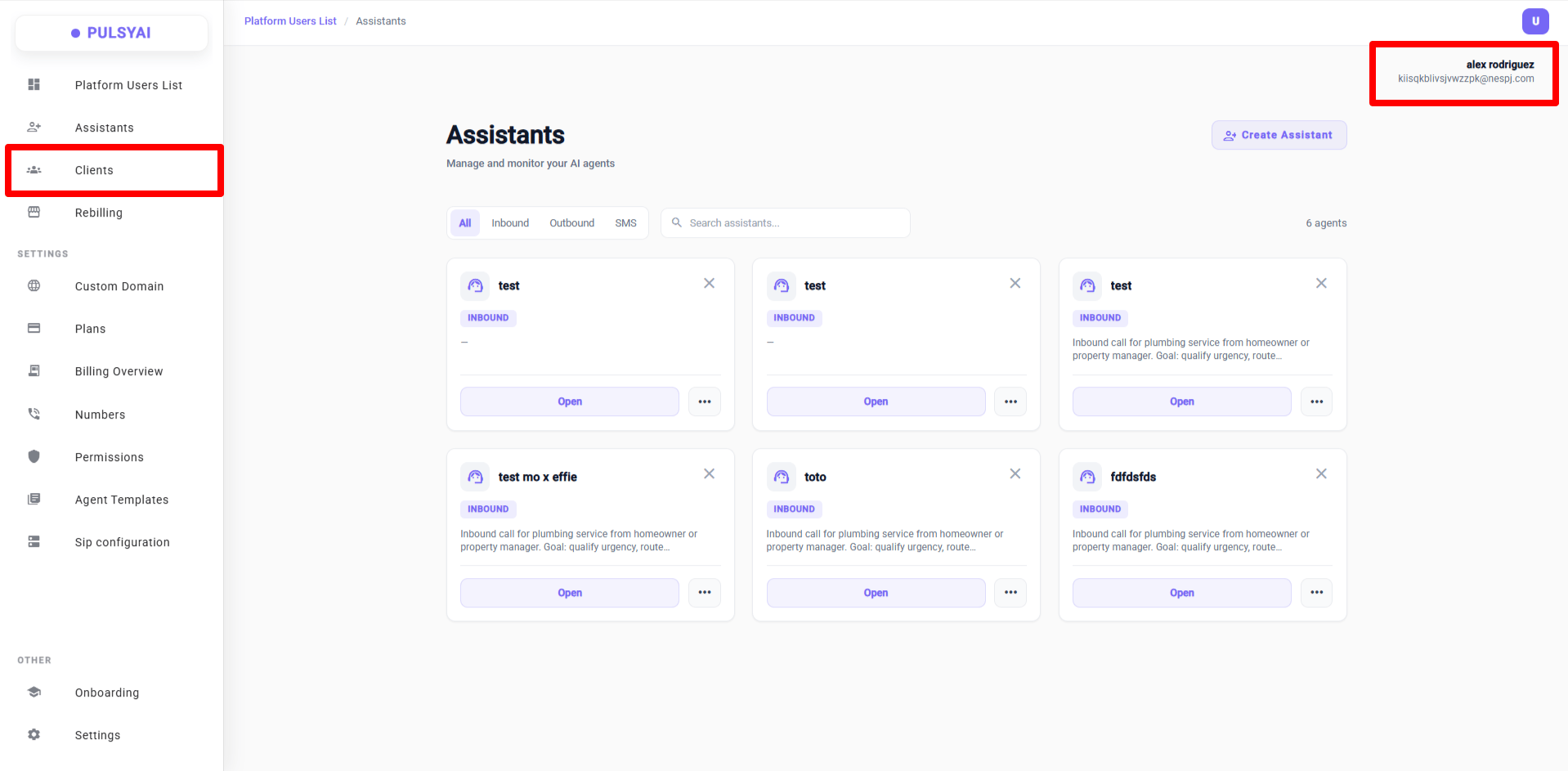
Impersonate a client and support them directly, no password needed.
10 · Redesigned Custom Domain page
Completely redesigned: numbered steps, well-organized DNS records table, quick-copy buttons, and helpful tips (where to find DNS settings, propagation time up to 48h).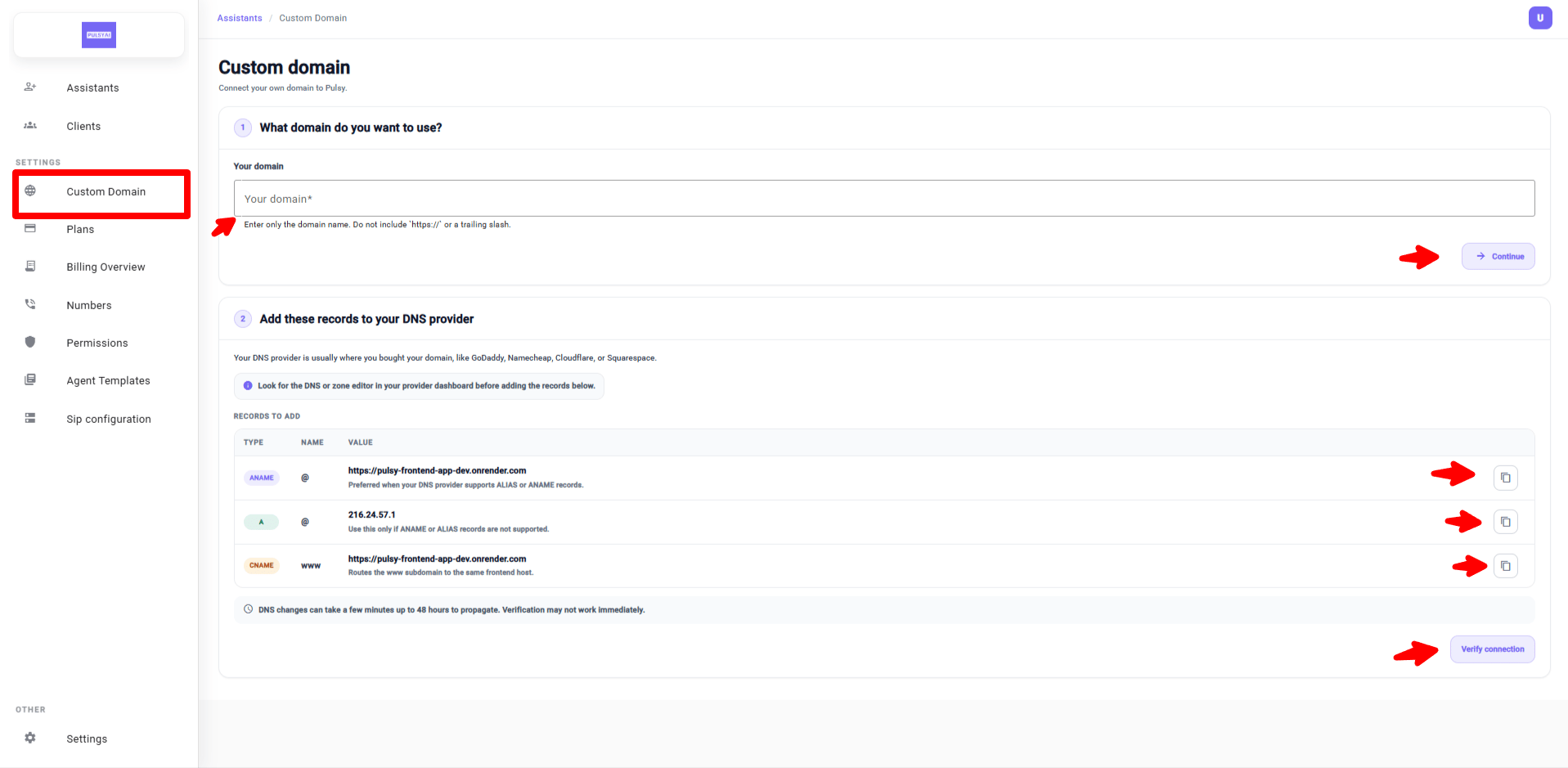
Redesigned Custom Domain page — numbered steps, DNS records table, quick-copy buttons.
Part 2 — Platform features (Call Flows & Agents)
11 · Fallback Voice
Configure a backup voice for your agents. If the primary voice becomes unavailable in real time (provider outage, latency), the agent automatically and seamlessly switches to the fallback voice — no dropped calls, no awkward silence.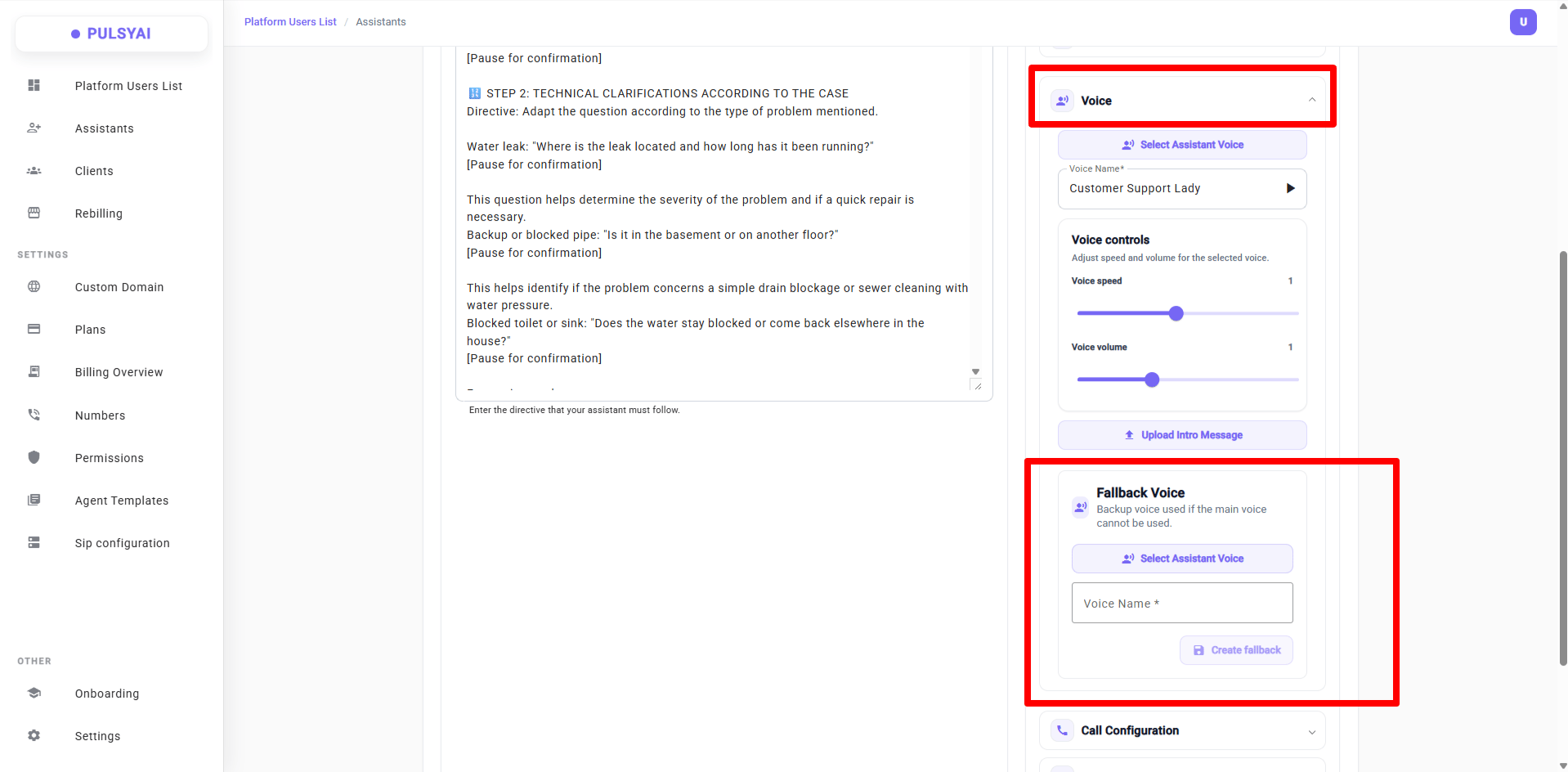
Fallback Voice — automatic switch if the primary voice fails.
12 · Improved voice selection + new providers
- Filter by gender, language, and provider
- New provider added: ElevenLabs
- Coming soon: Hume AI
- In the works: filter by accent
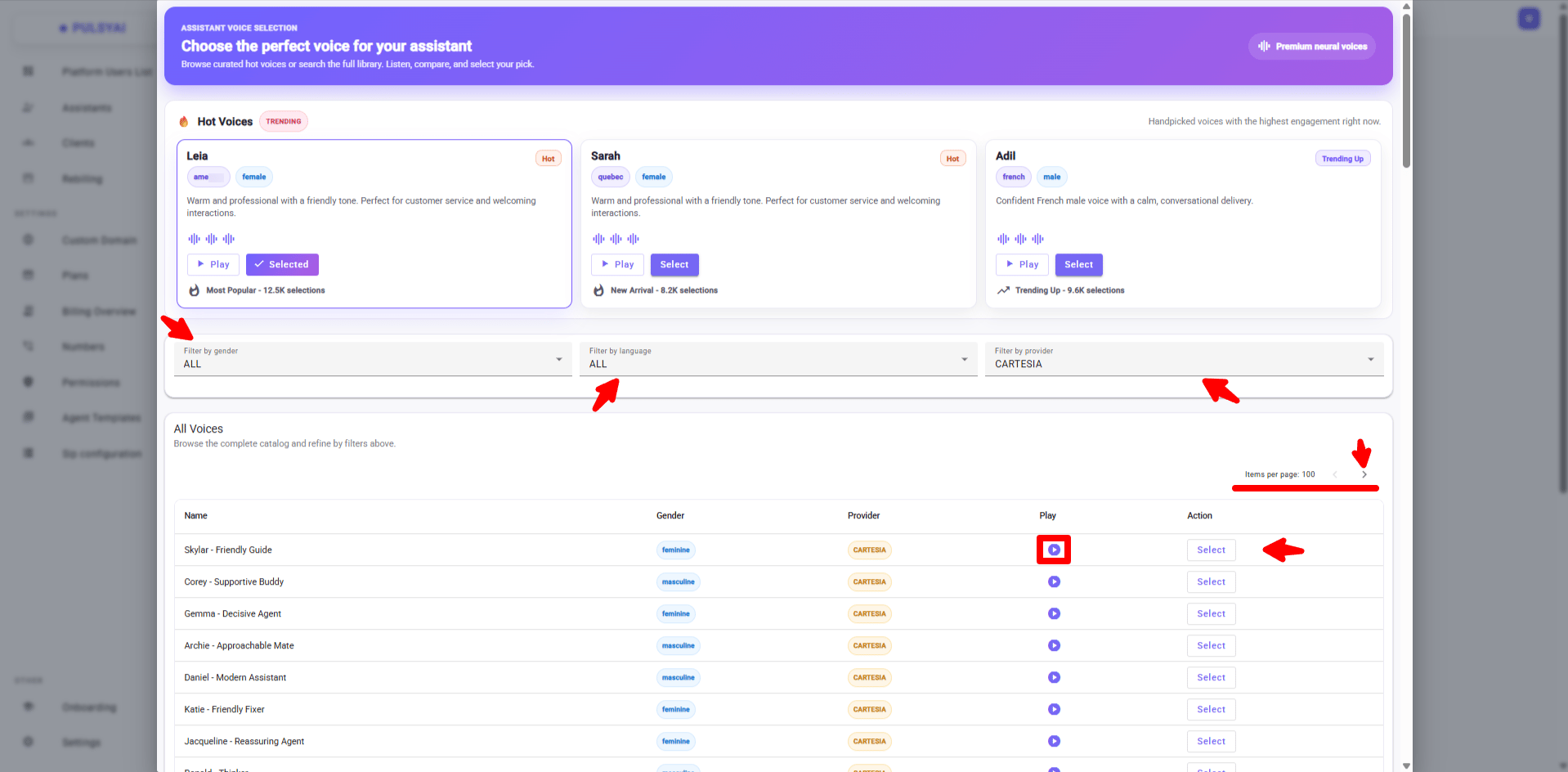
Improved voice selection with filters and new providers.
13 · Timezone in Call Configuration
Agents can now be connected to your chosen timezone:- If a caller asks for the time, the agent responds with the exact time in the configured timezone
- Enables time-based workflows (e.g., a pizzeria with a different daily special using the
{now}variable) - Crucial for calendar booking — match the configured timezone with your calendar’s timezone and pass
{now}in your prompt
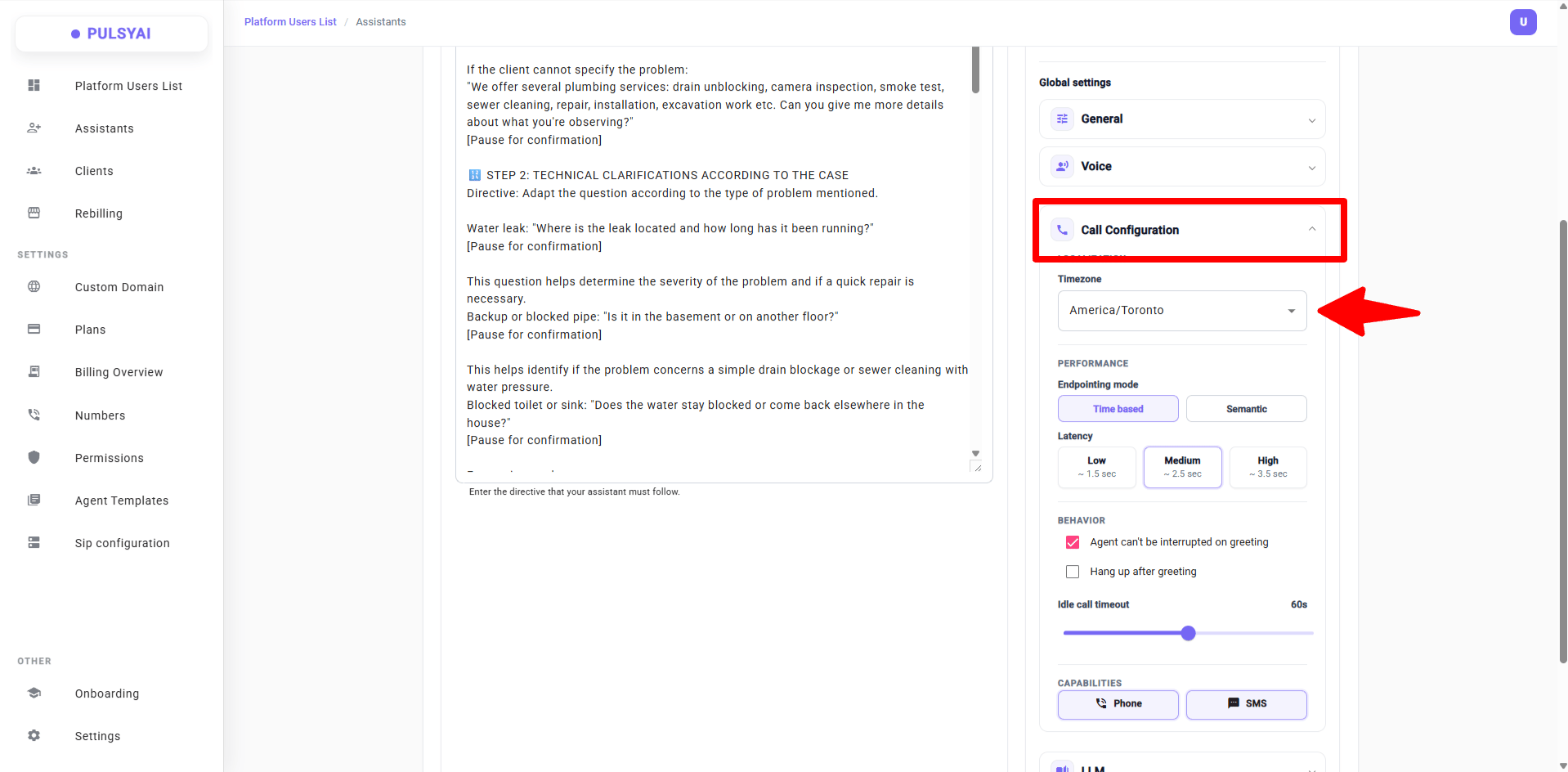
Timezone-aware agents — accurate time responses and calendar booking.
14 · New latency mode: Semantic Endpointing
Two modes to decide when the agent responds after the caller finishes speaking:Time Based — fixed delay after silence:- Low (1.5s) — best for outbound cold calling
- Medium (2.5s) — best for inbound customer service
- High (3.5s) — best for technical or legal calls
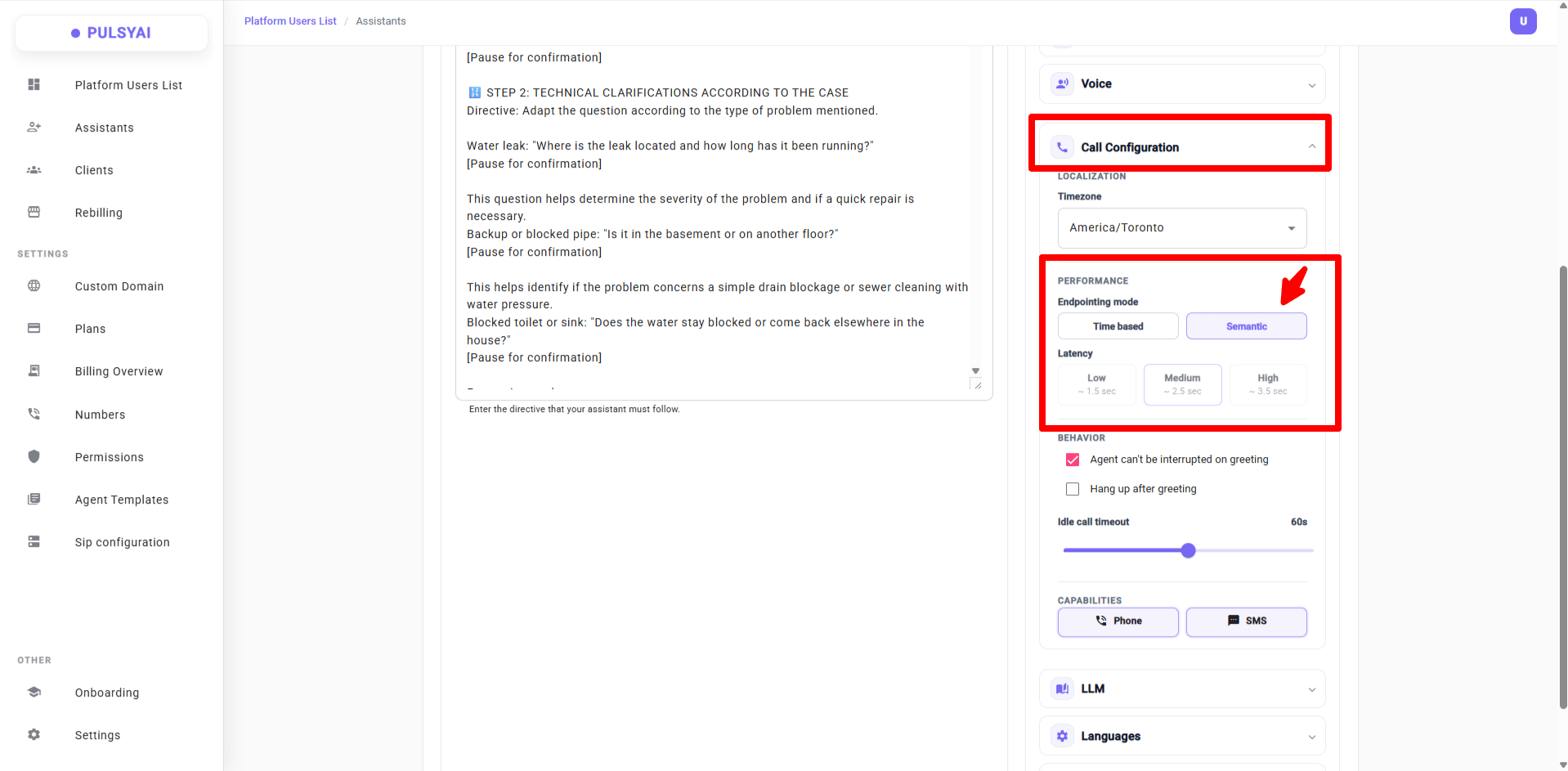
Semantic Endpointing — the agent knows when you're done talking.
15 · Idle Call Timeout
Configure the maximum time (in seconds) the agent waits during silence before ending the call. Default: 60 seconds on every new agent.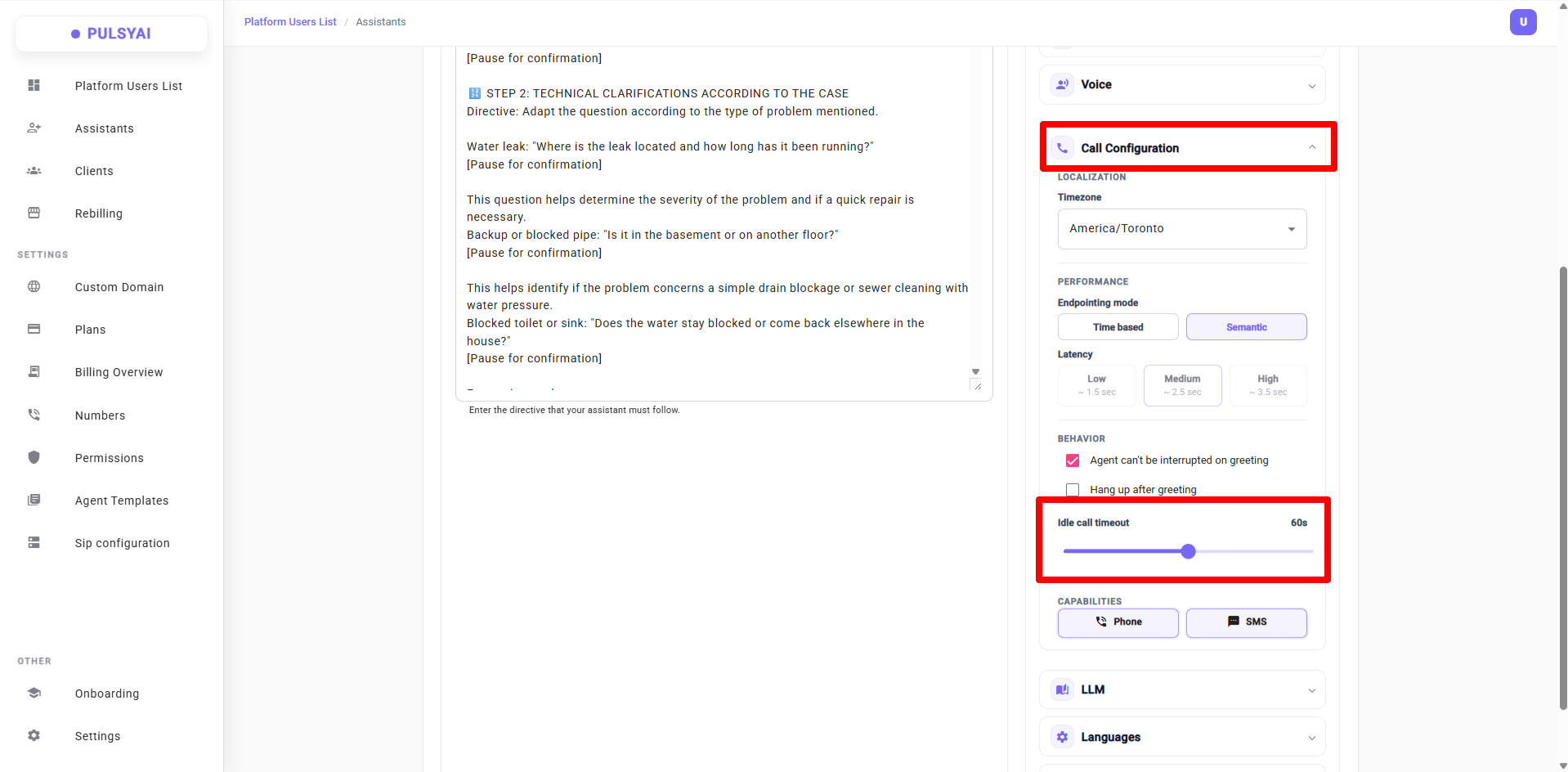
Idle Call Timeout — controls how long the agent waits during silence.
16 · Fallback LLM + new 5.4 mini / 5.4 nano models
Configure a backup LLM — automatic switch if the primary fails.- Two new models available: 5.4 mini and 5.4 nano
- Configure Max Tokens and Temperature independently for the primary and fallback LLM — fine-tune response length and randomness per model
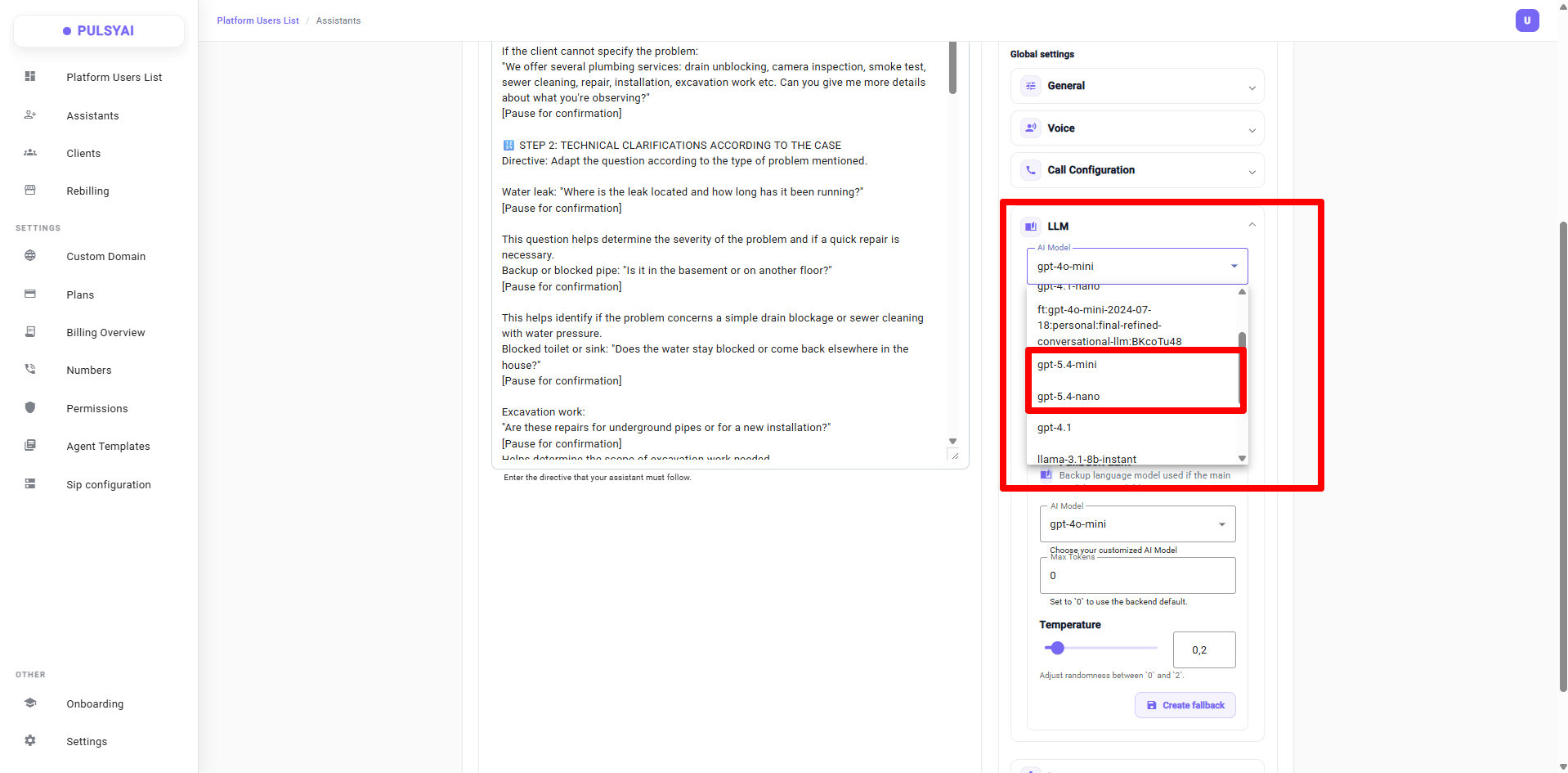
Primary LLM controls — Max Tokens and Temperature.
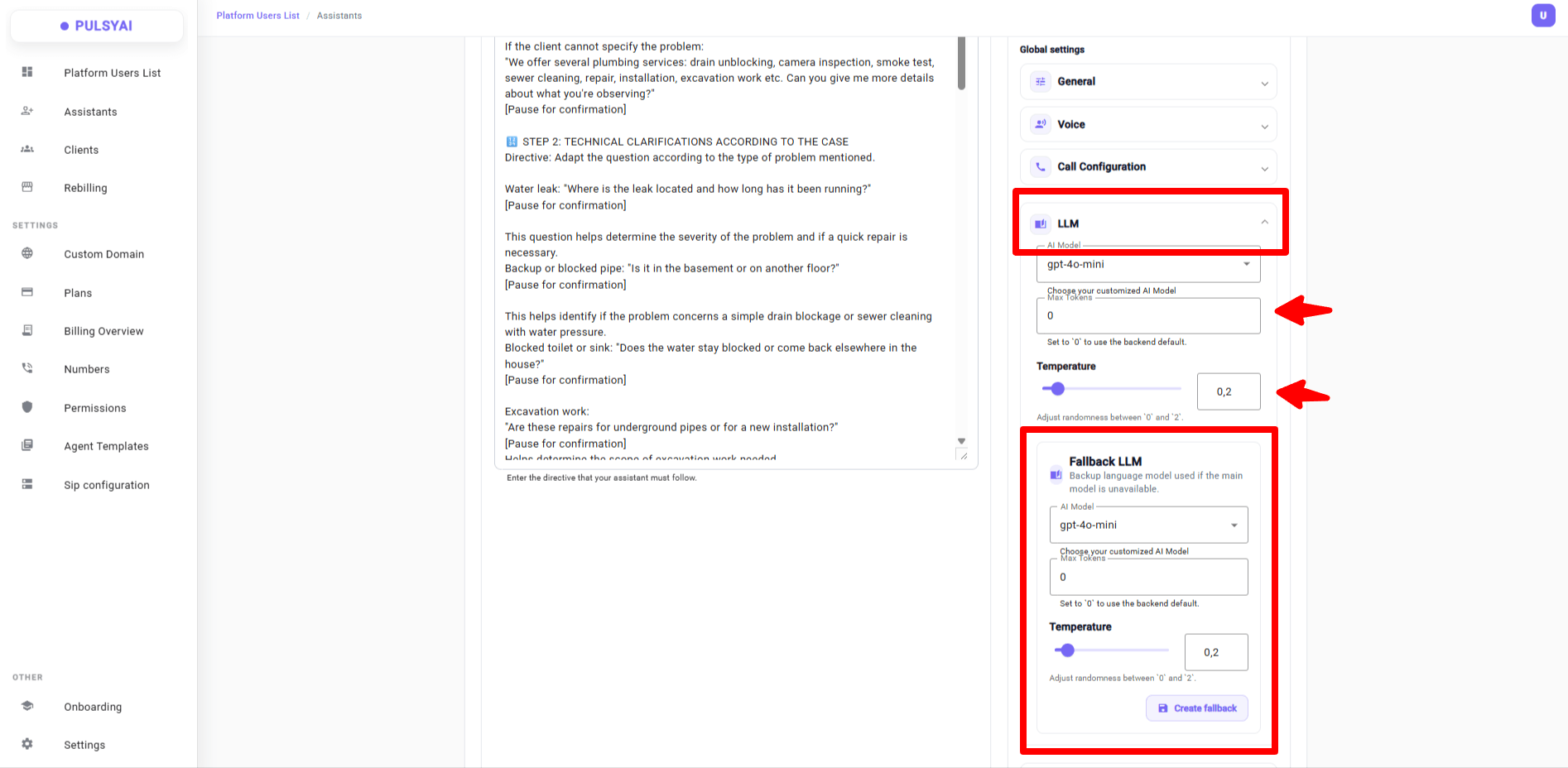
Fallback LLM — independent Max Tokens and Temperature settings.
17 · New tools in the Integrations tab
- Webhook — sends call lifecycle events (
call_start,call_end) to your HTTPS endpoint - Custom API Call — reusable tool the agent can invoke mid-call to send/fetch data from any HTTP endpoint
- Send DTMF digits — the agent sends keypad tones mid-call (IVR, extensions, codes)
- Collect keypad input — captures digits pressed by the caller (10s default timeout,
#,*default delimiters) - Stale Conversations — handles silent conversations with two timers: one pushes lead data to your integrations, another triggers automatic SMS re-engagement
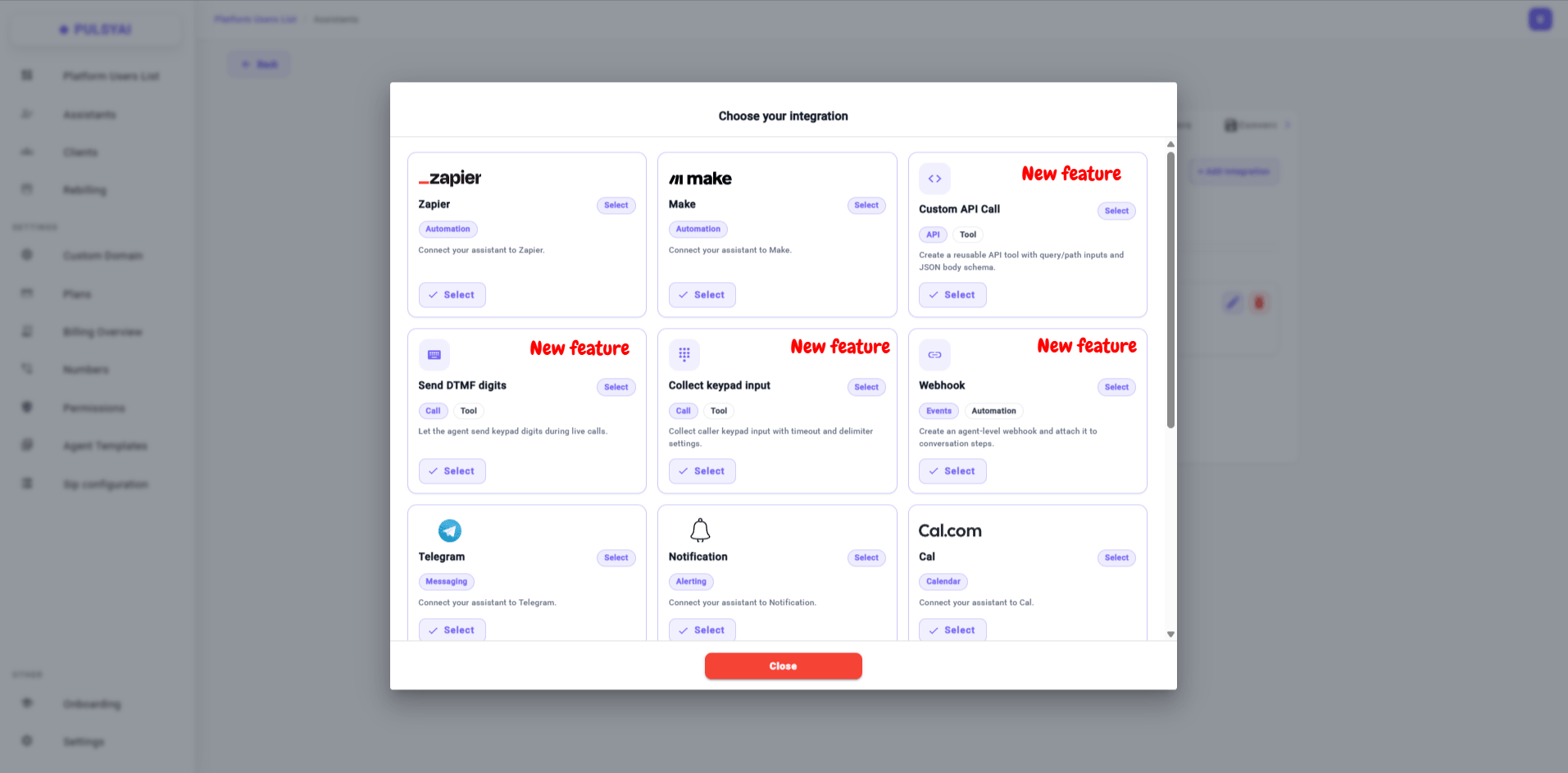
Integrations tab — Webhook, Custom API Call, DTMF, keypad input, and more.
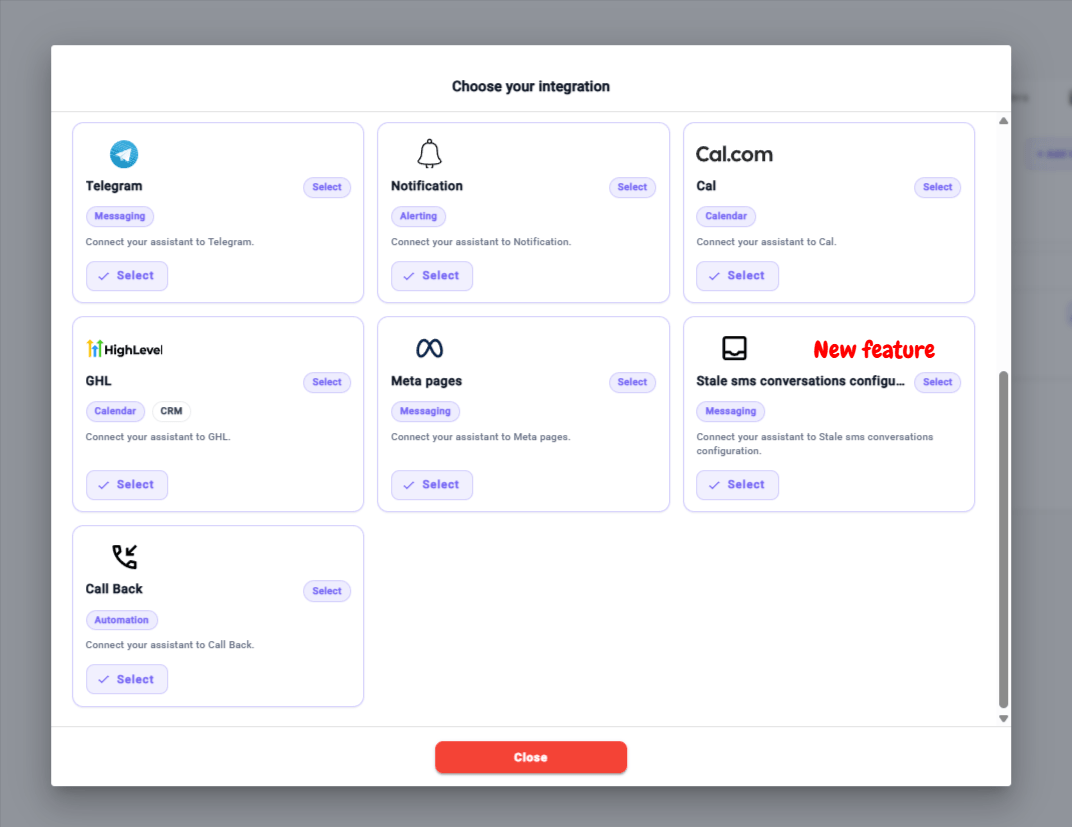
Stale Conversations — auto-follow up on silent SMS threads.
Part 3 — Bug fixes
Eight fixes shipped this quarter, focused on call reliability and platform polish.Latency — general optimizations for faster response times
Latency — general optimizations for faster response times
Voicemail Detection (outbound) — no more random mid-call hangups
Voicemail Detection (outbound) — no more random mid-call hangups
Default Fallback LLM / Voice — applied automatically
Default Fallback LLM / Voice — applied automatically
Account validation emails — invitation delivery fixed
Account validation emails — invitation delivery fixed
Knowledge Base scraping — full-page capture
Knowledge Base scraping — full-page capture
Mid-call interruption — much more natural
Mid-call interruption — much more natural
Transfer tab — international prefix fixed
Transfer tab — international prefix fixed
+1 prefix that blocked international transfers.Auto Call Back — max attempts correctly enforced
Auto Call Back — max attempts correctly enforced
Coming up
Full documentation
Discord community
Webinars
Public roadmap
Frequently asked questions
What is PulsyAI?
What is PulsyAI?
How is PulsyAI different from other voice AI platforms?
How is PulsyAI different from other voice AI platforms?
What languages and voices does PulsyAI support?
What languages and voices does PulsyAI support?
What LLMs are available on PulsyAI?
What LLMs are available on PulsyAI?
Can I white-label PulsyAI for my own brand?
Can I white-label PulsyAI for my own brand?
How does pricing work for resellers?
How does pricing work for resellers?
Can my clients break their AI agent configuration?
Can my clients break their AI agent configuration?
Thank you
Thanks for trusting us and betting on us. We’re pushing harder every day to make your lives easier.These updates are going weekly from now on.— The PulsyAI TeamIn progress
- Expanded integration deep-dives (Cal.com, GoHighLevel, Zapier, Make, Custom API Call)
- Build a Script with Claude walkthrough — the AI-assisted script drafting workflow
- Working with End-Clients reseller playbook expansion
- Transfers configuration deep-dive
- Troubleshooting section rewrite
On the roadmap
- PulsyAI Copilot — in-platform script generation assistant trained on the PulsyAI methodology
- Additional integration guides based on reseller demand
- Video walkthroughs for the most requested features
- Public roadmap with community voting