The SMS Configuration tab lets you add conditional text messages that your inbound or outbound voice AI agent can send during or after a call. Each message is triggered by a condition you define and pair with instructions in the call flow. SMS Configuration also includes a unique feature for verifying the information the agent collected. To open it, select an assistant and click the SMS configuration tab.
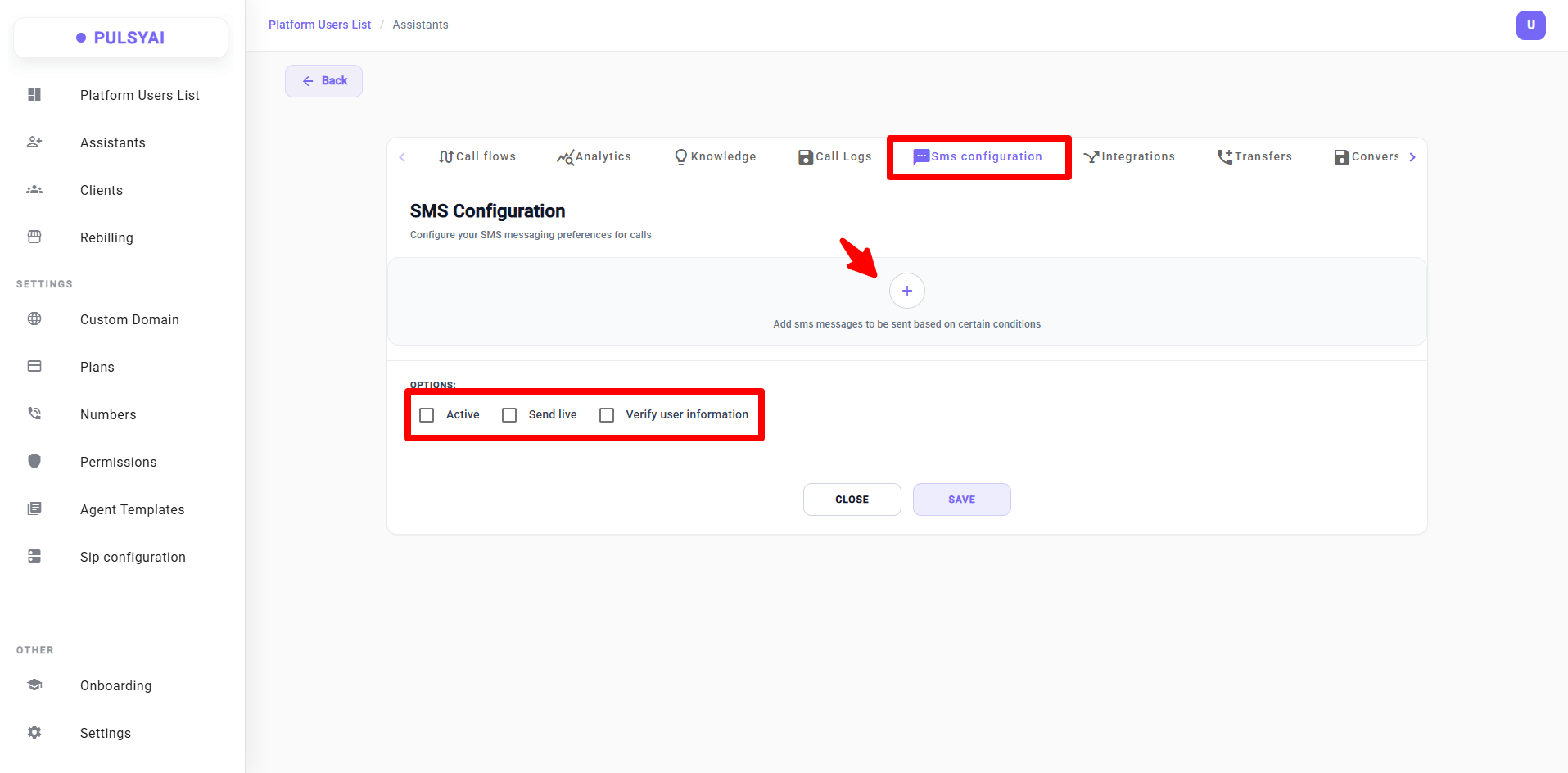
SMS Configuration tab overview — add conditional SMS messages with the + button, and toggle Active, Send live, and Verify user information options.

What SMS Configuration Lets You Do

SMS Configuration adds four core capabilities to your voice agent:

💬 Send SMS During a Call

While the agent is on a voice call, it can text the caller a static piece of information in real time — such as a calendar link, an address, or any pre-defined link. For dynamic content generated in real time, see the webhook documentation.

✉️ Send SMS After a Call

Automatically send a follow-up message once the call ends — a confirmation, summary, or next steps.

🔄 Continue by SMS

If the caller wants to keep talking after the call ends, the voice agent transitions into an SMS agent and continues the conversation through text. This behavior is configured in the Integrations tab.

✅ Verify Collected Information

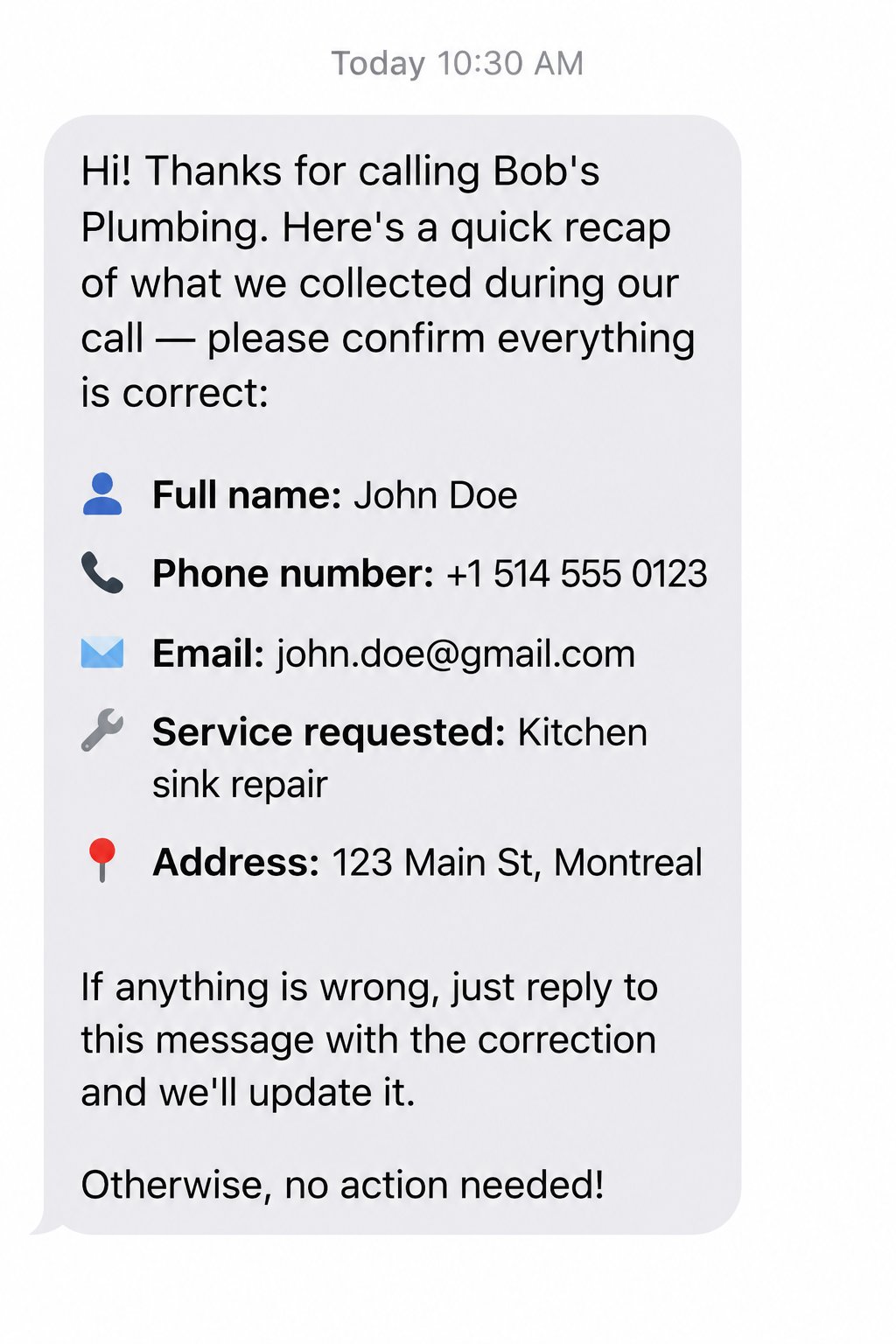
After the call, the agent sends an SMS recap of the information it collected — full name, phone, email — and asks the caller to confirm or correct it. Updates are saved automatically.

Adding a Conditional SMS Message

Click the + button to add a new SMS message. Each message has two fields:
1

Custom Message

Enter the text the agent will send. The label changes automatically based on whether the message is sent live during the call (Custom Live-Call Message) or after the call ends (Custom After-Call Message).
2

Send Condition

Define the condition under which this SMS should be sent. For example: “the caller asks for the booking link” or “the caller agrees to receive a recap by text”.
3

Add more messages

Click + Add Message to add as many conditional SMS messages as you need. Each one runs independently based on its own condition.
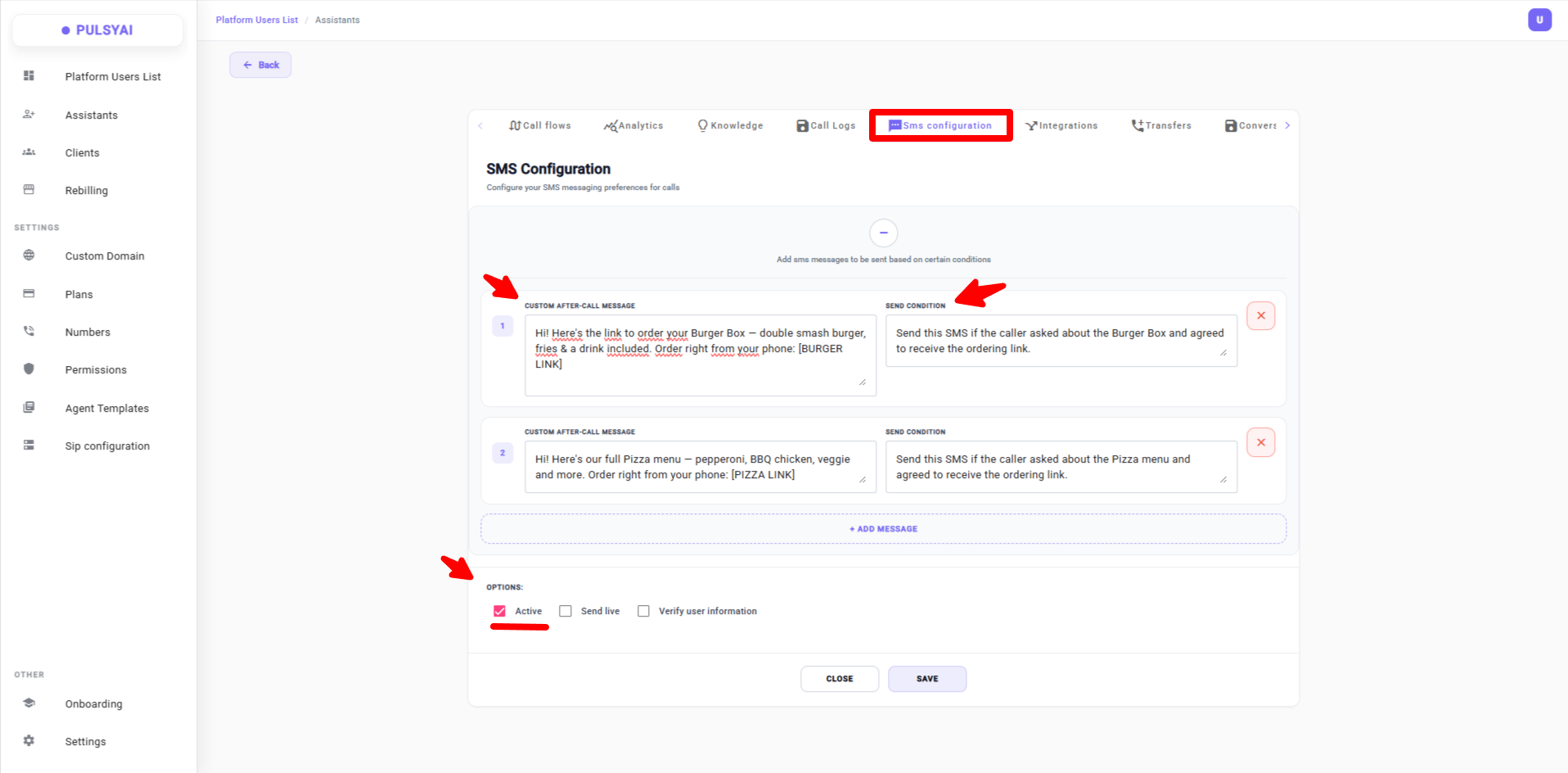
Example of two conditional SMS messages configured — each with its own custom message and send condition. Use the + Add Message button to add as many conditions as needed.
This example uses placeholders like [BURGER LINK] and [PIZZA LINK] for clarity. In your real setup, replace these placeholders with the actual links you want the agent to send.
SMS Configuration is tightly connected to the Call Flow. A condition you define here will only trigger if the call flow’s prompt explicitly instructs the agent to activate it. Without clear instructions in the call flow prompt, the condition will not fire.

How to Trigger an SMS from the Call Flow

For a conditional SMS to actually send, two things must align:

📋 Define the Condition Here

In SMS Configuration, write a clear Send Condition — for example, “the user agrees to receive the link by SMS”.

🗺️ Instruct the Agent in the Call Flow

In the Call Flow prompt, tell the agent when to ask permission and when to trigger the SMS — for example: “Ask the user if they want the link by SMS. If they say yes, send the SMS.”
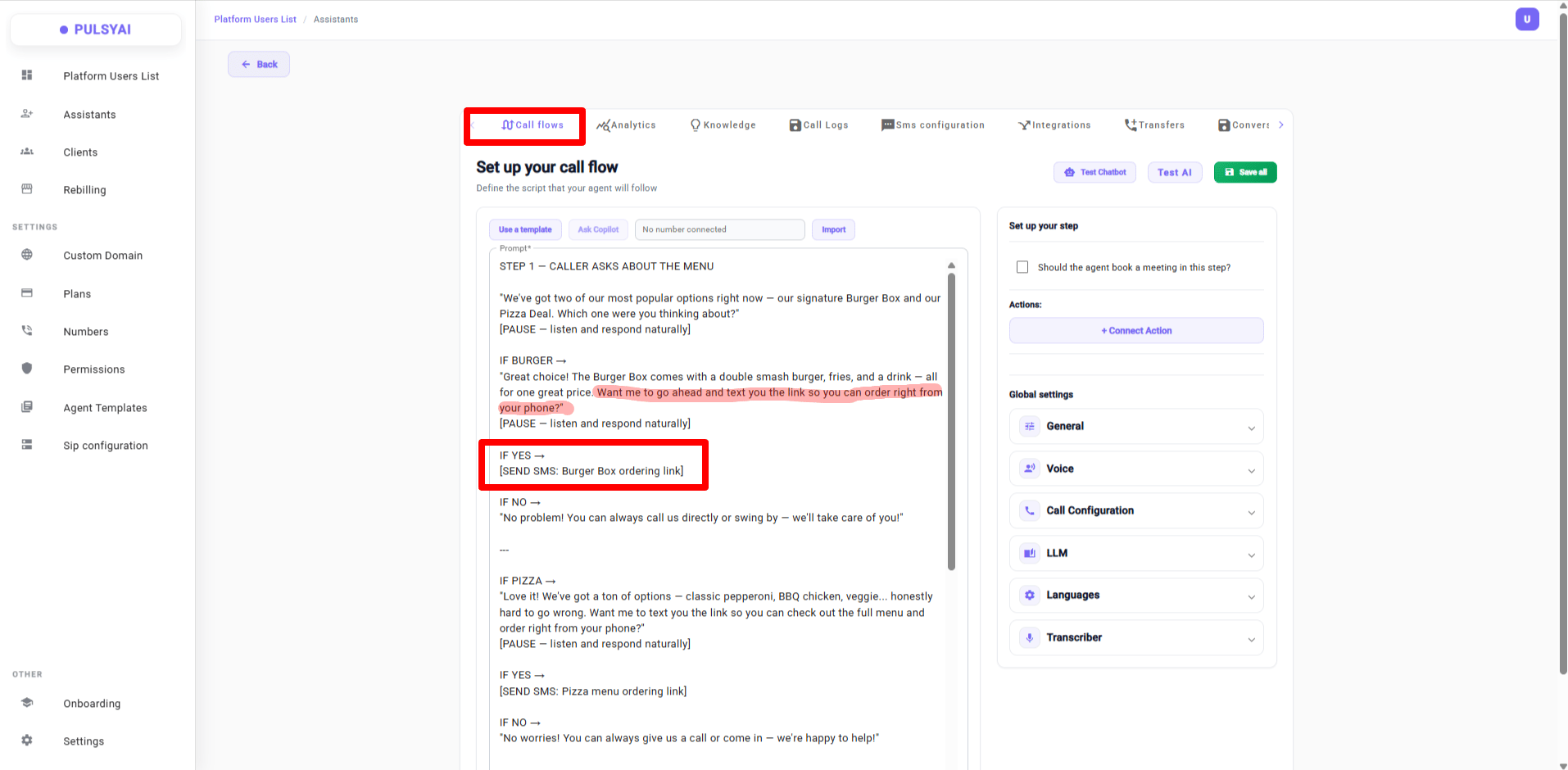
Here is a real example of a call flow prompt that triggers conditional SMS messages — the agent asks the user first and only sends the SMS when the user agrees.
Example of a call flow prompt that triggers conditional SMS messages — the agent asks the user before sending, and only sends the SMS if the user agrees.
STEP 1 — CALLER ASKS ABOUT THE MENU
"We've got two of our most popular options right now — our signature Burger Box and our Pizza Deal. Which one were you thinking about?"
[PAUSE — listen and respond naturally]

IF BURGER →
"Great choice! The Burger Box comes with a double smash burger, fries, and a drink — all for one great price. Want me to go ahead and text you the link so you can order right from your phone?"
[PAUSE — listen and respond naturally]

  IF YES →
    [SEND SMS: Burger Box ordering link]
  IF NO →
    "No problem! You can always call us directly or swing by — we'll take care of you!"

---

IF PIZZA →
"Love it! We've got a ton of options — classic pepperoni, BBQ chicken, veggie... honestly hard to go wrong. Want me to text you the link so you can check out the full menu and order right from your phone?"
[PAUSE — listen and respond naturally]

  IF YES →
    [SEND SMS: Pizza menu ordering link]
  IF NO →
    "No worries! You can always give us a call or come in — we're happy to help!"

---

STEP 2 — CALLER WANTS CURRENT SPECIALS
"Right now we've got a Burger + Pizza combo deal running — great for groups or families. Want me to text you the details and the ordering link?"
[PAUSE — listen and respond naturally]

  IF YES →
    [SEND SMS: Combo deal details + ordering link]
    "Sent! Everything's right there — you can customize your order and place it straight from your phone. Anything else I can help with?"
  IF NO →
    "No problem! Just give us a call or check out our website and we'll get you sorted."

---

STEP 3 — ORDER CONFIRMATION (Auto-Send — No Permission Needed)
"Perfect — you're all set! You'll get a confirmation text in just a moment with all your order details."
[PAUSE — listen and respond naturally]
[SEND SMS: Order confirmation → to customer + all internal numbers simultaneously]
If your agent does not trigger SMS reliably, switch to a more capable AI model such as GPT-4.1. Smarter models follow function-calling instructions and conditional logic far better than smaller models.
Each [SEND SMS: ...] line in the call flow corresponds to a conditional SMS you configured in this tab. The two pages work together.
As with any function call, the agent should always ask the user a yes/no question first before triggering an SMS. For example: “Would you like me to send you the link by text?” Function calls work much more reliably when the agent has a clear confirmation from the user before triggering them. This applies to every conditional SMS you set up.

Options

Three checkboxes control how SMS behaves for the agent:

🟢 Active

Enables SMS functionality for this agent. If unchecked, SMS messaging is disabled and no messages will be sent. Active should be enabled by default.

⚡ Send Live

When checked, the agent can send SMS messages live during the call instead of only after. The Custom Message field automatically updates from “Custom After-Call Message” to “Custom Live-Call Message”.

✅ Verify User Information

After the call, the agent sends an SMS containing the information it collected — full name, phone number, email, and so on — and asks the caller to confirm. If something is wrong, the caller replies with the correction and PulsyAI updates the data in the database automatically.

How Live SMS Works

When Send Live is enabled, two things change automatically: the message label switches from “Custom After-Call Message” to “Custom Live-Call Message”, and the Send Condition should specify that the SMS must be sent immediately during the call rather than after.
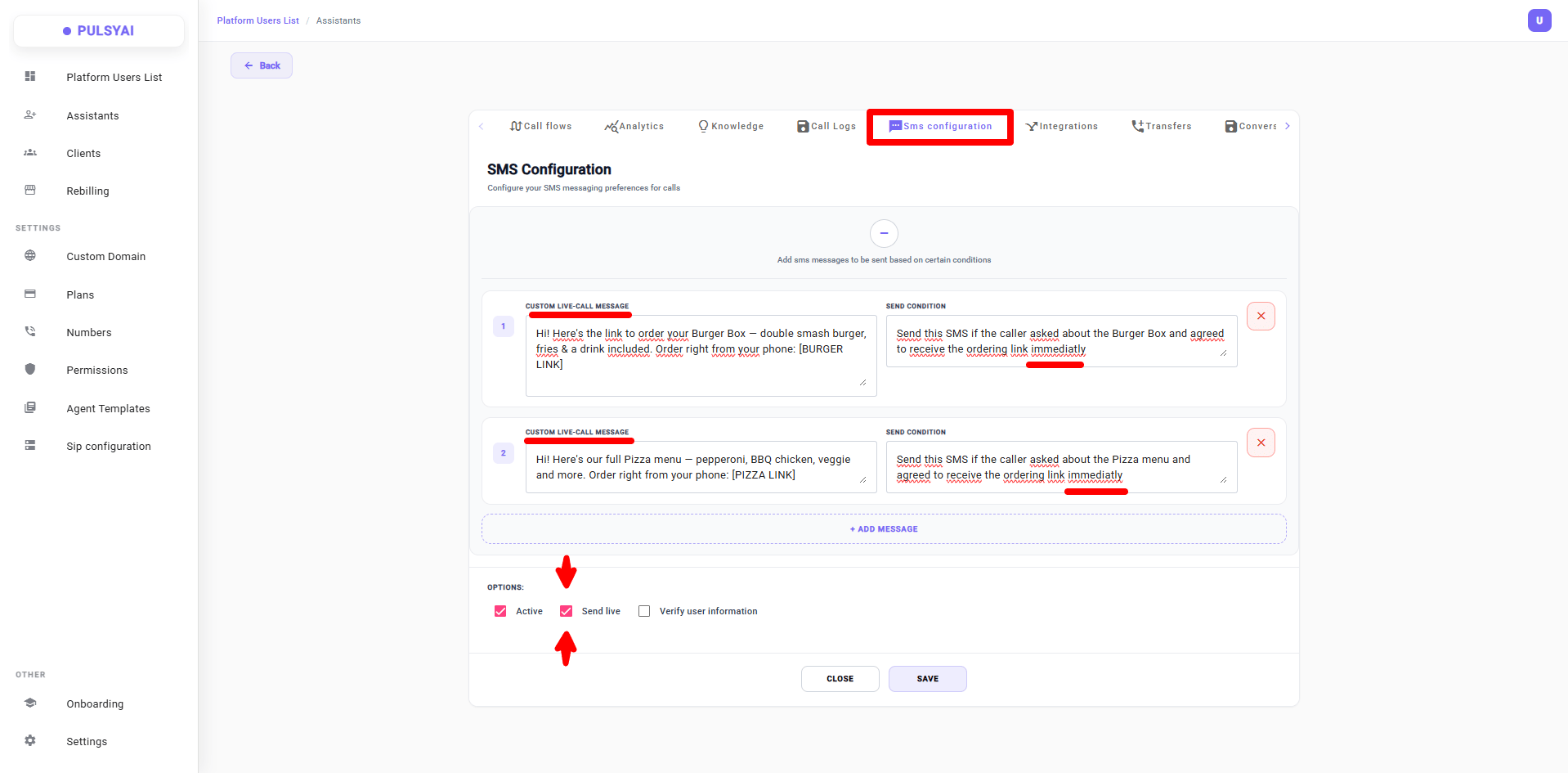
When Send Live is enabled, the message label becomes 'Custom Live-Call Message' and the Send Condition should end with 'immediately' to signal real-time delivery during the call.
To trigger an SMS live during the call rather than after, do three things: check the Send Live option, write your message in the Custom Live-Call Message field, and end the Send Condition with the word “immediately” (for example: “Send this SMS if the caller asked about the Pizza menu and agreed to receive the ordering link immediately”). The word “immediately” is what tells the agent to send the SMS in real time.

How Verify User Information Works

Verify User Information is one of the most powerful features for boosting data accuracy. Speech-to-text is not perfect — especially for languages other than English, like French, Arabic, or Hindi — and even in English, emails and unusual names are sometimes misheard. Enabling this option lets the caller confirm or fix the data themselves, dramatically improving CRM data quality and lead capture accuracy.
Example of Verify User Information in action — the agent sends a recap of collected information by SMS, the caller replies with a correction, and PulsyAI updates the data automatically.

Time to Wait Before Sending Information

When Verify User Information is enabled, a new field appears: Time to wait before sending information. This setting controls how long PulsyAI waits for the caller’s SMS reply before pushing the lead data to your CRM or external system. You can set the wait time in minutes, hours, or days.
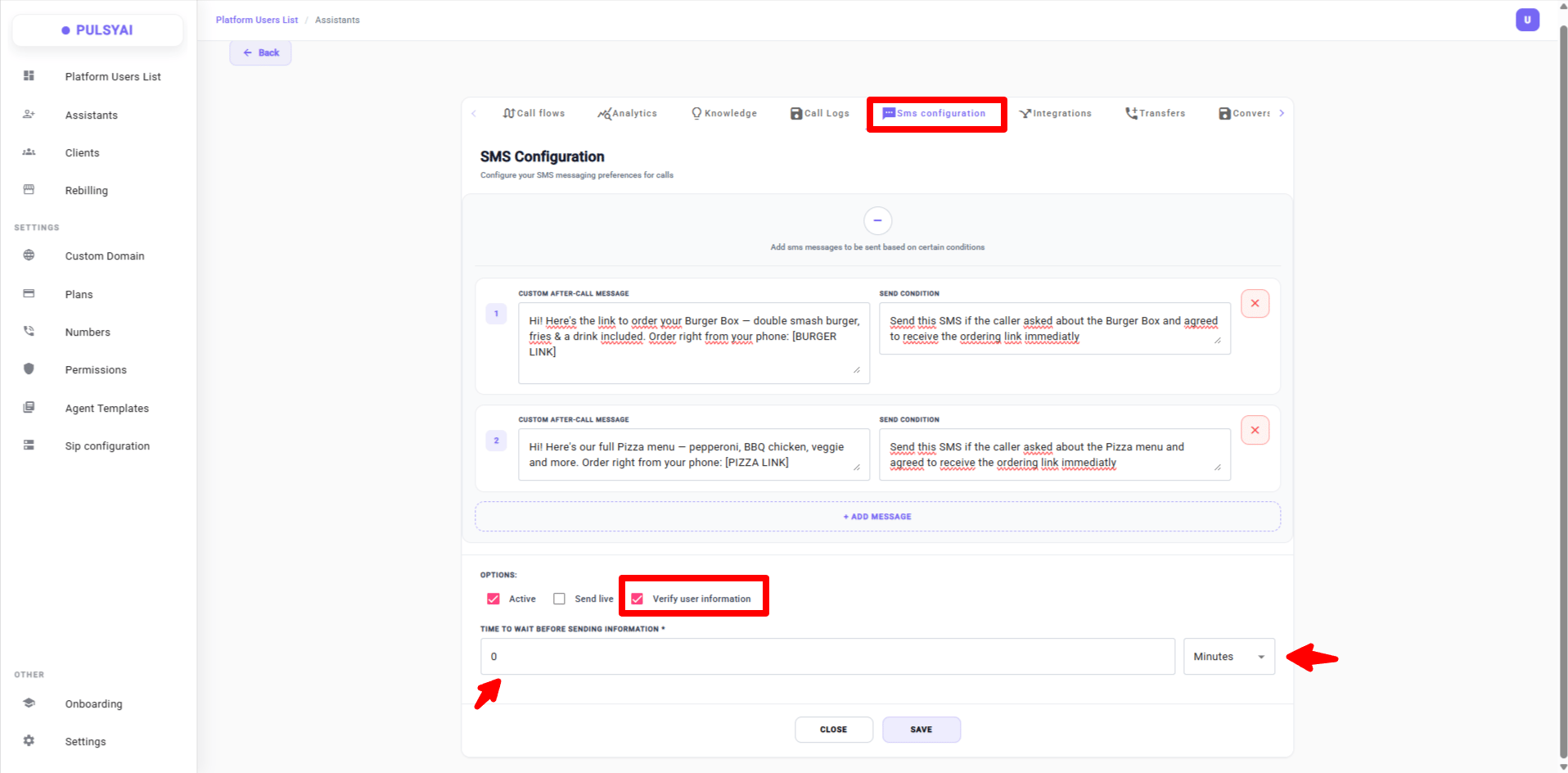
When Verify User Information is enabled, the 'Time to wait before sending information' field appears — set the delay in minutes, hours, or days before PulsyAI pushes the lead data automatically.

How the Wait Time Works

PulsyAI uses the wait time as a safety net to guarantee that every lead reaches your CRM, even if the caller never replies to the verification SMS. Here is the logic:

If the caller replies before the wait time

PulsyAI pushes the lead to your CRM with the corrected, verified information — exactly what the caller confirmed by SMS.

If the caller does not reply in time

PulsyAI pushes the lead to your CRM with the original information collected during the call. No lead is ever lost or stuck waiting indefinitely.
A common setup is 15 minutes — long enough for most callers to reply, short enough that your CRM receives leads quickly. You can adjust this to whatever fits your business: shorter delays prioritize speed, longer delays prioritize data accuracy.

Re-Engaging Leads by SMS

SMS is also a powerful tool for re-engagement. If a caller hangs up before the agent can collect their contact information, PulsyAI can automatically follow up by SMS to continue the conversation and even retry multiple times until the lead is captured. These re-engagement workflows are configured in the Integrations tab.
Click Save to apply your SMS configuration to the agent.

Next Steps

🗺️ Call Flows

Add the instructions that trigger your conditional SMS messages.

🔌 Integrations

Set up advanced workflows like automatic re-engagement and stale conversation handling.