> ## Documentation Index
> Fetch the complete documentation index at: https://docs.pulsyai.com/llms.txt
> Use this file to discover all available pages before exploring further.
# Auto Call Back
> Configure Auto Call Back to automatically retry missed outbound calls, respect business hours, and fall back to SMS to maximize contact rates.
Auto Call Back is a PulsyAI feature that automatically retries unanswered outbound calls from your voice agent — with configurable delays between retries, a cap on the total number of attempts, weekly time windows that control when callbacks are allowed, and an optional SMS follow-up after all retries are exhausted. It saves you from manually tracking missed connections and gives every contact multiple chances to engage.
Auto Call Back is available only on **Outbound voice AI agents**. The tab does not appear on Inbound voice agents or SMS AI agents.
Auto Call Back is different from the **Call Back** integration in the Integrations tab. **Auto Call Back** automatically retries **outbound calls** the recipient didn't answer, using a built-in retry schedule. The **Call Back** integration recovers **inbound callers** who hung up early on your agent, using a custom condition you define and your choice of a Phone agent or SMS Agent for the follow-up. Both features can coexist on the same agent.
## Where to find Auto Call Back
Auto Call Back lives in its own tab inside every Outbound voice AI agent.
Navigate to your Outbound voice AI agent from the Assistants list.
Click the **Auto Call Back** tab in the agent navigation.
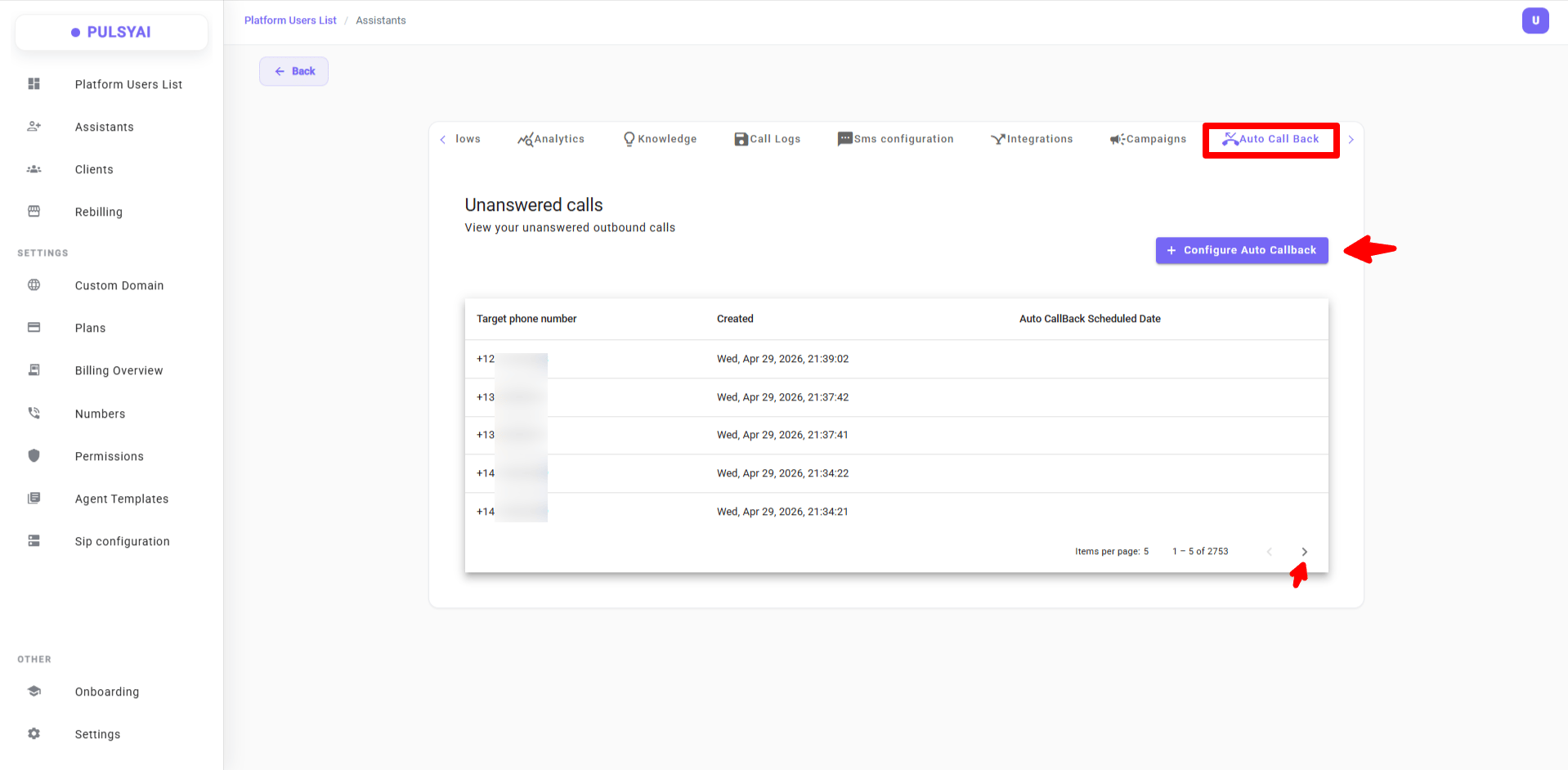 Normally, this tab is **blank** if your Outbound AI agent has never placed a call. The screenshot above is from an agent that has already run — it shows what the tab looks like once unanswered calls start accumulating.
## Configure Auto Call Back
Open the Auto Call Back Settings modal to define how retries are scheduled and bounded.
Click **+ Configure Auto Callback** at the top right of the Auto Call Back tab.
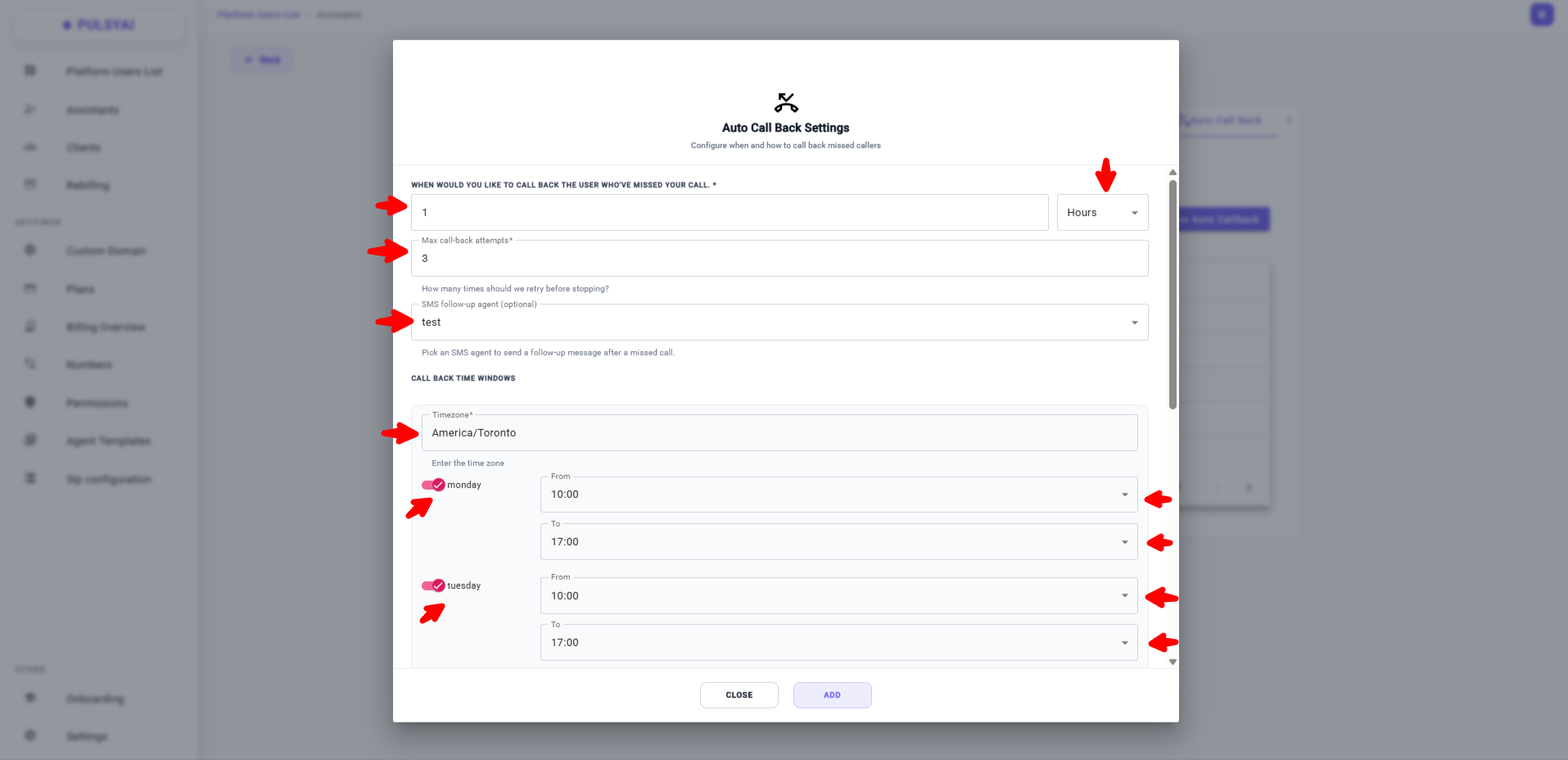
Configure the four sections described below: callback delay, max attempts, optional SMS follow-up agent, and call back time windows.
Click **Add** to save your Auto Call Back configuration. From that point on, every unanswered outbound call from this agent is automatically processed according to your settings.
Normally, this tab is **blank** if your Outbound AI agent has never placed a call. The screenshot above is from an agent that has already run — it shows what the tab looks like once unanswered calls start accumulating.
## Configure Auto Call Back
Open the Auto Call Back Settings modal to define how retries are scheduled and bounded.
Click **+ Configure Auto Callback** at the top right of the Auto Call Back tab.
Configure the four sections described below: callback delay, max attempts, optional SMS follow-up agent, and call back time windows.
Click **Add** to save your Auto Call Back configuration. From that point on, every unanswered outbound call from this agent is automatically processed according to your settings.
 ## Auto Call Back settings
Auto Call Back has four configuration areas: the retry delay, the maximum number of attempts, an optional SMS follow-up agent, and the call back time windows.
### Callback delay
The callback delay defines how long PulsyAI waits after a missed call before placing the first retry attempt.
* Enter a number, then choose the unit: **Minutes**, **Hours**, or **Days**.
* The first retry is placed exactly this long after the original unanswered call.
### Max call-back attempts
The maximum number of retry attempts caps how many times your agent will try to reach an unanswered contact.
* Once this cap is hit and the contact has still not been reached, no further voice retries are placed for that contact.
* If you've configured an SMS follow-up agent below, an SMS message is sent at this point instead.
### SMS follow-up agent (optional)
The SMS follow-up agent is an optional fallback that sends an SMS message to the contact after every voice retry has been exhausted.
* The dropdown lists every **SMS AI agent** in your platform, plus the **current Outbound voice agent itself** — since voice agents can also send SMS through their SMS Configuration. Each option is shown under the name you gave the agent at creation.
* Pick the agent you want to handle the SMS follow-up.
* Leave this field blank to disable the SMS fallback — unanswered calls will simply be marked closed once the retry cap is reached.
### Call back time windows
Call back time windows restrict when PulsyAI is allowed to place retry calls — useful for staying within business hours and respecting recipient time zones.
* Set a **Timezone** — this is the timezone the daily From/To times refer to. Match it to where your leads are located, not where your business operates from, so retries reach recipients during their local business hours.
* For each day of the week (Monday through Sunday), use the toggle to enable that day, then set a **From** time and a **To** time. Disabled days have no retries.
If a retry is due at a time outside your configured windows (for example a retry comes due at 11pm but your window is 9am to 5pm), the retry is automatically rescheduled to the next valid window — it is never skipped, and it does not count against your max attempts cap.
## Auto Call Back settings
Auto Call Back has four configuration areas: the retry delay, the maximum number of attempts, an optional SMS follow-up agent, and the call back time windows.
### Callback delay
The callback delay defines how long PulsyAI waits after a missed call before placing the first retry attempt.
* Enter a number, then choose the unit: **Minutes**, **Hours**, or **Days**.
* The first retry is placed exactly this long after the original unanswered call.
### Max call-back attempts
The maximum number of retry attempts caps how many times your agent will try to reach an unanswered contact.
* Once this cap is hit and the contact has still not been reached, no further voice retries are placed for that contact.
* If you've configured an SMS follow-up agent below, an SMS message is sent at this point instead.
### SMS follow-up agent (optional)
The SMS follow-up agent is an optional fallback that sends an SMS message to the contact after every voice retry has been exhausted.
* The dropdown lists every **SMS AI agent** in your platform, plus the **current Outbound voice agent itself** — since voice agents can also send SMS through their SMS Configuration. Each option is shown under the name you gave the agent at creation.
* Pick the agent you want to handle the SMS follow-up.
* Leave this field blank to disable the SMS fallback — unanswered calls will simply be marked closed once the retry cap is reached.
### Call back time windows
Call back time windows restrict when PulsyAI is allowed to place retry calls — useful for staying within business hours and respecting recipient time zones.
* Set a **Timezone** — this is the timezone the daily From/To times refer to. Match it to where your leads are located, not where your business operates from, so retries reach recipients during their local business hours.
* For each day of the week (Monday through Sunday), use the toggle to enable that day, then set a **From** time and a **To** time. Disabled days have no retries.
If a retry is due at a time outside your configured windows (for example a retry comes due at 11pm but your window is 9am to 5pm), the retry is automatically rescheduled to the next valid window — it is never skipped, and it does not count against your max attempts cap.
 ## Unanswered calls list
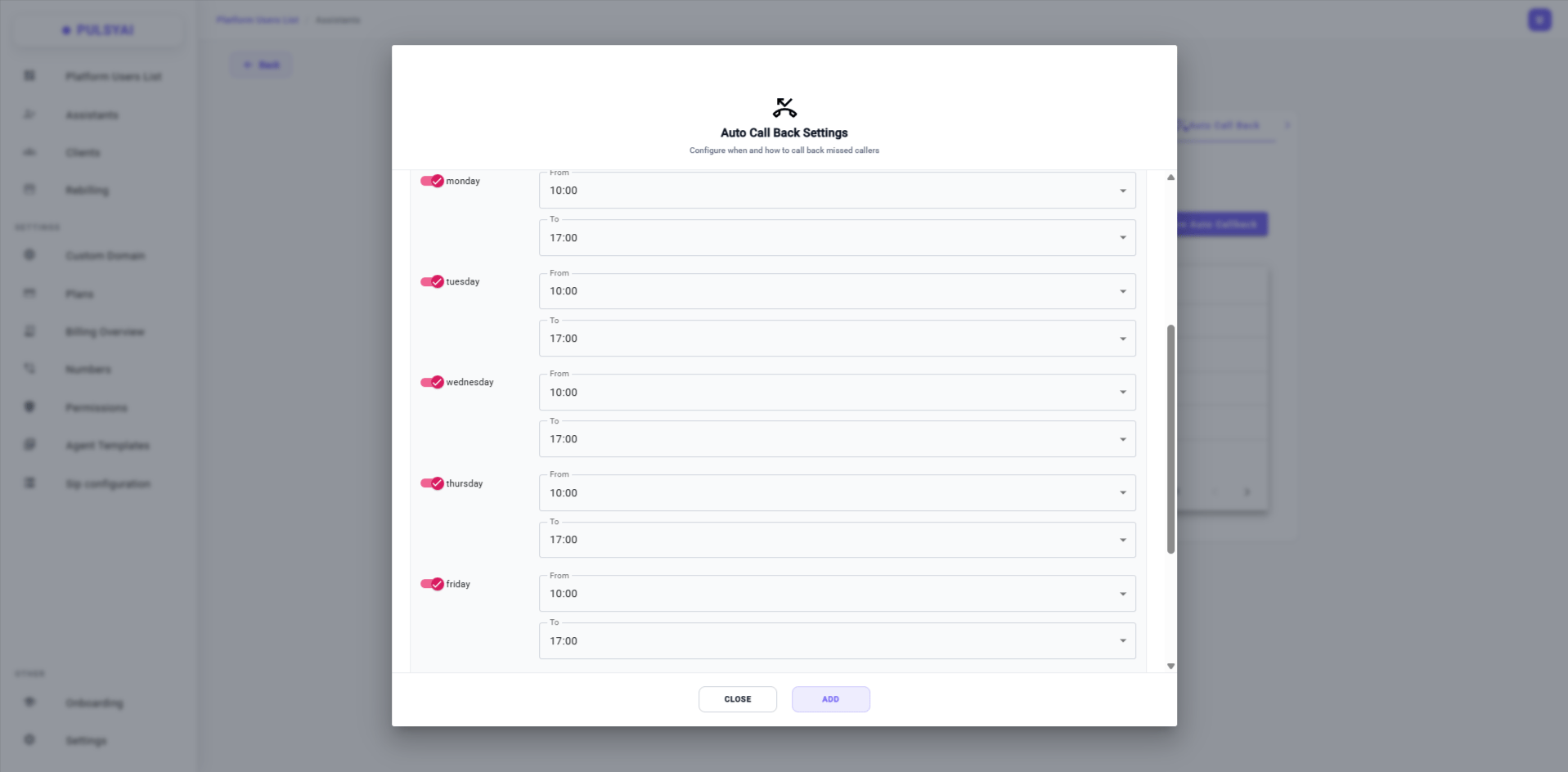
The Unanswered calls list shows every outbound call from this agent that was not answered. A call is considered unanswered if the recipient lets it ring out, the call goes to voicemail, or the line is busy.
The list shows three columns:
* **Target phone number** — the contact number that did not pick up.
* **Created** — the date and time of the original outbound call attempt.
* **Auto CallBack Scheduled Date** — the date and time of the next scheduled retry, when Auto Call Back is configured.
The list paginates so you can browse large volumes of unanswered calls without performance issues.
## How retries work
Here is the full lifecycle of an unanswered call once Auto Call Back is configured.
1. Your Outbound voice agent places an outbound call (manually, via API, or from a Campaign).
2. The recipient does not answer — the call rings out, hits voicemail, or the line is busy.
3. PulsyAI logs the call in the Unanswered calls list and schedules a retry based on your configured callback delay.
4. If the scheduled retry falls inside one of your time windows, the call is placed. If it falls outside, the retry is rescheduled to the next valid window.
5. If the contact still does not answer, PulsyAI schedules the next retry — repeating this loop until the maximum attempts cap is reached.
6. Once the cap is reached, the SMS follow-up agent (if configured) sends an SMS message to the contact. The unanswered call is then closed.
## Example configuration
Below is an example Auto Call Back configuration suitable for a typical B2B outbound campaign in North America.
With this setup:
* The first retry fires **1 hour** after each unanswered call.
* Each contact is retried **up to 3 times** before voice retries stop.
* After all 3 retries are exhausted, the SMS AI agent named **test** sends a follow-up message — covering contacts who don't engage by phone.
* Retries are placed Monday through Friday between **10:00 and 17:00** in the **America/Toronto** timezone.
### Time window best practices
Connection rates vary heavily by time of day and day of week. As a general rule for outbound campaigns:
* **Weekday mornings (10:00 – 12:00 local time)** and **late afternoons (16:00 – 18:00 local time)** tend to produce the highest connection rates for B2B outbound calls.
* **Lunch hours (12:00 – 14:00)** typically show the lowest pickup rates, as recipients are often away from their desks.
* **Weekends** depend on your audience. For B2B prospects, leave weekends disabled — calls placed on Saturday or Sunday rarely connect. For B2C consumer outreach, **Saturday late morning (10:00 – 12:00)** can perform well, while Sunday tends to underperform across the board.
Always match the **Timezone** to where most of your leads are based — not to where your business operates from. A reseller running campaigns on UK leads from Montreal should set the timezone to `Europe/London`, not `America/Toronto`, so retries hit recipients during their local business hours.
### Why use an SMS follow-up agent
Configuring an SMS follow-up agent measurably increases your overall connection and conversion rate. Some leads will never pick up a phone call but will respond to a text message — combining voice retries with an SMS fallback creates a multi-channel safety net that captures contacts your voice agent alone would lose.
The SMS follow-up agent is optional, but for most outbound campaigns enabling it is a quick win — every contact that ignores three voice attempts still receives one chance to engage by text before being closed.
Configure your retry delays, maximum attempts, and time windows responsibly. You are responsible for ensuring your callback activity complies with applicable telecom and consumer protection regulations in every jurisdiction where your contacts reside — including consent requirements, do-not-call (DNC) lists, calling-hour restrictions, and limits on the number of contact attempts. Excessive retries or calls placed outside legally permitted hours can result in significant fines in many regions. For a broader overview of regulatory considerations, see [Compliance](/platform/compliance).
## Unanswered calls list
The Unanswered calls list shows every outbound call from this agent that was not answered. A call is considered unanswered if the recipient lets it ring out, the call goes to voicemail, or the line is busy.
The list shows three columns:
* **Target phone number** — the contact number that did not pick up.
* **Created** — the date and time of the original outbound call attempt.
* **Auto CallBack Scheduled Date** — the date and time of the next scheduled retry, when Auto Call Back is configured.
The list paginates so you can browse large volumes of unanswered calls without performance issues.
## How retries work
Here is the full lifecycle of an unanswered call once Auto Call Back is configured.
1. Your Outbound voice agent places an outbound call (manually, via API, or from a Campaign).
2. The recipient does not answer — the call rings out, hits voicemail, or the line is busy.
3. PulsyAI logs the call in the Unanswered calls list and schedules a retry based on your configured callback delay.
4. If the scheduled retry falls inside one of your time windows, the call is placed. If it falls outside, the retry is rescheduled to the next valid window.
5. If the contact still does not answer, PulsyAI schedules the next retry — repeating this loop until the maximum attempts cap is reached.
6. Once the cap is reached, the SMS follow-up agent (if configured) sends an SMS message to the contact. The unanswered call is then closed.
## Example configuration
Below is an example Auto Call Back configuration suitable for a typical B2B outbound campaign in North America.
With this setup:
* The first retry fires **1 hour** after each unanswered call.
* Each contact is retried **up to 3 times** before voice retries stop.
* After all 3 retries are exhausted, the SMS AI agent named **test** sends a follow-up message — covering contacts who don't engage by phone.
* Retries are placed Monday through Friday between **10:00 and 17:00** in the **America/Toronto** timezone.
### Time window best practices
Connection rates vary heavily by time of day and day of week. As a general rule for outbound campaigns:
* **Weekday mornings (10:00 – 12:00 local time)** and **late afternoons (16:00 – 18:00 local time)** tend to produce the highest connection rates for B2B outbound calls.
* **Lunch hours (12:00 – 14:00)** typically show the lowest pickup rates, as recipients are often away from their desks.
* **Weekends** depend on your audience. For B2B prospects, leave weekends disabled — calls placed on Saturday or Sunday rarely connect. For B2C consumer outreach, **Saturday late morning (10:00 – 12:00)** can perform well, while Sunday tends to underperform across the board.
Always match the **Timezone** to where most of your leads are based — not to where your business operates from. A reseller running campaigns on UK leads from Montreal should set the timezone to `Europe/London`, not `America/Toronto`, so retries hit recipients during their local business hours.
### Why use an SMS follow-up agent
Configuring an SMS follow-up agent measurably increases your overall connection and conversion rate. Some leads will never pick up a phone call but will respond to a text message — combining voice retries with an SMS fallback creates a multi-channel safety net that captures contacts your voice agent alone would lose.
The SMS follow-up agent is optional, but for most outbound campaigns enabling it is a quick win — every contact that ignores three voice attempts still receives one chance to engage by text before being closed.
Configure your retry delays, maximum attempts, and time windows responsibly. You are responsible for ensuring your callback activity complies with applicable telecom and consumer protection regulations in every jurisdiction where your contacts reside — including consent requirements, do-not-call (DNC) lists, calling-hour restrictions, and limits on the number of contact attempts. Excessive retries or calls placed outside legally permitted hours can result in significant fines in many regions. For a broader overview of regulatory considerations, see [Compliance](/platform/compliance).