> ## Documentation Index
> Fetch the complete documentation index at: https://docs.pulsyai.com/llms.txt
> Use this file to discover all available pages before exploring further.
# Changelog
> New features, improvements, and updates to the PulsyAI voice AI platform — the white-label voice AI solution for agencies, resellers, MSPs, and GoHighLevel partners.
 The PulsyAI Changelog documents every meaningful update to the platform — new features, integrations, breaking changes, and documentation launches. Entries are ordered with the newest updates at the top. For a deeper look at any feature, follow the linked documentation pages.
**About PulsyAI:** PulsyAI is an AI voice agent platform built for resellers and agencies. Configure intelligent inbound and outbound voice agents, deploy them across verticals (dental, insurance, real estate, restaurants, legal, hair salons, and more), and manage all your clients from a single white-label dashboard. PulsyAI focuses on reseller workflows: agent templates, per-client permissions, billing overview, and custom domain support.
July 2026 — Product update: 11 features shipped
What's shipping next on PulsyAI
Subscribe to get every release
Explore the full PulsyAI docs
Visit pulsyai.com to learn more about the platform
**TL;DR:** New SIP configuration page, official documentation launch, upgraded Outbound Configuration (with voicemail detection strategy), End Reason field in Call Logs, Dark / Light / System theme mode, latency improvement via Silero VAD, bulk upload for transfer recipients, full-account impersonation, ElevenLabs voice community import, plus a UI/UX polish across the platform.
## Platform & Infrastructure
### 01 · SIP Configuration
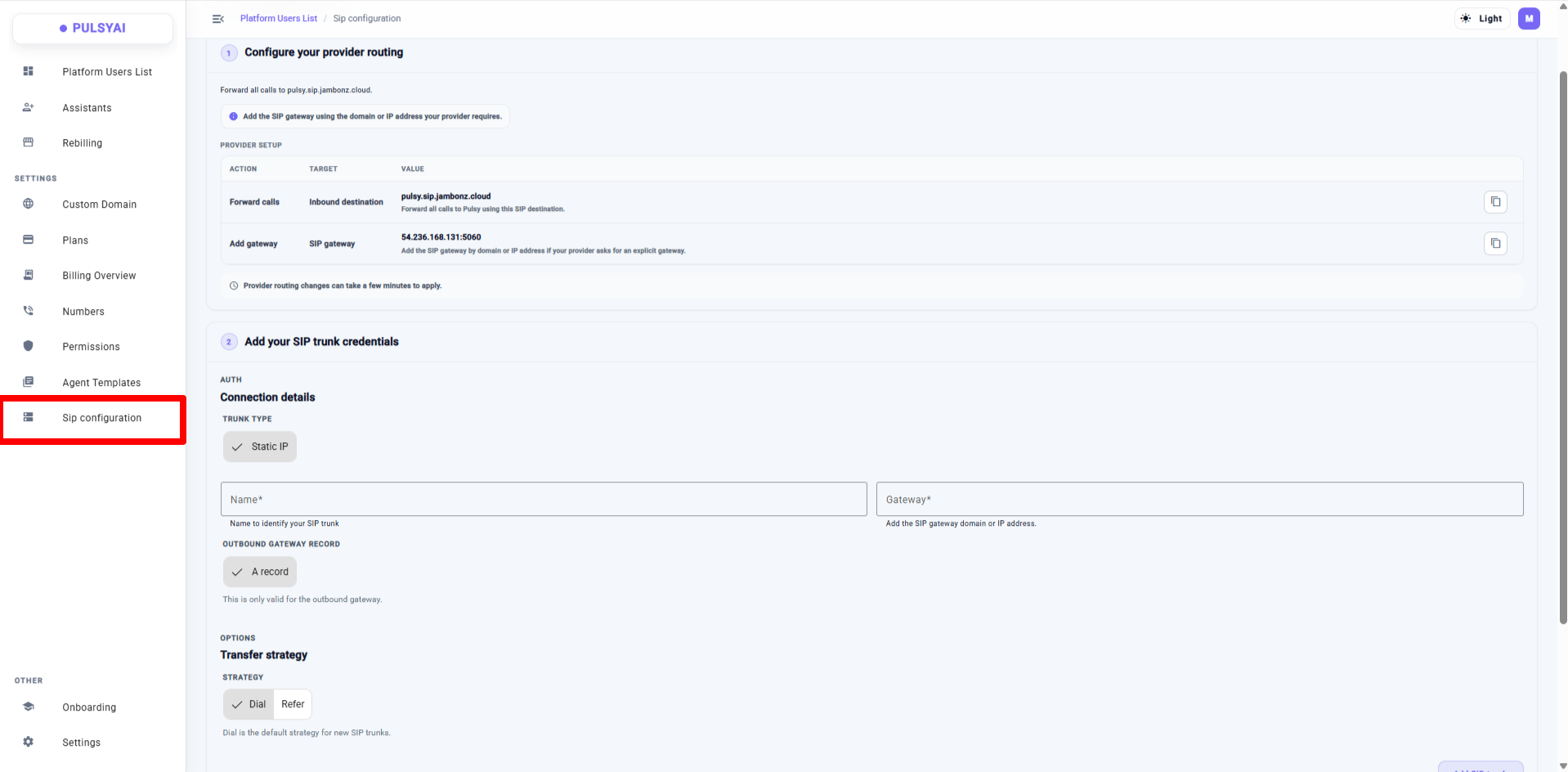
A brand new **SIP configuration** page lets you connect your SIP gateway and route calls directly to PulsyAI. Configure provider routing, add your SIP trunk credentials (Static IP, gateway domain/IP, outbound gateway record), and set your transfer strategy (**Dial** or **Refer**). Manage multiple SIP trunks from a single view.
The PulsyAI Changelog documents every meaningful update to the platform — new features, integrations, breaking changes, and documentation launches. Entries are ordered with the newest updates at the top. For a deeper look at any feature, follow the linked documentation pages.
**About PulsyAI:** PulsyAI is an AI voice agent platform built for resellers and agencies. Configure intelligent inbound and outbound voice agents, deploy them across verticals (dental, insurance, real estate, restaurants, legal, hair salons, and more), and manage all your clients from a single white-label dashboard. PulsyAI focuses on reseller workflows: agent templates, per-client permissions, billing overview, and custom domain support.
July 2026 — Product update: 11 features shipped
What's shipping next on PulsyAI
Subscribe to get every release
Explore the full PulsyAI docs
Visit pulsyai.com to learn more about the platform
**TL;DR:** New SIP configuration page, official documentation launch, upgraded Outbound Configuration (with voicemail detection strategy), End Reason field in Call Logs, Dark / Light / System theme mode, latency improvement via Silero VAD, bulk upload for transfer recipients, full-account impersonation, ElevenLabs voice community import, plus a UI/UX polish across the platform.
## Platform & Infrastructure
### 01 · SIP Configuration
A brand new **SIP configuration** page lets you connect your SIP gateway and route calls directly to PulsyAI. Configure provider routing, add your SIP trunk credentials (Static IP, gateway domain/IP, outbound gateway record), and set your transfer strategy (**Dial** or **Refer**). Manage multiple SIP trunks from a single view.
 ### 02 · Dark / Light / System theme
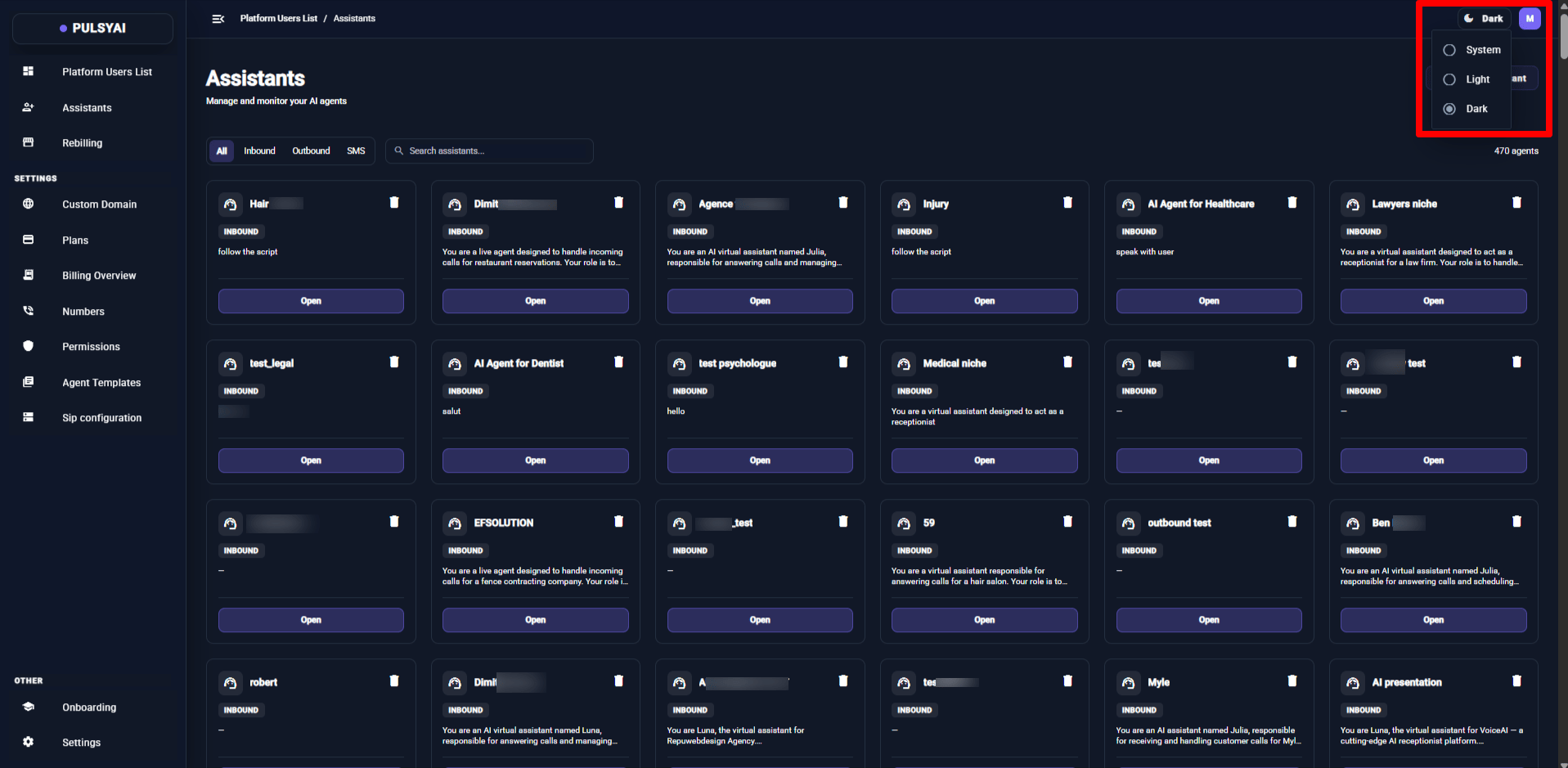
Personalize your workspace with three theme modes: **Dark**, **Light**, or **System** (matches your OS setting). Toggle from the top-right menu.
### 02 · Dark / Light / System theme
Personalize your workspace with three theme modes: **Dark**, **Light**, or **System** (matches your OS setting). Toggle from the top-right menu.
 ## Outbound & Call Management
### 03 · Outbound Configuration (formerly Auto Call Back)
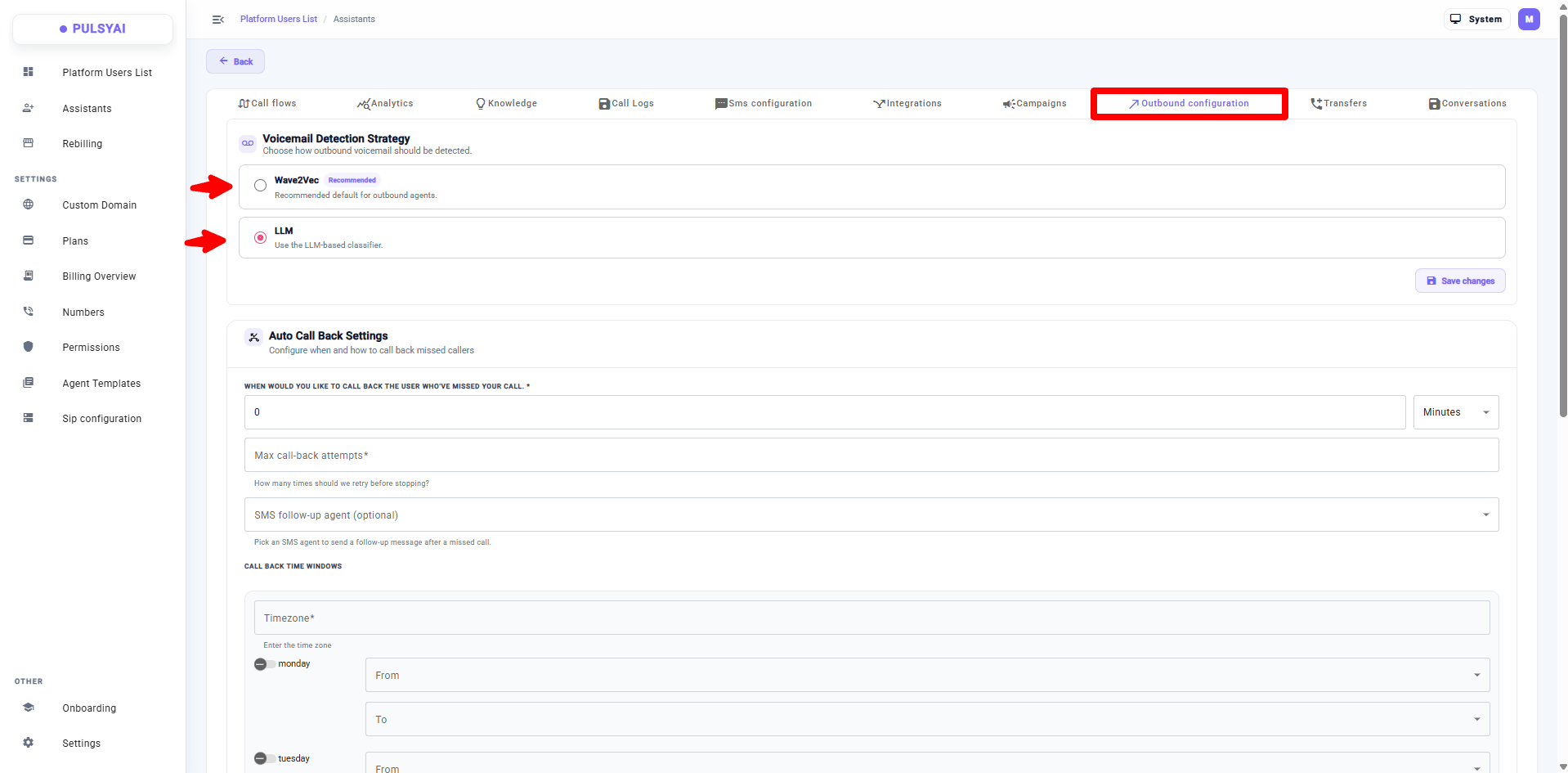
The **Auto Call Back** tab has been renamed and upgraded to **Outbound Configuration**. It keeps all the previous callback settings and adds a new **Voicemail Detection Strategy** selector — choose between **Wave2Vec** (recommended default for outbound) or **LLM** (LLM-based classifier).
## Outbound & Call Management
### 03 · Outbound Configuration (formerly Auto Call Back)
The **Auto Call Back** tab has been renamed and upgraded to **Outbound Configuration**. It keeps all the previous callback settings and adds a new **Voicemail Detection Strategy** selector — choose between **Wave2Vec** (recommended default for outbound) or **LLM** (LLM-based classifier).
 ### 04 · End Reason field in Call Logs
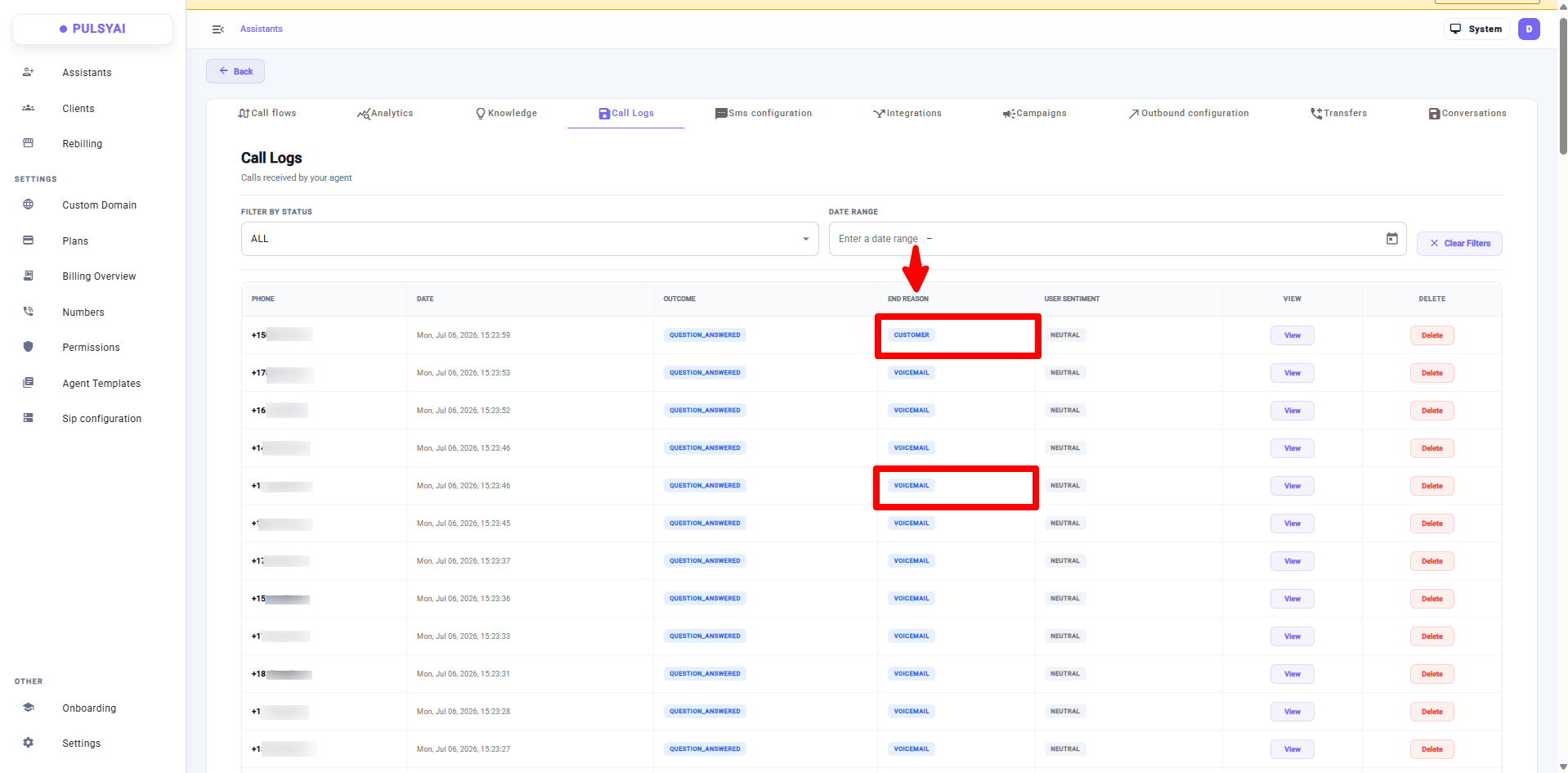
Call Logs now include an **End Reason** column, so outbound campaigners can immediately see whether a call was answered by a human, hit voicemail, or ended for another reason. No more wondering why a 100-lead campaign only shows 30 answered calls — you can now see the 70 that went to voicemail.
### 04 · End Reason field in Call Logs
Call Logs now include an **End Reason** column, so outbound campaigners can immediately see whether a call was answered by a human, hit voicemail, or ended for another reason. No more wondering why a 100-lead campaign only shows 30 answered calls — you can now see the 70 that went to voicemail.
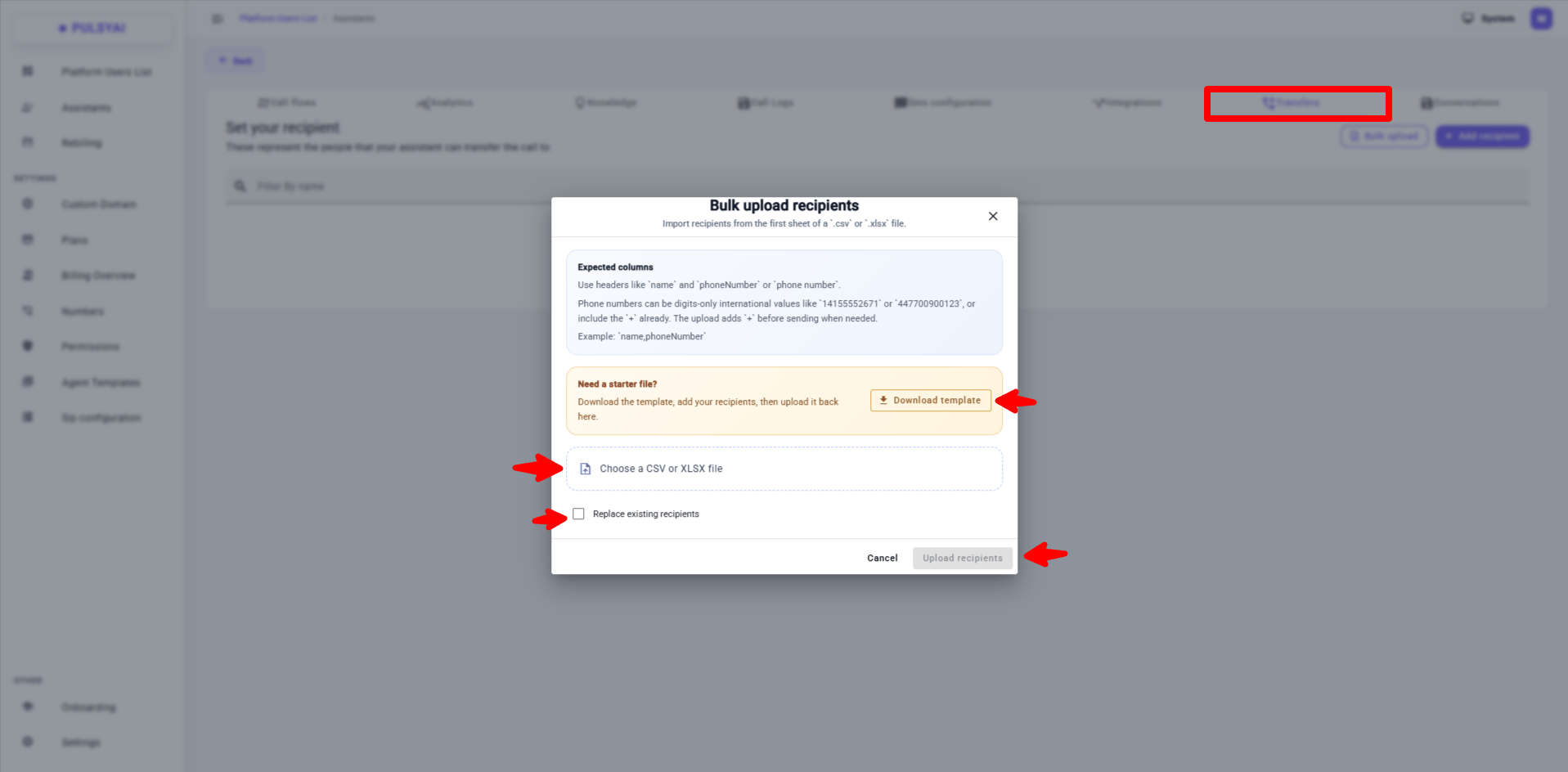
 ### 05 · Bulk upload for Transfer recipients
Add transfer recipients in bulk from a `.csv` or `.xlsx` file. Use the expected columns (`name`, `phoneNumber` or `phone number`), download the starter template if needed, and optionally replace all existing recipients in one go.
### 05 · Bulk upload for Transfer recipients
Add transfer recipients in bulk from a `.csv` or `.xlsx` file. Use the expected columns (`name`, `phoneNumber` or `phone number`), download the starter template if needed, and optionally replace all existing recipients in one go.
 ## Reseller (Admin) Features
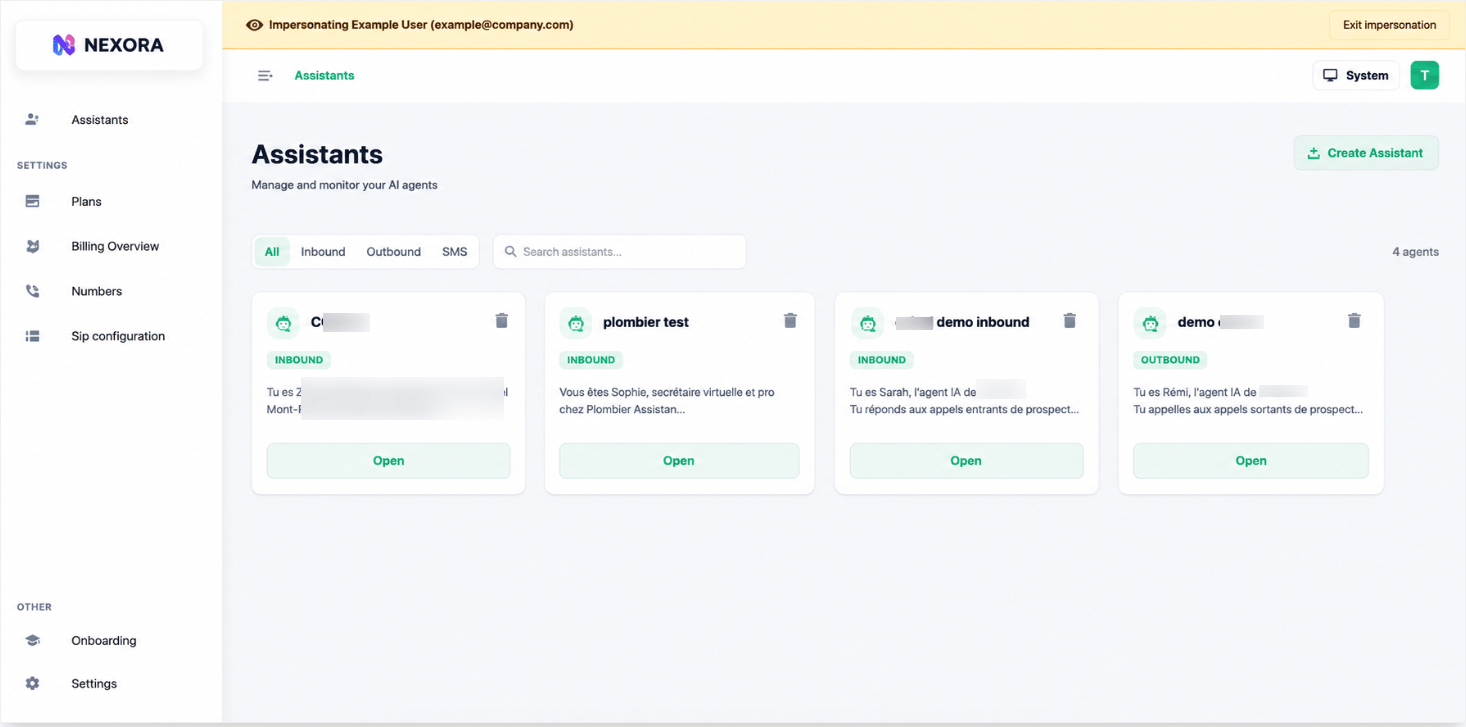
### 06 · Full-account impersonation
Impersonation used to let you view a client dashboard and create agents on their behalf. Now you can do **everything** inside a client's account: manage phone numbers, settings, subscriptions (including cancellations), and every reseller-controlled surface. A persistent banner at the top shows the impersonated client's name and email, with an **Exit impersonation** button always visible.
## Reseller (Admin) Features
### 06 · Full-account impersonation
Impersonation used to let you view a client dashboard and create agents on their behalf. Now you can do **everything** inside a client's account: manage phone numbers, settings, subscriptions (including cancellations), and every reseller-controlled surface. A persistent banner at the top shows the impersonated client's name and email, with an **Exit impersonation** button always visible.
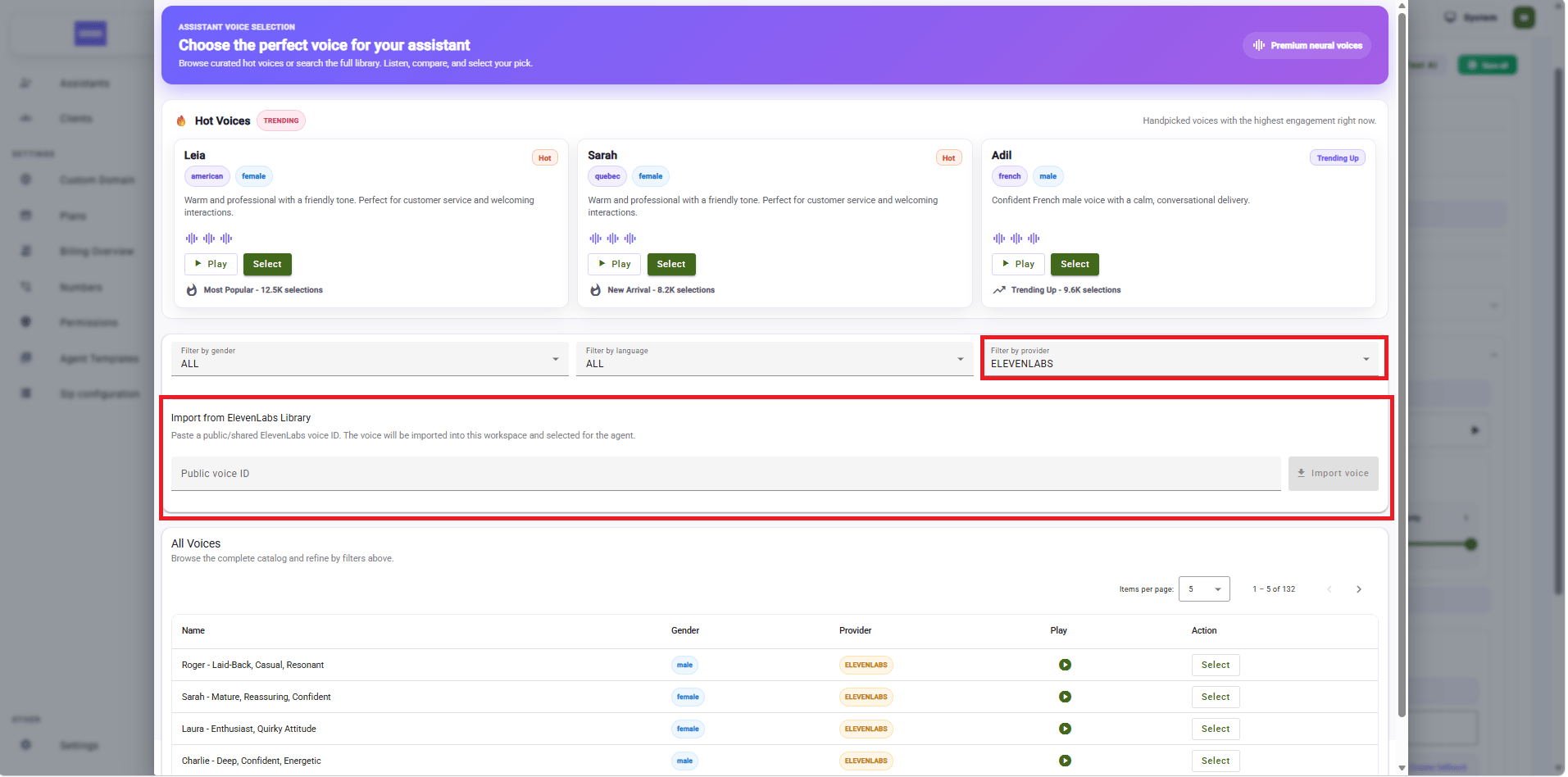
 ### 07 · ElevenLabs voice community import
When browsing voices in the **ElevenLabs** library, you can now import any public/shared ElevenLabs voice directly into your workspace by pasting its **Public Voice ID**. The voice is imported into the workspace and selected for the agent in one click.
### 07 · ElevenLabs voice community import
When browsing voices in the **ElevenLabs** library, you can now import any public/shared ElevenLabs voice directly into your workspace by pasting its **Public Voice ID**. The voice is imported into the workspace and selected for the agent in one click.
 ## Improvements & Fixes
* **Silero VAD — latency improvement.** Replaced the OpenAI-based Voice Activity Detection with Silero VAD. Noticeably lower latency on every call, and no more dependency on an external API for VAD.
* **UI/UX refresh.** Refreshed layouts, tighter spacing, and improved visual consistency across the entire platform. A smoother, more polished experience end-to-end.
* **Transfer announcement.** When an agent triggers a transfer, it now announces to the caller that the transfer is happening while the function call runs in the background — no more 2–3 seconds of awkward silence before the caller gets handed off.
## Documentation
**Official docs launch at [docs.pulsyai.com](https://docs.pulsyai.com).** The PulsyAI documentation is now officially live at **docs.pulsyai.com**. A large portion is complete — including the most important sections — and we'll continue expanding it in the coming weeks with more guides, integration deep-dives, and walkthroughs.
***
Updates will keep landing at a regular cadence. Subscribe via RSS to catch every release.
**Last updated: June 2026** · Recap of the last 3 months of shipping.
**Pricing change — the \$59/month promo is ending soon**
The \$59/month introductory rate is going up for new subscribers in the coming weeks.
✅ If you're already subscribed at \$59, you keep that rate for as long as you stay subscribed.
This offer won't be coming back. If you have prospects on the fence, now's the moment to lock them in.
## Part 1 — Reseller (Admin) features
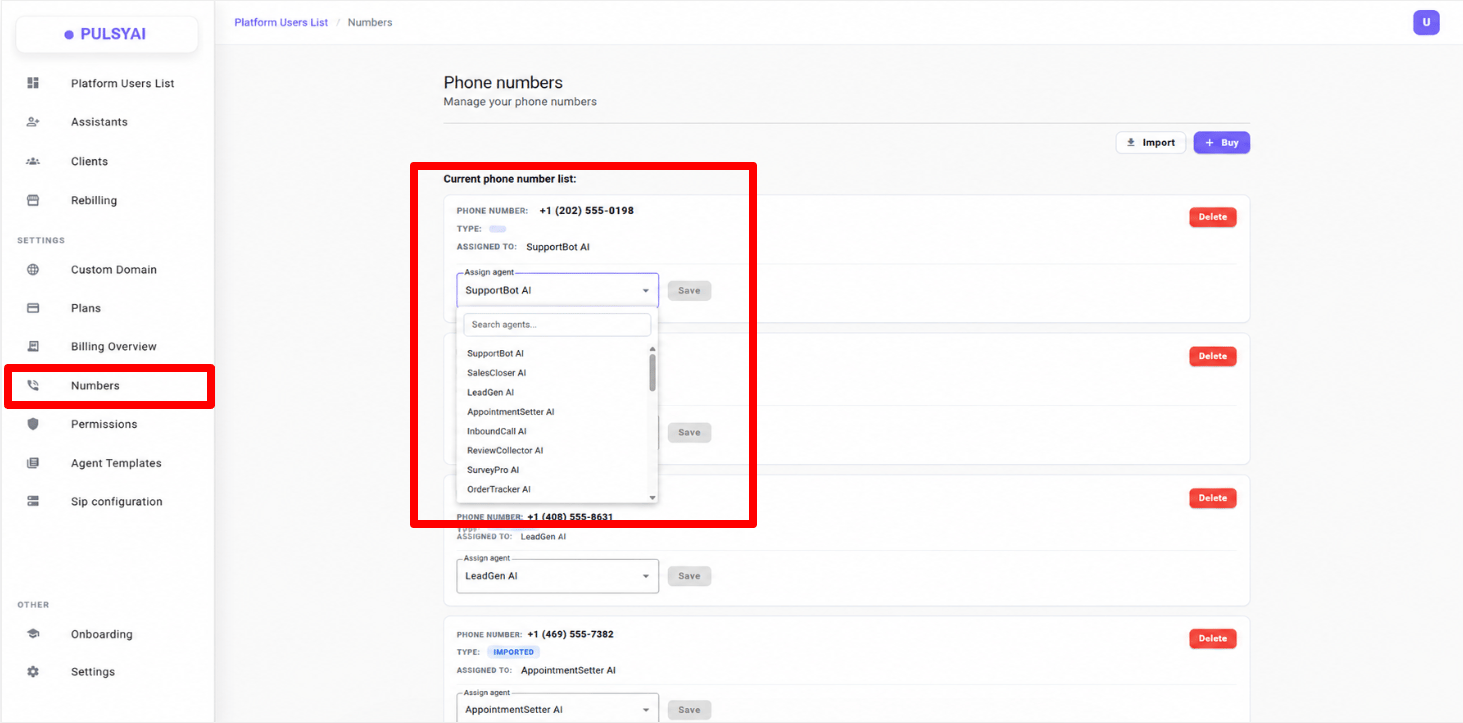
### 01 · Quick phone number reassignment
From the **Numbers** tab, reassign a phone number to another agent using a dropdown. No more removing the number and re-searching for the new agent — pick the agent and hit **Save**.
## Improvements & Fixes
* **Silero VAD — latency improvement.** Replaced the OpenAI-based Voice Activity Detection with Silero VAD. Noticeably lower latency on every call, and no more dependency on an external API for VAD.
* **UI/UX refresh.** Refreshed layouts, tighter spacing, and improved visual consistency across the entire platform. A smoother, more polished experience end-to-end.
* **Transfer announcement.** When an agent triggers a transfer, it now announces to the caller that the transfer is happening while the function call runs in the background — no more 2–3 seconds of awkward silence before the caller gets handed off.
## Documentation
**Official docs launch at [docs.pulsyai.com](https://docs.pulsyai.com).** The PulsyAI documentation is now officially live at **docs.pulsyai.com**. A large portion is complete — including the most important sections — and we'll continue expanding it in the coming weeks with more guides, integration deep-dives, and walkthroughs.
***
Updates will keep landing at a regular cadence. Subscribe via RSS to catch every release.
**Last updated: June 2026** · Recap of the last 3 months of shipping.
**Pricing change — the \$59/month promo is ending soon**
The \$59/month introductory rate is going up for new subscribers in the coming weeks.
✅ If you're already subscribed at \$59, you keep that rate for as long as you stay subscribed.
This offer won't be coming back. If you have prospects on the fence, now's the moment to lock them in.
## Part 1 — Reseller (Admin) features
### 01 · Quick phone number reassignment
From the **Numbers** tab, reassign a phone number to another agent using a dropdown. No more removing the number and re-searching for the new agent — pick the agent and hit **Save**.
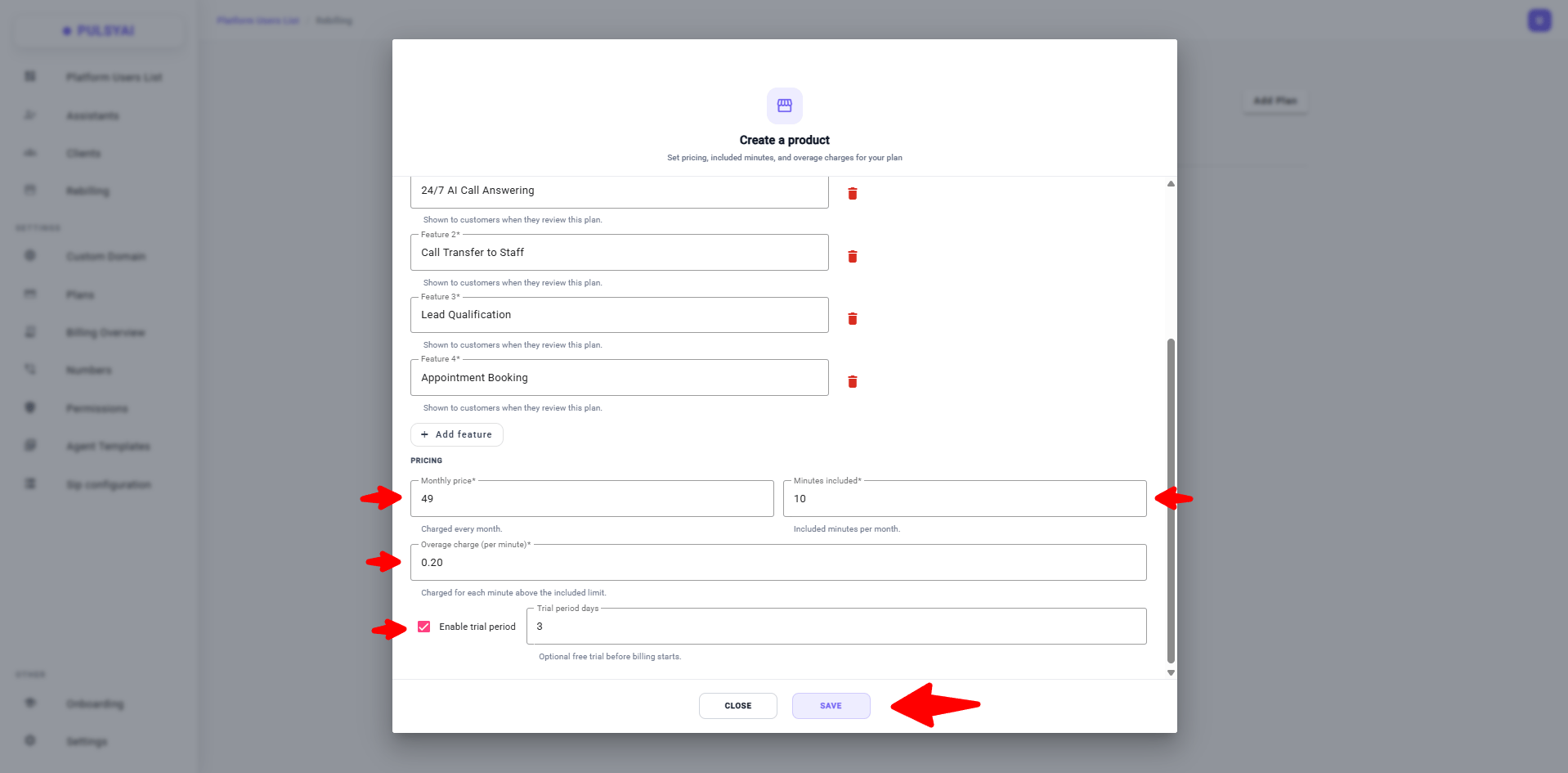
 ### 02 · Flexible plan creation + free trial days
* Add your own custom features to a plan, displayed directly to clients
* Enable a free trial period (trial days) on any plan you create
### 02 · Flexible plan creation + free trial days
* Add your own custom features to a plan, displayed directly to clients
* Enable a free trial period (trial days) on any plan you create
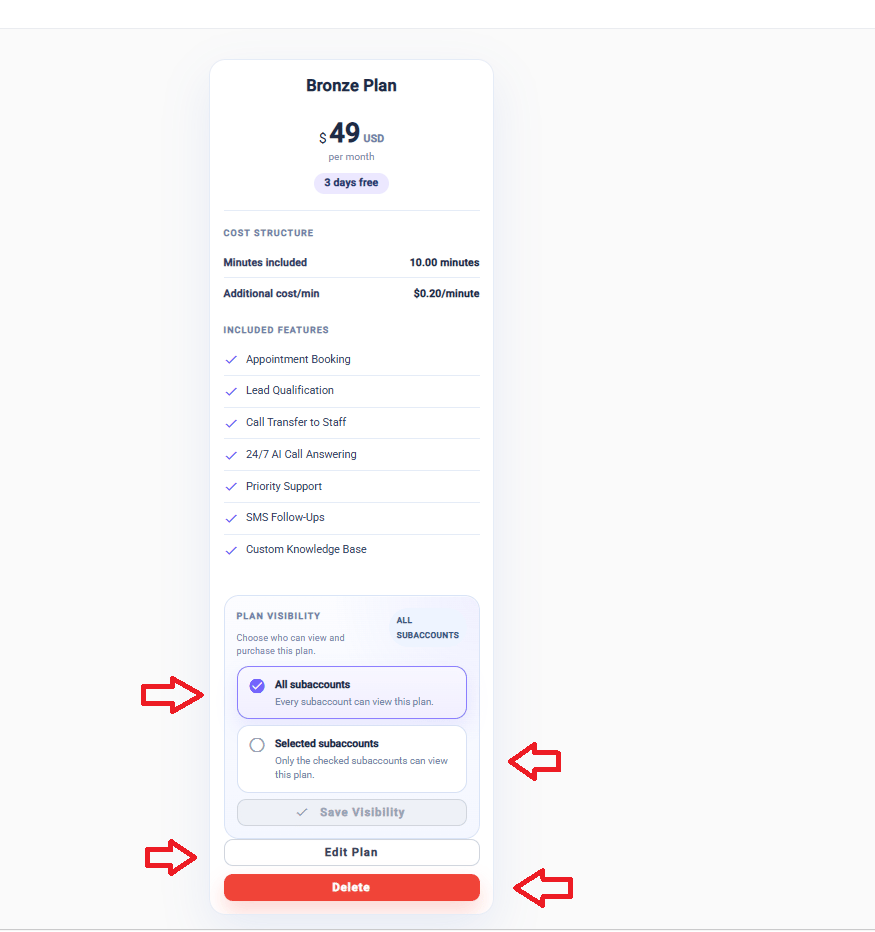
 ### 03 · Plan visibility per client (special offers)
For each plan, choose:
* **All subaccounts** — visible to all clients (default)
* **Selected subaccounts** — visible only to specific clients
Perfect for negotiated deals or custom pricing.
### 03 · Plan visibility per client (special offers)
For each plan, choose:
* **All subaccounts** — visible to all clients (default)
* **Selected subaccounts** — visible only to specific clients
Perfect for negotiated deals or custom pricing.
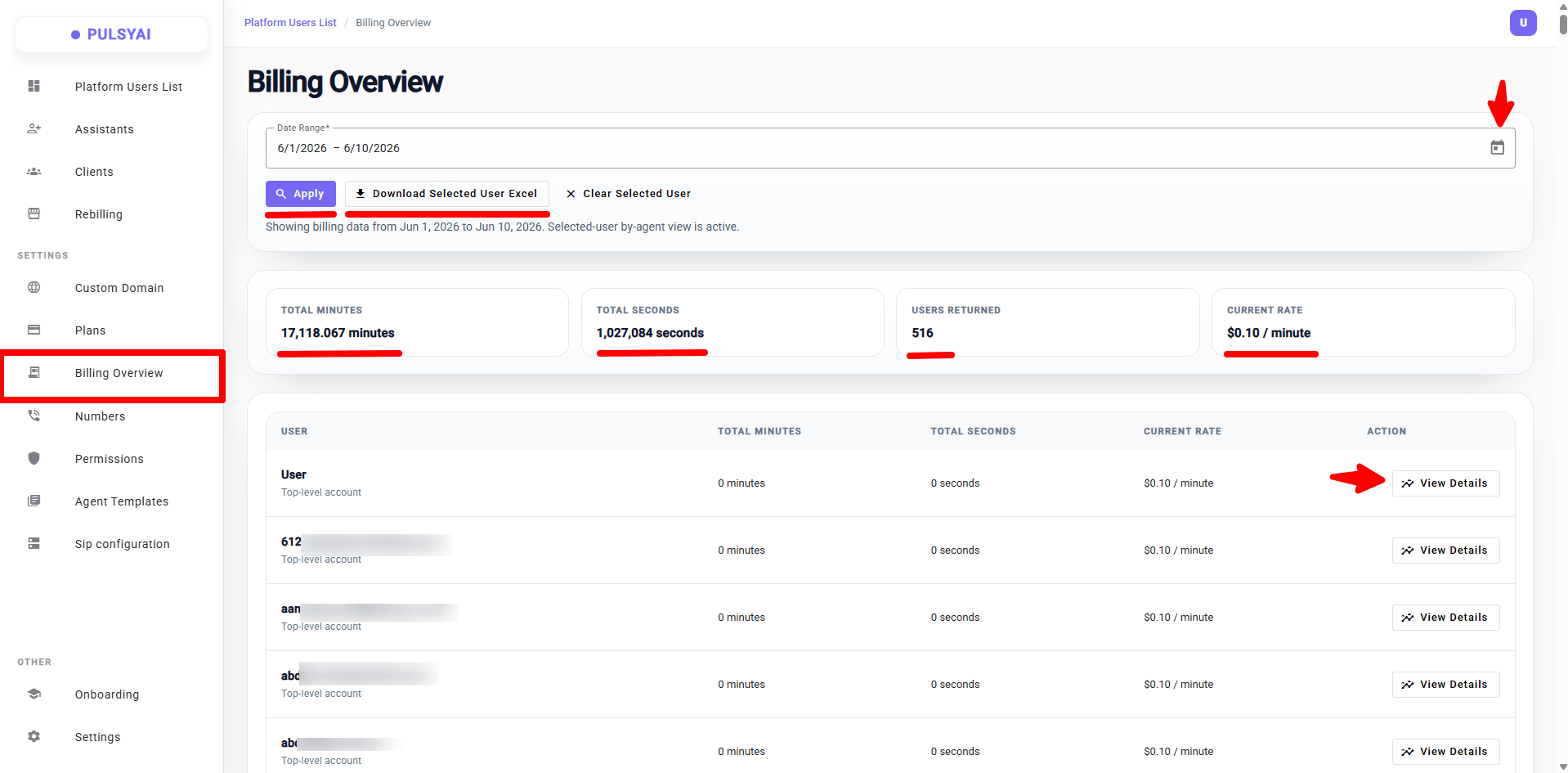
 ### 04 · Billing Overview
A new **Billing Overview** page with real-time visibility:
* Total minutes and seconds consumed
* Total number of users
* Your current rate
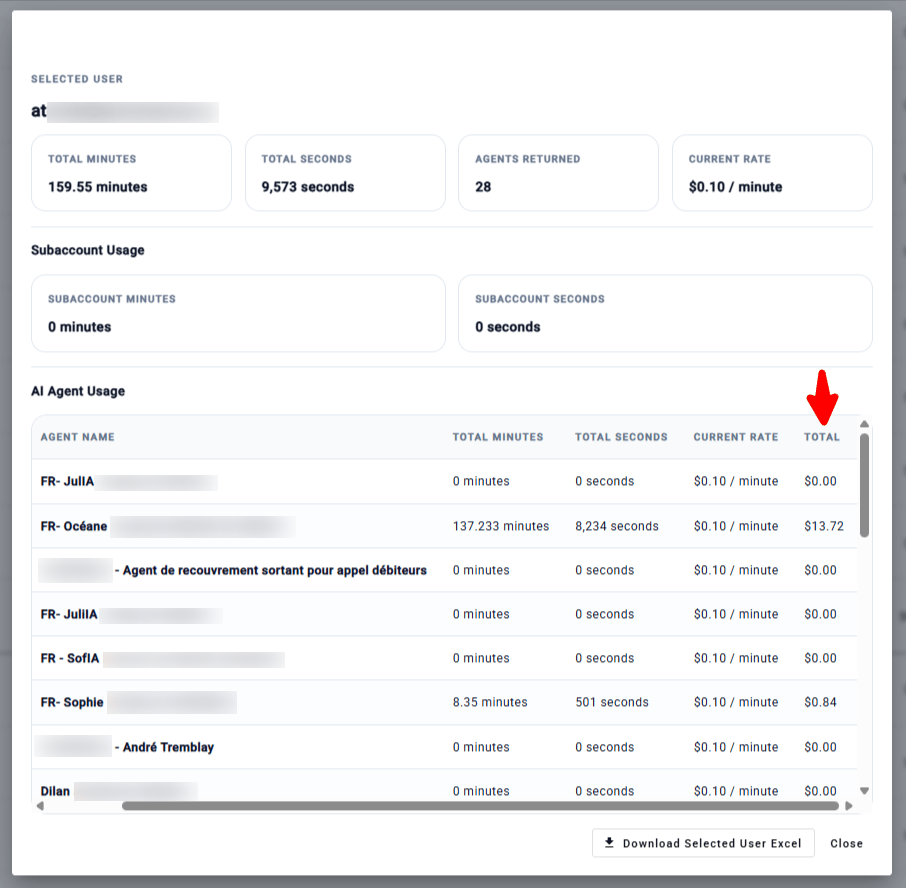
Click into a client to see:
* Minutes/seconds consumed
* All active AI agents (including top consumer)
* Revenue generated per client based on your rate
Everything is exportable to Excel in one click.
### 04 · Billing Overview
A new **Billing Overview** page with real-time visibility:
* Total minutes and seconds consumed
* Total number of users
* Your current rate
Click into a client to see:
* Minutes/seconds consumed
* All active AI agents (including top consumer)
* Revenue generated per client based on your rate
Everything is exportable to Excel in one click.
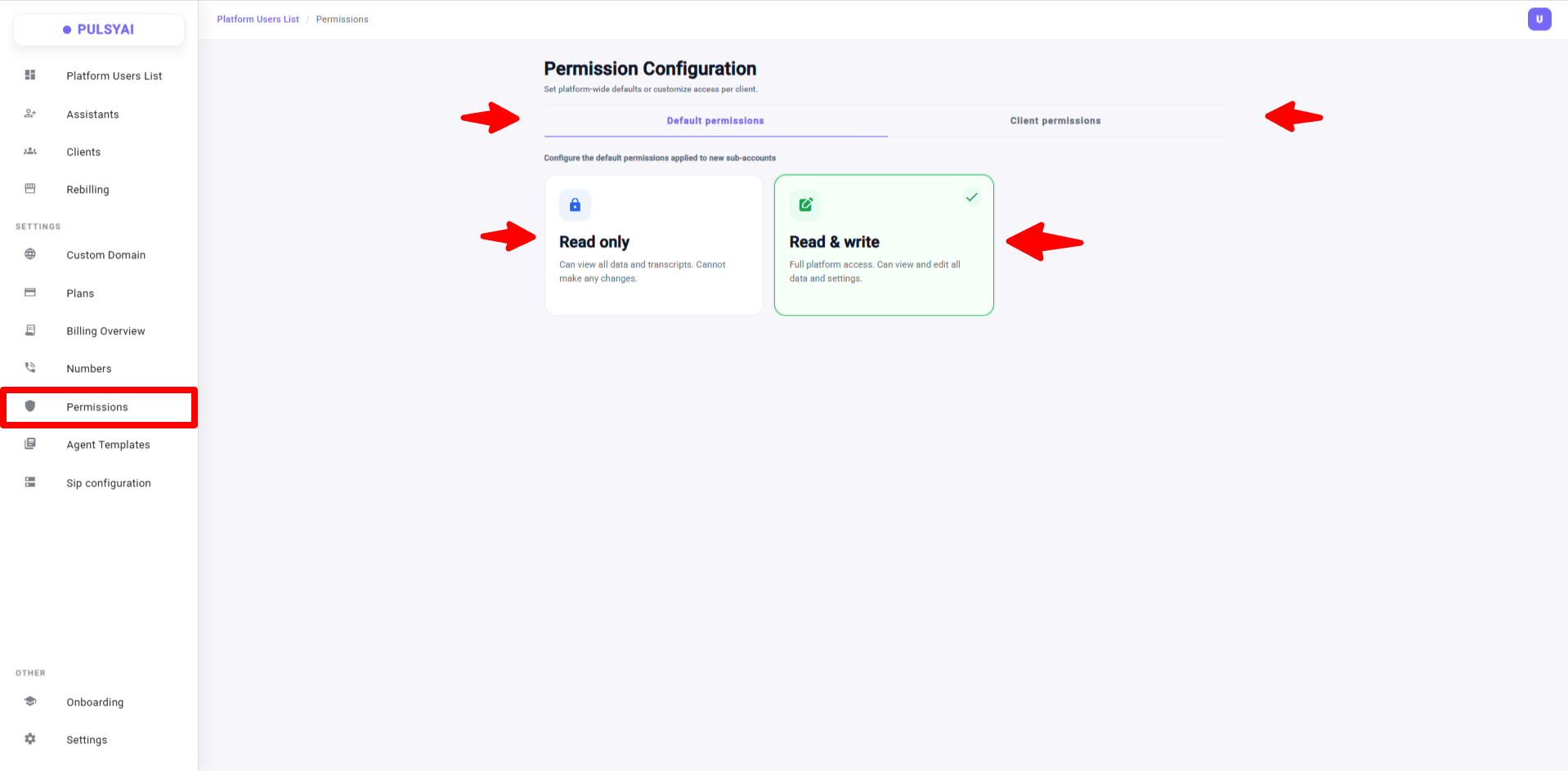
 ### 05 · Per-client permissions — Read only / Read & write
Control exactly what your clients can see and edit. Two access levels:
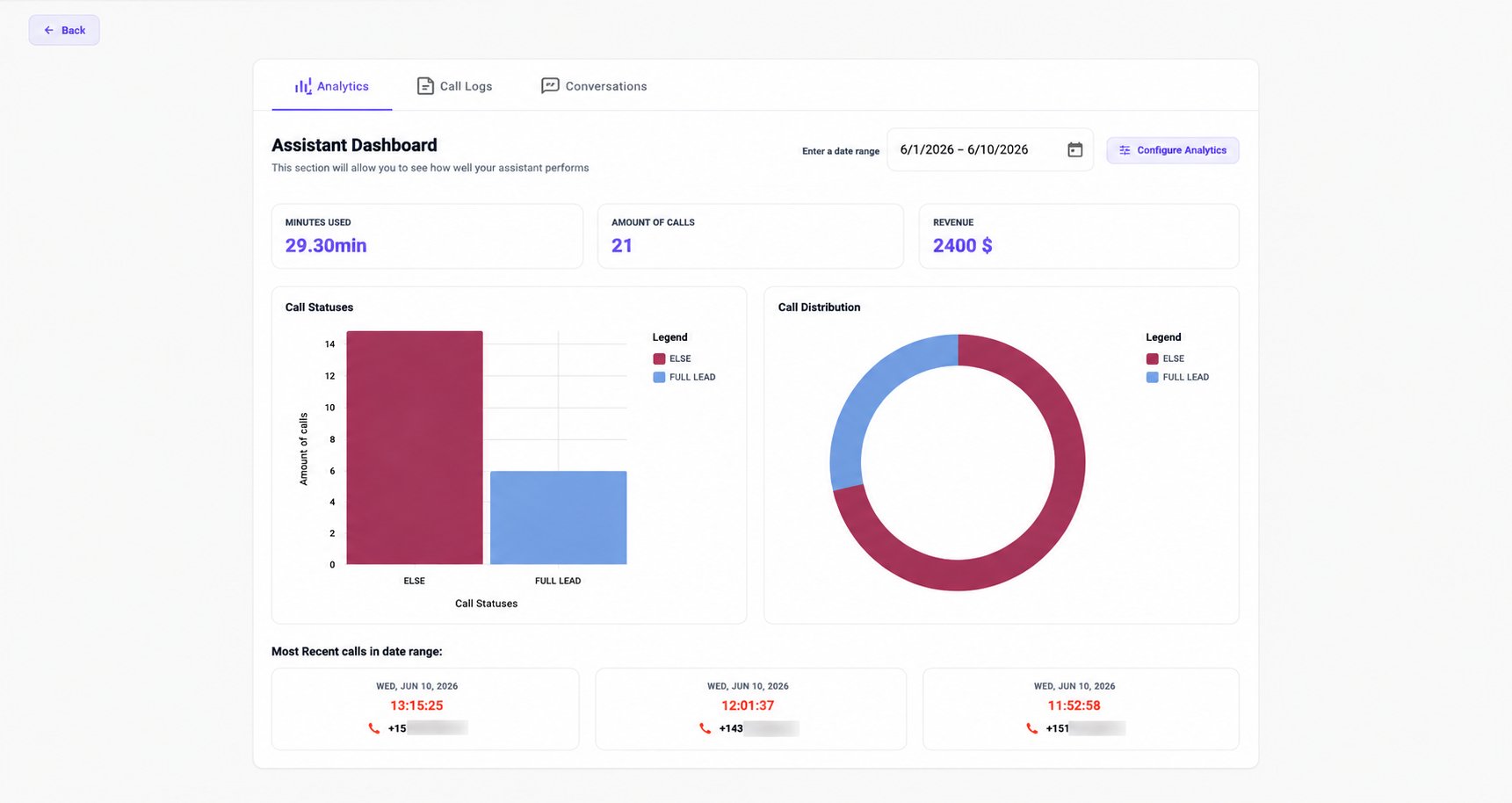
* **Read only** — Client sees only 3 tabs: Analytics, Call Logs, Conversations. They can review stats, listen to call recordings, read SMS conversations — but can't change anything: prompts, call flows, knowledge base, integrations, phone numbers, SMS config — all hidden. API Keys section in Settings is also hidden. Profile and password remain accessible.
* **Read & write** — Full platform access, as before.
**Why this matters:** Many non-technical clients tinker with their prompt and break their agent (hallucinations, bad call routing) — then blame you. With Read only, they keep visibility for ROI validation without being able to touch the configuration.
**How it works:**
* **Default permissions** — access level applied automatically to every new client
* **Client permissions** — override the default for specific clients
Changes are instant, no logout required, and the client isn't notified.
**For testing:** while impersonating, you (admin) always see everything — even on a Read only account. To check what a Read only client actually sees, log in directly with their credentials in an incognito window.
### 05 · Per-client permissions — Read only / Read & write
Control exactly what your clients can see and edit. Two access levels:
* **Read only** — Client sees only 3 tabs: Analytics, Call Logs, Conversations. They can review stats, listen to call recordings, read SMS conversations — but can't change anything: prompts, call flows, knowledge base, integrations, phone numbers, SMS config — all hidden. API Keys section in Settings is also hidden. Profile and password remain accessible.
* **Read & write** — Full platform access, as before.
**Why this matters:** Many non-technical clients tinker with their prompt and break their agent (hallucinations, bad call routing) — then blame you. With Read only, they keep visibility for ROI validation without being able to touch the configuration.
**How it works:**
* **Default permissions** — access level applied automatically to every new client
* **Client permissions** — override the default for specific clients
Changes are instant, no logout required, and the client isn't notified.
**For testing:** while impersonating, you (admin) always see everything — even on a Read only account. To check what a Read only client actually sees, log in directly with their credentials in an incognito window.
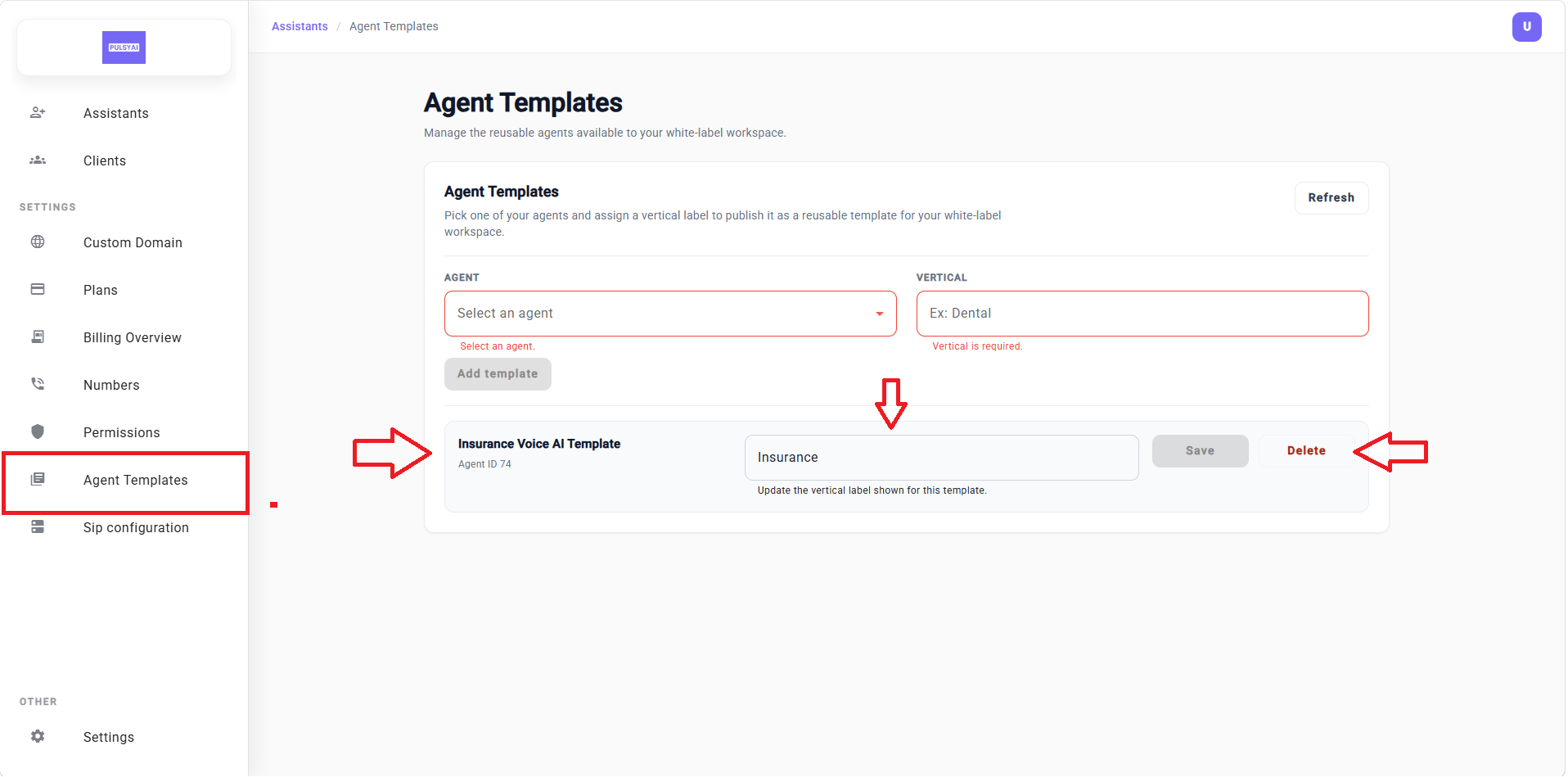
 ### 06 · Agent Templates — deploy agents to all your clients in one click
A major feature for anyone working in a vertical (insurance, dental, real estate, plumbing, restaurants).
**How it works:** Configure an agent perfectly once in your own account — prompt, voice, call flow, integrations — then publish it as a template under a vertical label (e.g., "Dental", "Insurance"). Every client (existing and new) sees this template as a 1-click starting point.
**What gets cloned automatically:** full prompt, voice/provider, call flow logic, general settings.
**What the client adds afterward:** their Knowledge Base, integrations (rewired to the new agent ID), SMS config if applicable.
Editing the source agent does **not** update already-published templates or existing client deployments. To refresh, delete the template and republish — only future deployments will get the new config.
**Result:** onboarding goes from hours of prompt engineering to minutes per client.
### 06 · Agent Templates — deploy agents to all your clients in one click
A major feature for anyone working in a vertical (insurance, dental, real estate, plumbing, restaurants).
**How it works:** Configure an agent perfectly once in your own account — prompt, voice, call flow, integrations — then publish it as a template under a vertical label (e.g., "Dental", "Insurance"). Every client (existing and new) sees this template as a 1-click starting point.
**What gets cloned automatically:** full prompt, voice/provider, call flow logic, general settings.
**What the client adds afterward:** their Knowledge Base, integrations (rewired to the new agent ID), SMS config if applicable.
Editing the source agent does **not** update already-published templates or existing client deployments. To refresh, delete the template and republish — only future deployments will get the new config.
**Result:** onboarding goes from hours of prompt engineering to minutes per client.
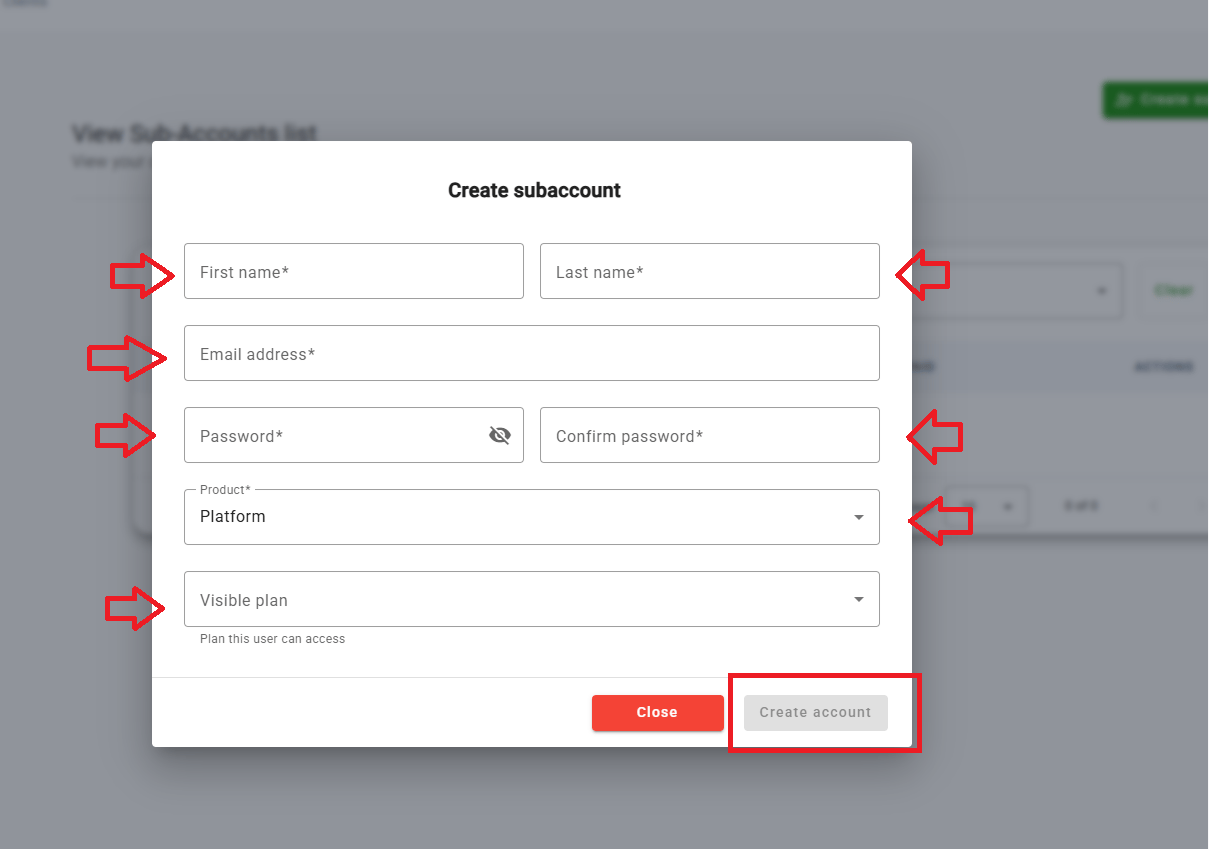
 ### 07 · Manual subaccount creation — no more emails lost in spam
In the **Clients** section, when manually creating a subaccount, you now set the email and password yourself, then share credentials with your client however you prefer (email, SMS, in person). No more relying on an automated email that gets caught in spam.
Self-signup via your own signup page (`yourdomain.com/signup`) still works exactly as before — this only applies to manual account creation.
### 07 · Manual subaccount creation — no more emails lost in spam
In the **Clients** section, when manually creating a subaccount, you now set the email and password yourself, then share credentials with your client however you prefer (email, SMS, in person). No more relying on an automated email that gets caught in spam.
Self-signup via your own signup page (`yourdomain.com/signup`) still works exactly as before — this only applies to manual account creation.
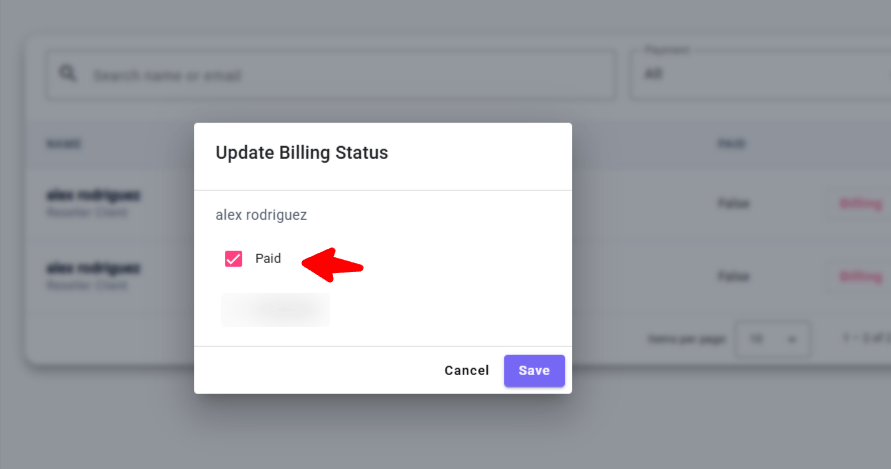
 ### 08 · Manual "Paid" toggle
In the **Clients** tab, the **Billing** button lets you manually mark a subaccount as **Paid** — useful if:
* You handle payment outside the platform (Stripe link, wire transfer, external invoicing)
* You create your own internal subaccounts (testing, demos)
Marking an account as "Paid" without an actual platform payment means you absorb the usage cost — PulsyAI bills based on usage regardless.
### 08 · Manual "Paid" toggle
In the **Clients** tab, the **Billing** button lets you manually mark a subaccount as **Paid** — useful if:
* You handle payment outside the platform (Stripe link, wire transfer, external invoicing)
* You create your own internal subaccounts (testing, demos)
Marking an account as "Paid" without an actual platform payment means you absorb the usage cost — PulsyAI bills based on usage regardless.
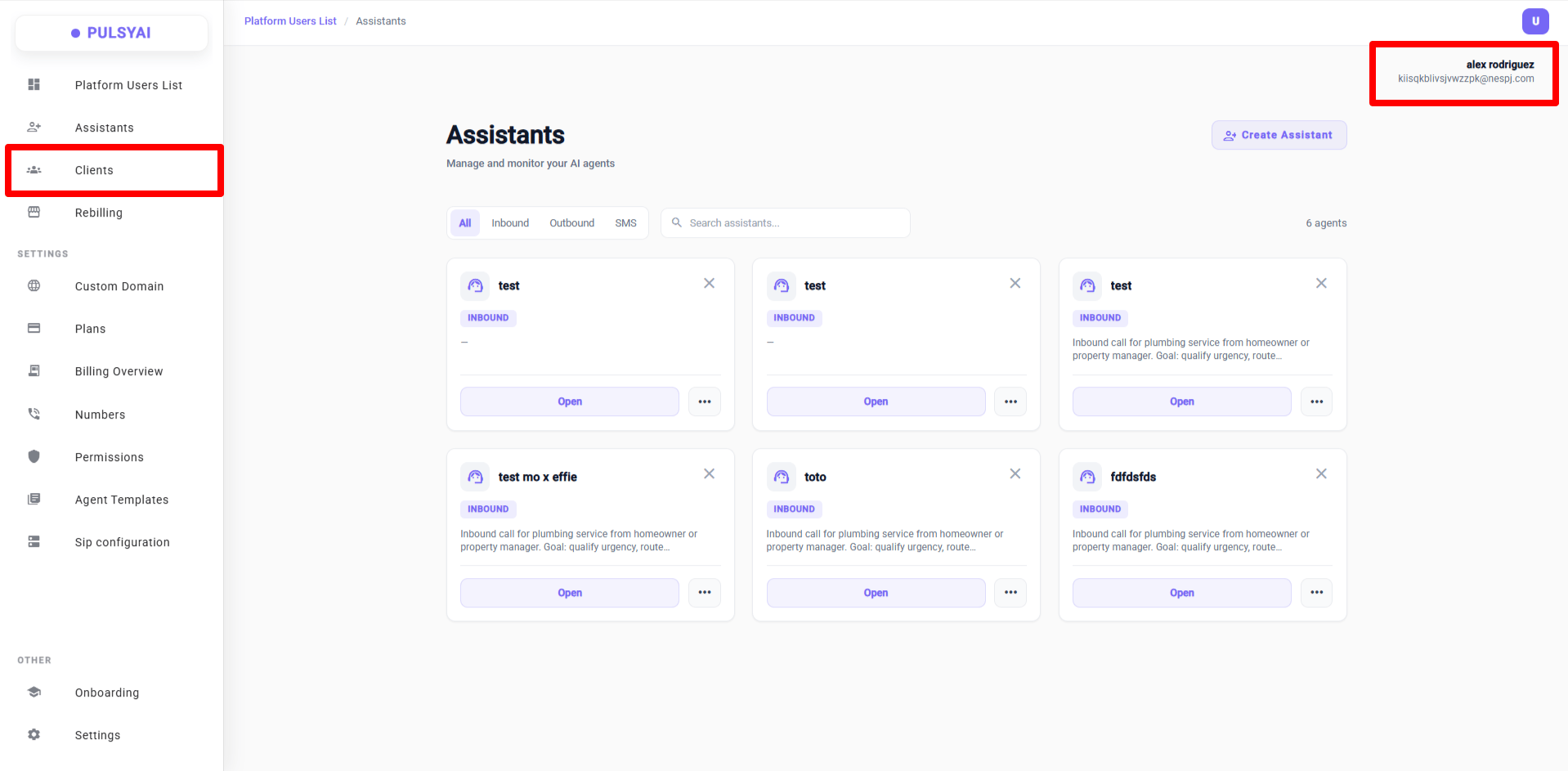
 ### 09 · Impersonation — white-glove support without a client password
Click **Select** on any client to access their account exactly as they see it — without their password. You can edit their agents, call flows, knowledge base, integrations, view their logs, and even access their Settings.
A visual indicator in the top right shows the client's name/email while impersonating. To exit, head back to **Clients** or click any other admin nav item.
### 09 · Impersonation — white-glove support without a client password
Click **Select** on any client to access their account exactly as they see it — without their password. You can edit their agents, call flows, knowledge base, integrations, view their logs, and even access their Settings.
A visual indicator in the top right shows the client's name/email while impersonating. To exit, head back to **Clients** or click any other admin nav item.
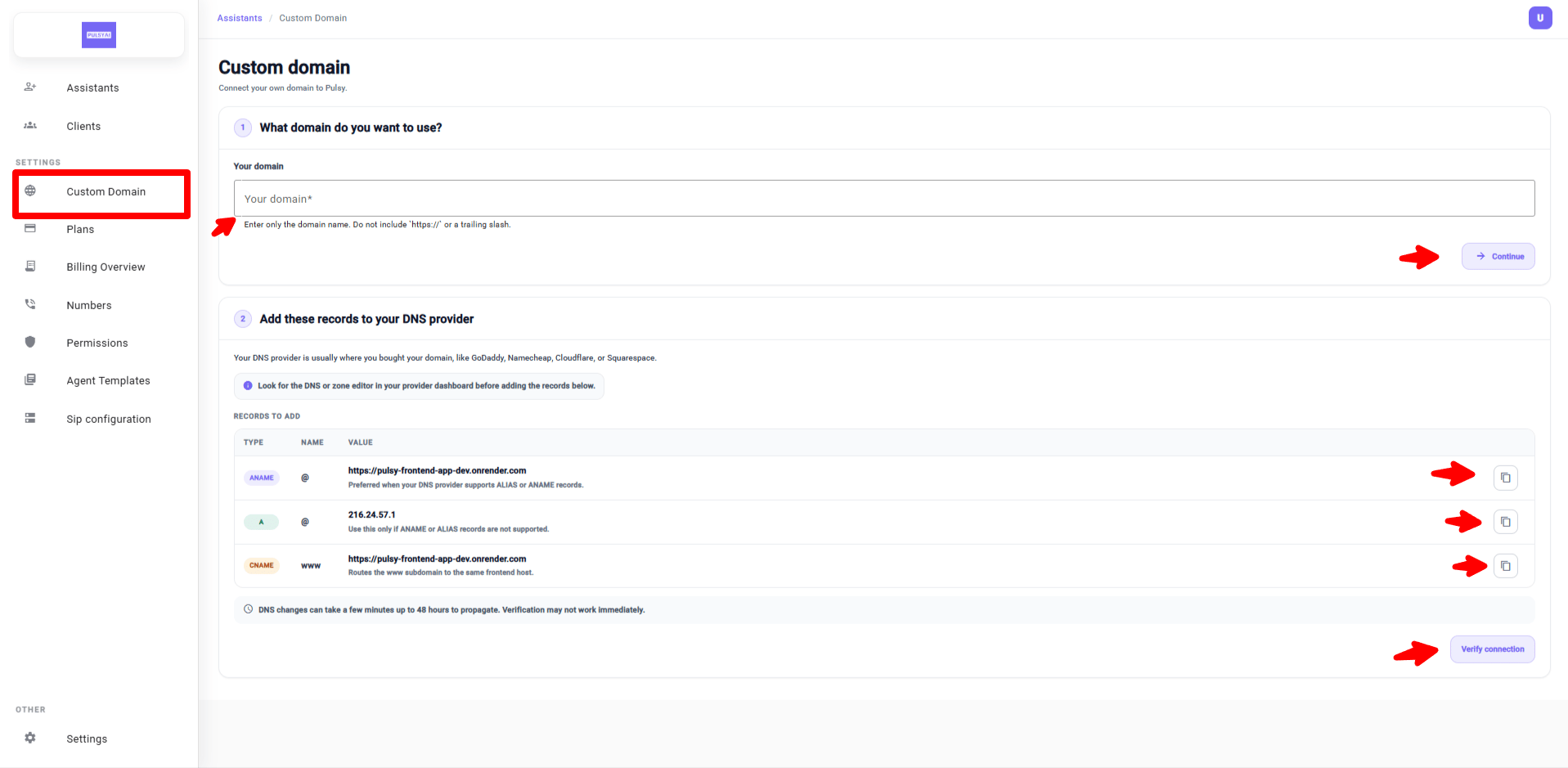
 ### 10 · Redesigned Custom Domain page
Completely redesigned: numbered steps, well-organized DNS records table, quick-copy buttons, and helpful tips (where to find DNS settings, propagation time up to 48h).
### 10 · Redesigned Custom Domain page
Completely redesigned: numbered steps, well-organized DNS records table, quick-copy buttons, and helpful tips (where to find DNS settings, propagation time up to 48h).
 ## Part 2 — Platform features (Call Flows & Agents)
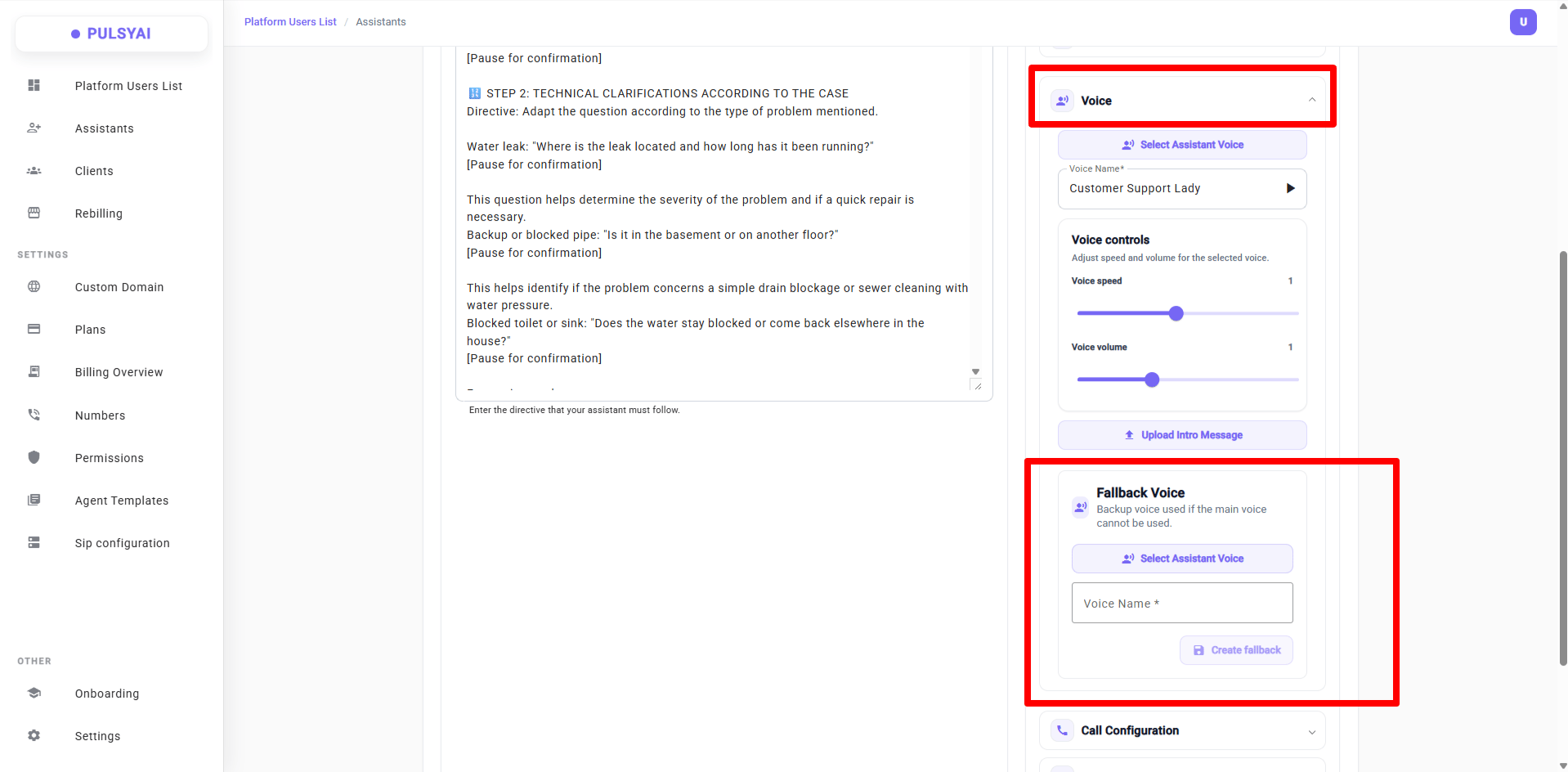
### 11 · Fallback Voice
Configure a backup voice for your agents. If the primary voice becomes unavailable in real time (provider outage, latency), the agent automatically and seamlessly switches to the fallback voice — no dropped calls, no awkward silence.
## Part 2 — Platform features (Call Flows & Agents)
### 11 · Fallback Voice
Configure a backup voice for your agents. If the primary voice becomes unavailable in real time (provider outage, latency), the agent automatically and seamlessly switches to the fallback voice — no dropped calls, no awkward silence.
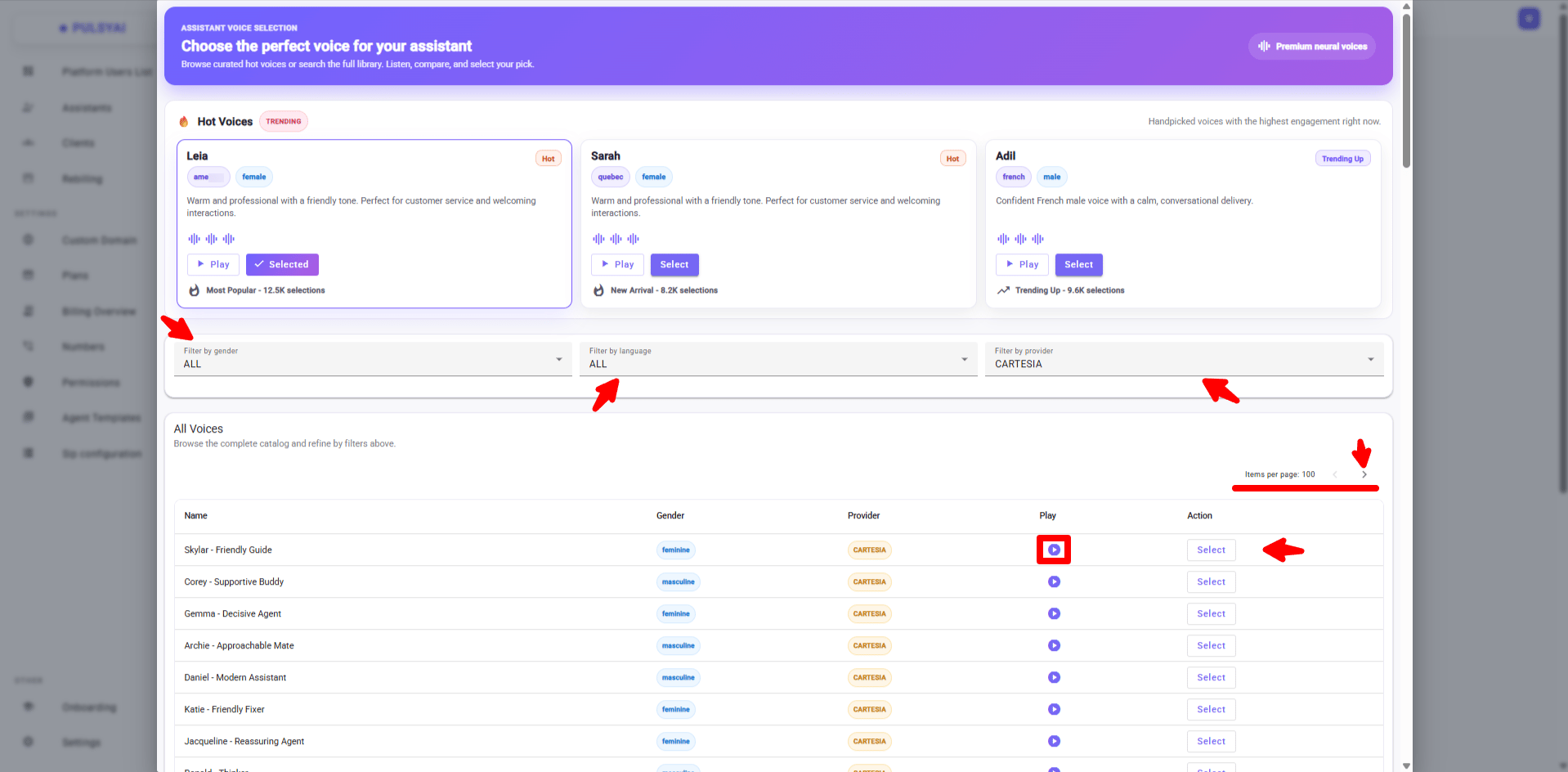
 ### 12 · Improved voice selection + new providers
* Filter by **gender**, **language**, and **provider**
* New provider added: **ElevenLabs**
* Coming soon: **Hume AI**
* In the works: filter by **accent**
### 12 · Improved voice selection + new providers
* Filter by **gender**, **language**, and **provider**
* New provider added: **ElevenLabs**
* Coming soon: **Hume AI**
* In the works: filter by **accent**
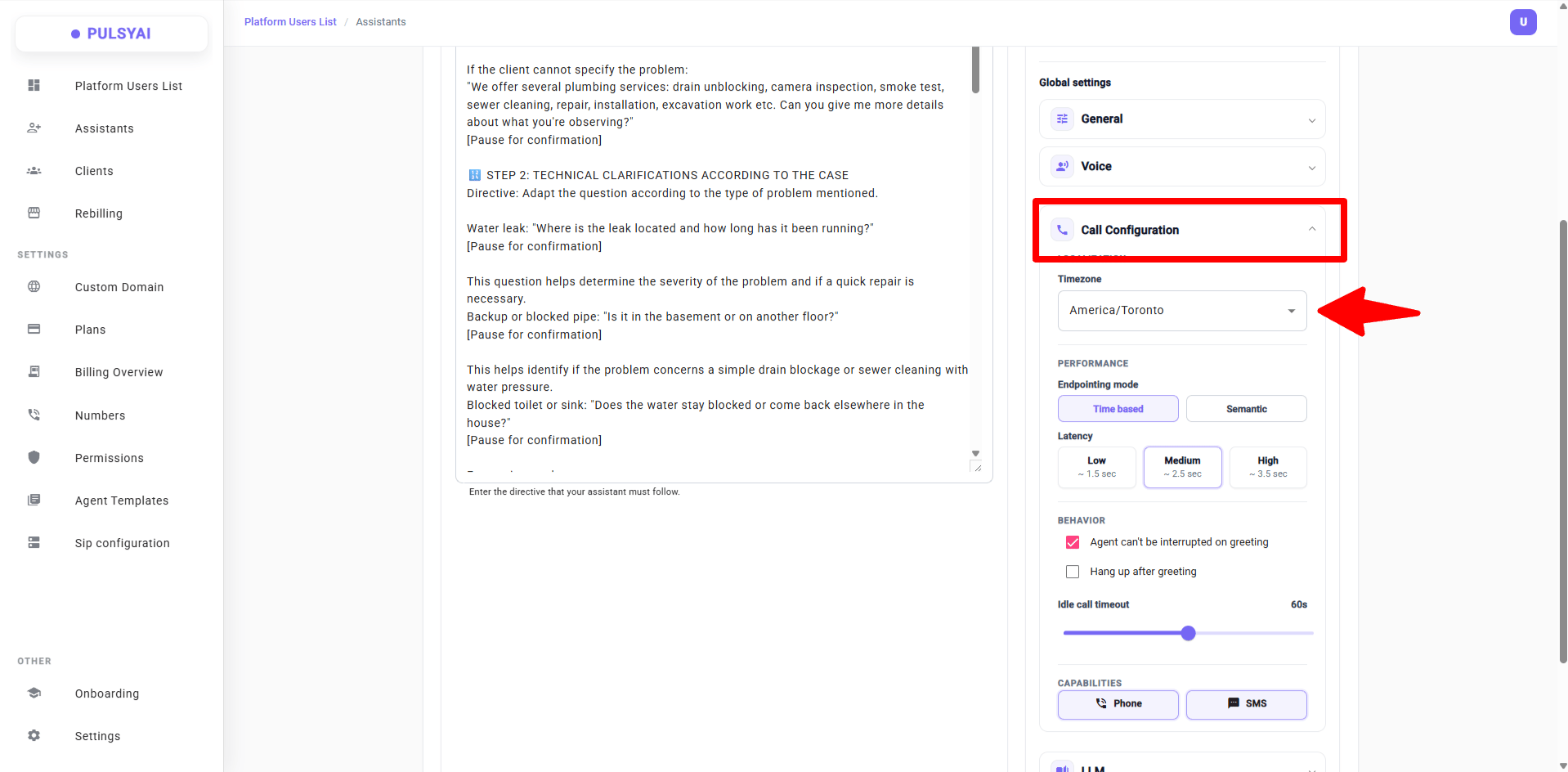
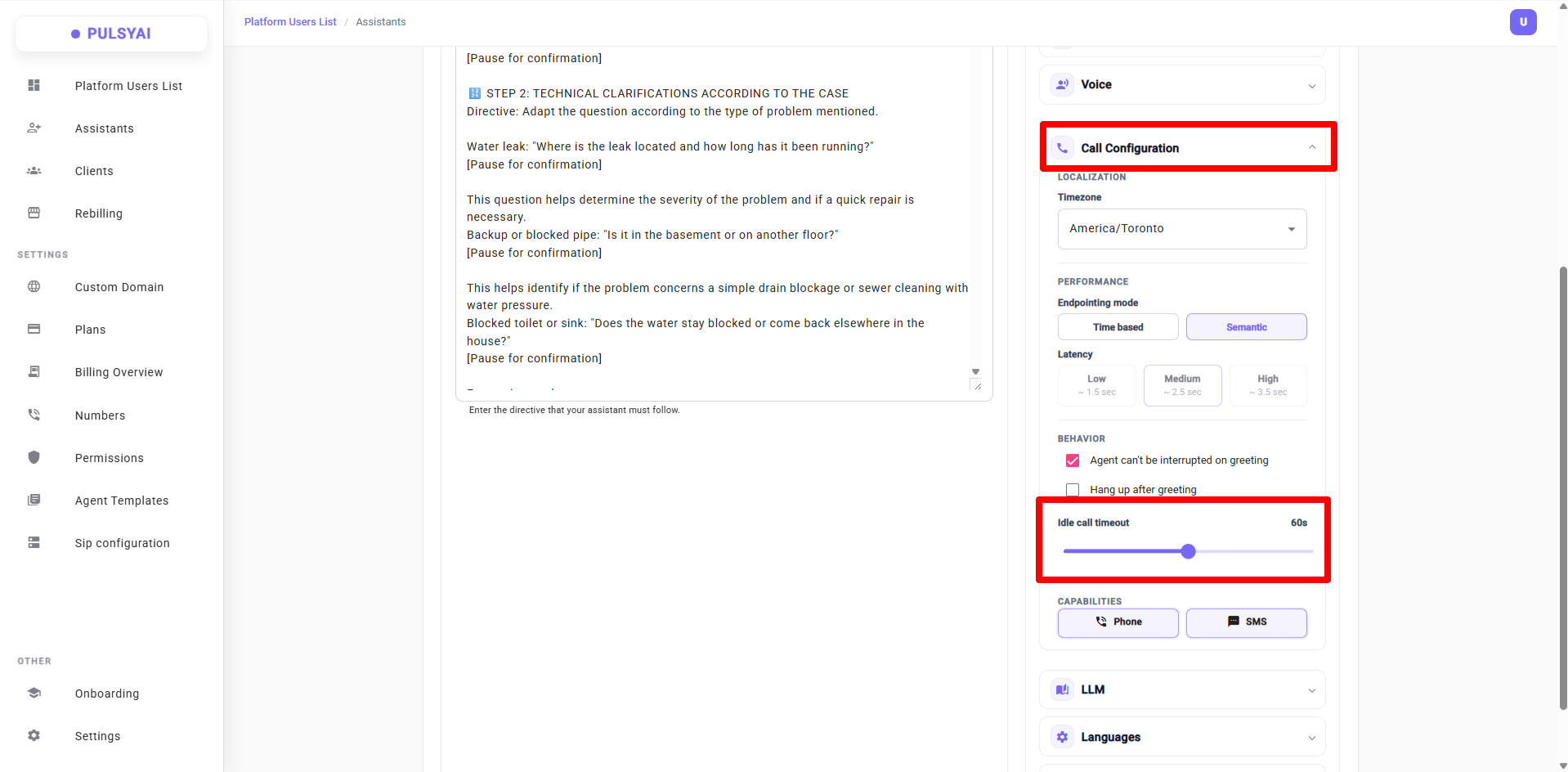
 ### 13 · Timezone in Call Configuration
Agents can now be connected to your chosen timezone:
* If a caller asks for the time, the agent responds with the exact time in the configured timezone
* Enables time-based workflows (e.g., a pizzeria with a different daily special using the `{now}` variable)
* Crucial for calendar booking — match the configured timezone with your calendar's timezone and pass `{now}` in your prompt
### 13 · Timezone in Call Configuration
Agents can now be connected to your chosen timezone:
* If a caller asks for the time, the agent responds with the exact time in the configured timezone
* Enables time-based workflows (e.g., a pizzeria with a different daily special using the `{now}` variable)
* Crucial for calendar booking — match the configured timezone with your calendar's timezone and pass `{now}` in your prompt
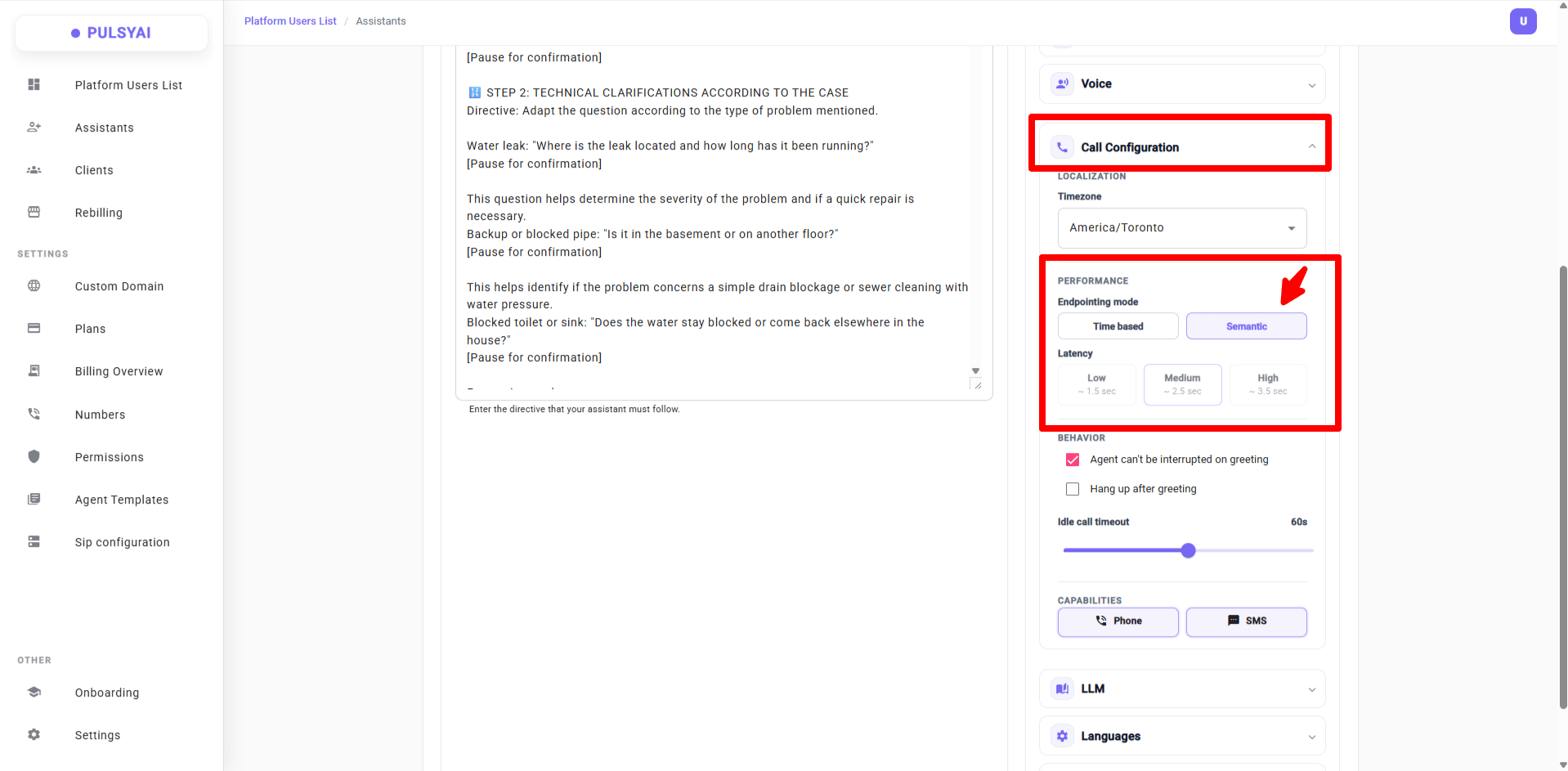
 ### 14 · New latency mode: Semantic Endpointing
Two modes to decide when the agent responds after the caller finishes speaking:
**Time Based** — fixed delay after silence:
* **Low (1.5s)** — best for outbound cold calling
* **Medium (2.5s)** — best for inbound customer service
* **High (3.5s)** — best for technical or legal calls
**Semantic** — the agent detects when the caller has finished their thought based on meaning. More natural, fluid conversations.
### 14 · New latency mode: Semantic Endpointing
Two modes to decide when the agent responds after the caller finishes speaking:
**Time Based** — fixed delay after silence:
* **Low (1.5s)** — best for outbound cold calling
* **Medium (2.5s)** — best for inbound customer service
* **High (3.5s)** — best for technical or legal calls
**Semantic** — the agent detects when the caller has finished their thought based on meaning. More natural, fluid conversations.
 ### 15 · Idle Call Timeout
Configure the maximum time (in seconds) the agent waits during silence before ending the call. Default: **60 seconds** on every new agent.
Never set this to **0** — the agent would hang up instantly. Recommendation: \~15s for outbound, \~60s for inbound.
### 15 · Idle Call Timeout
Configure the maximum time (in seconds) the agent waits during silence before ending the call. Default: **60 seconds** on every new agent.
Never set this to **0** — the agent would hang up instantly. Recommendation: \~15s for outbound, \~60s for inbound.
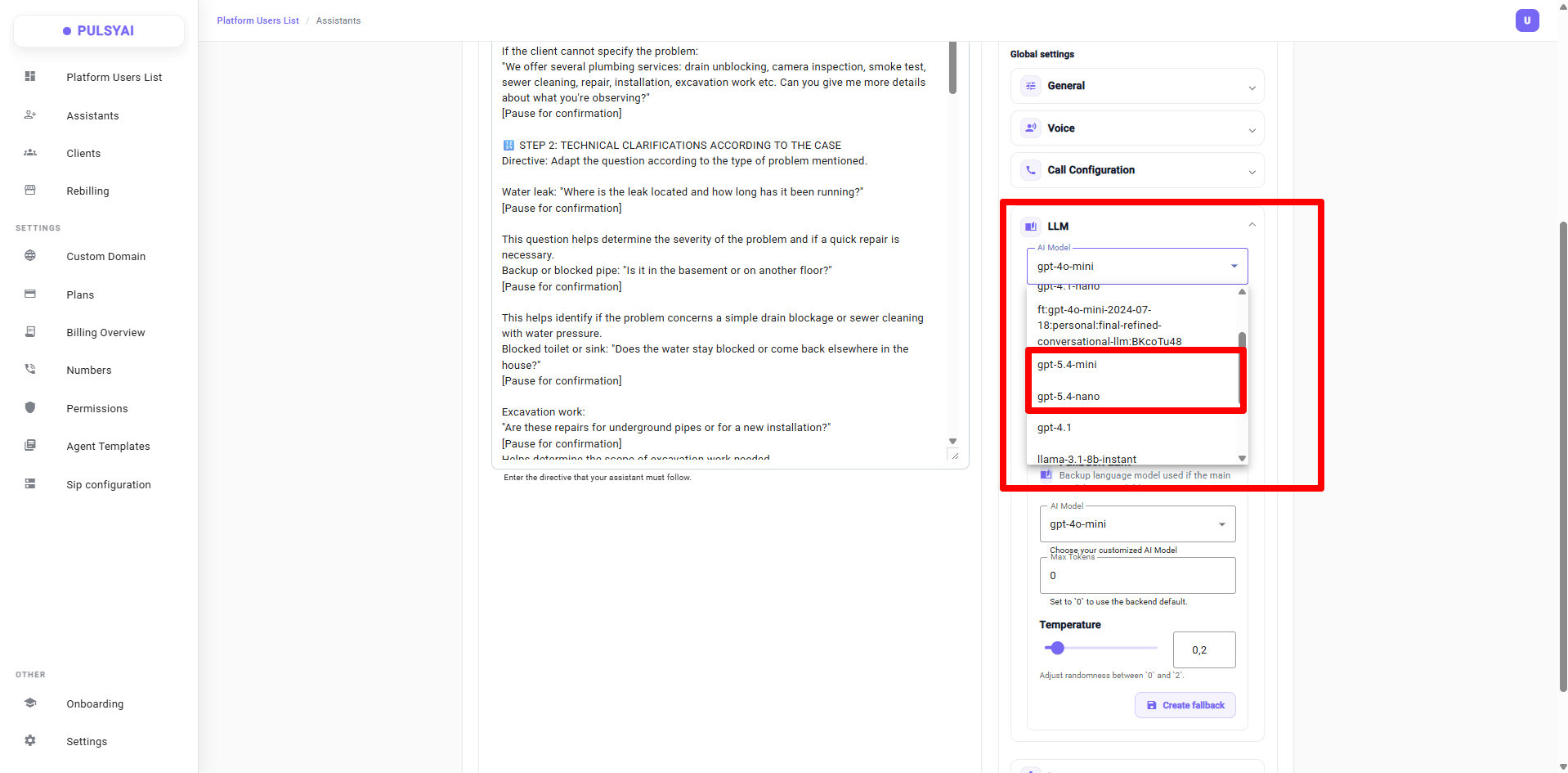
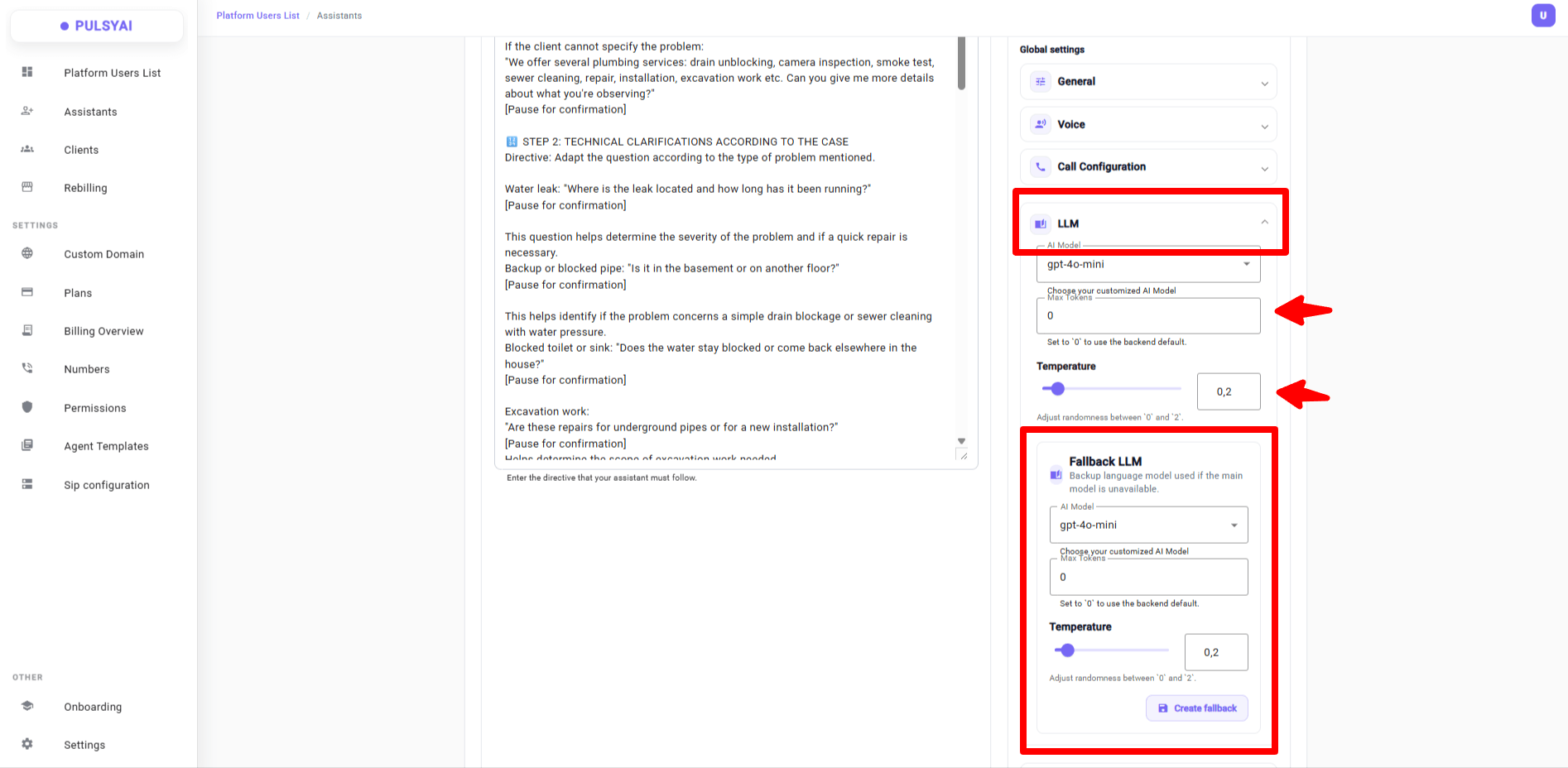
 ### 16 · Fallback LLM + new 5.4 mini / 5.4 nano models
Configure a backup LLM — automatic switch if the primary fails.
* Two new models available: **5.4 mini** and **5.4 nano**
* Configure **Max Tokens** and **Temperature** independently for the primary and fallback LLM — fine-tune response length and randomness per model
### 16 · Fallback LLM + new 5.4 mini / 5.4 nano models
Configure a backup LLM — automatic switch if the primary fails.
* Two new models available: **5.4 mini** and **5.4 nano**
* Configure **Max Tokens** and **Temperature** independently for the primary and fallback LLM — fine-tune response length and randomness per model
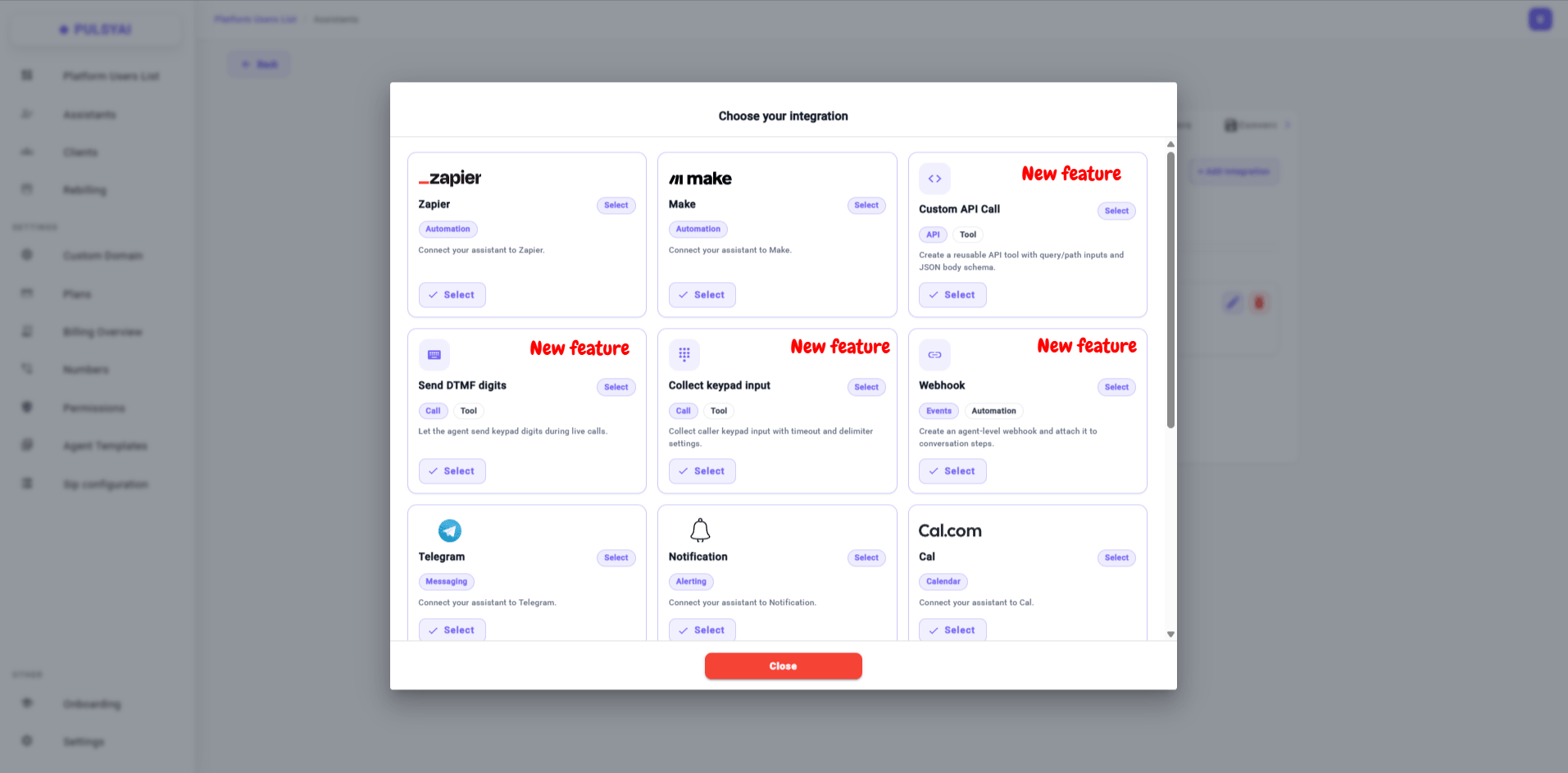
 ### 17 · New tools in the Integrations tab
* **Webhook** — sends call lifecycle events (`call_start`, `call_end`) to your HTTPS endpoint
* **Custom API Call** — reusable tool the agent can invoke mid-call to send/fetch data from any HTTP endpoint
* **Send DTMF digits** — the agent sends keypad tones mid-call (IVR, extensions, codes)
* **Collect keypad input** — captures digits pressed by the caller (10s default timeout, `#`, `*` default delimiters)
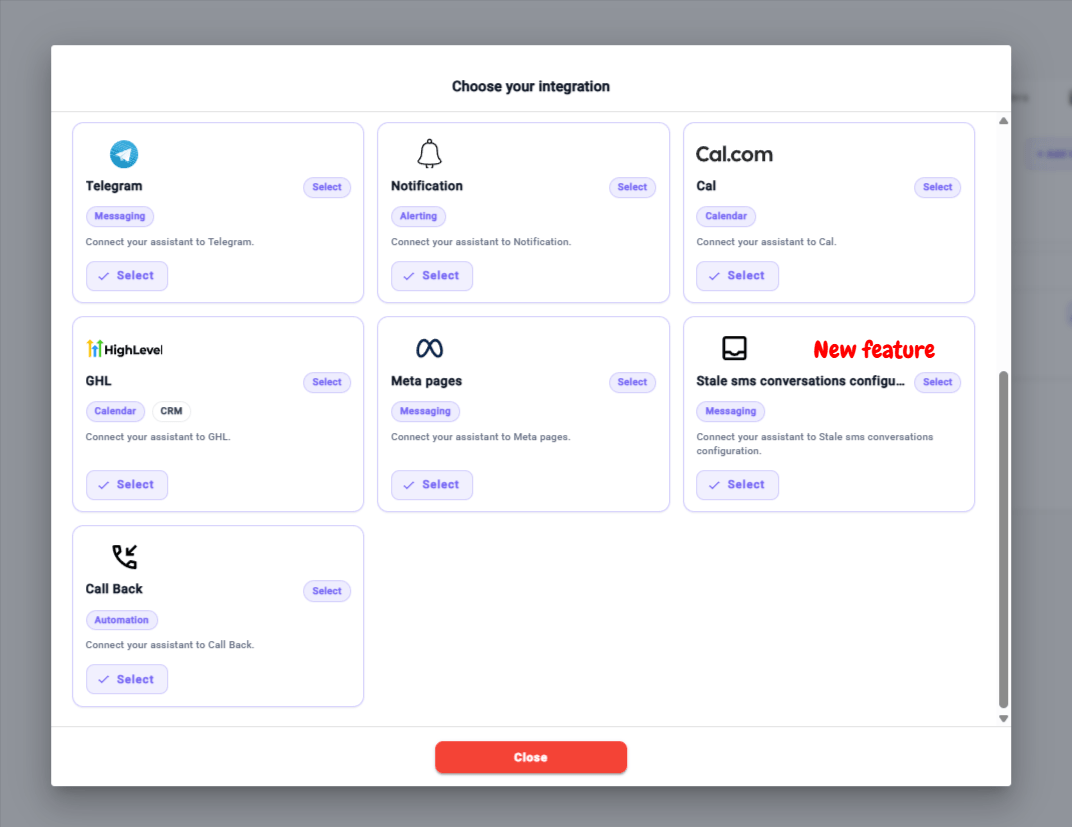
* **Stale Conversations** — handles silent conversations with two timers: one pushes lead data to your integrations, another triggers automatic SMS re-engagement
### 17 · New tools in the Integrations tab
* **Webhook** — sends call lifecycle events (`call_start`, `call_end`) to your HTTPS endpoint
* **Custom API Call** — reusable tool the agent can invoke mid-call to send/fetch data from any HTTP endpoint
* **Send DTMF digits** — the agent sends keypad tones mid-call (IVR, extensions, codes)
* **Collect keypad input** — captures digits pressed by the caller (10s default timeout, `#`, `*` default delimiters)
* **Stale Conversations** — handles silent conversations with two timers: one pushes lead data to your integrations, another triggers automatic SMS re-engagement
 ## Part 3 — Bug fixes
Eight fixes shipped this quarter, focused on call reliability and platform polish.
Backend and pipeline improvements reduce end-to-end latency across every call.
Agent no longer hangs up randomly mid-call. Accuracy is now at **97%**.
A sensible default Fallback LLM and Fallback Voice are now applied automatically on the backend for every new agent.
Client invitation emails now deliver reliably.
Website scraping now captures all content on the page, not just the top section.
It's now much easier and more natural to interrupt the AI mid-response.
Fixed the auto `+1` prefix that blocked international transfers.
Max attempts is now correctly respected on every Auto Call Back configuration.
## Coming up
Step-by-step guides, marketing tips, 4 years of lessons learned. Almost done.
A real space for resellers to support and share with each other.
To support the community even further.
Including Copilot, one of the most-requested features.
## Frequently asked questions
PulsyAI is a white-label AI voice agent platform designed for resellers and agencies. It lets you create, deploy, and manage AI-powered voice agents (inbound and outbound) for your clients across multiple verticals such as dental, insurance, real estate, restaurants, hair salons, and legal services.
PulsyAI is built specifically for the reseller business model. Where developer-first platforms focus on APIs, PulsyAI provides reseller-focused features: agent templates that deploy to all clients in one click, per-client permissions (Read only / Read & write), a billing overview with revenue tracking per client, white-label custom domains, and client impersonation for support.
PulsyAI supports multiple voice providers including ElevenLabs (newly added), with Hume AI coming soon. Voices can be filtered by gender, language, and provider. An accent filter is also in development.
PulsyAI supports multiple LLMs, including the newly added **5.4 mini** and **5.4 nano** models. Each agent can be configured with both a primary LLM and a fallback LLM that takes over automatically if the primary becomes unavailable.
Yes. PulsyAI supports custom domains with a guided DNS setup (the page was completely redesigned with numbered steps, a DNS records table, quick-copy buttons, and propagation tips).
Resellers set their own rate per client. The **Billing Overview** page shows minutes consumed, top-consuming agents, and revenue generated per client in real time, with one-click Excel export. The current \$59/month promo for new subscribers is ending soon — existing subscribers at that rate are grandfathered in.
Not if you set them to **Read only** mode. With per-client permissions, you can restrict clients to viewing only Analytics, Call Logs, and Conversations — preventing them from modifying prompts, call flows, knowledge base, integrations, or any other critical configuration.
## Thank you
Thanks for trusting us and betting on us. We're pushing harder every day to make your lives easier.
These updates are going weekly from now on.
— The PulsyAI Team
## In progress
* Expanded integration deep-dives (Cal.com, GoHighLevel, Zapier, Make, Custom API Call)
* Build a Script with Claude walkthrough — the AI-assisted script drafting workflow
* Working with End-Clients reseller playbook expansion
* Transfers configuration deep-dive
* Troubleshooting section rewrite
## On the roadmap
* **PulsyAI Copilot** — in-platform script generation assistant trained on the PulsyAI methodology
* Additional integration guides based on reseller demand
* Video walkthroughs for the most requested features
* Public roadmap with community voting
Subscribe to the PulsyAI newsletter (and the RSS feed above) to be notified when new features and documentation land.
## Part 3 — Bug fixes
Eight fixes shipped this quarter, focused on call reliability and platform polish.
Backend and pipeline improvements reduce end-to-end latency across every call.
Agent no longer hangs up randomly mid-call. Accuracy is now at **97%**.
A sensible default Fallback LLM and Fallback Voice are now applied automatically on the backend for every new agent.
Client invitation emails now deliver reliably.
Website scraping now captures all content on the page, not just the top section.
It's now much easier and more natural to interrupt the AI mid-response.
Fixed the auto `+1` prefix that blocked international transfers.
Max attempts is now correctly respected on every Auto Call Back configuration.
## Coming up
Step-by-step guides, marketing tips, 4 years of lessons learned. Almost done.
A real space for resellers to support and share with each other.
To support the community even further.
Including Copilot, one of the most-requested features.
## Frequently asked questions
PulsyAI is a white-label AI voice agent platform designed for resellers and agencies. It lets you create, deploy, and manage AI-powered voice agents (inbound and outbound) for your clients across multiple verticals such as dental, insurance, real estate, restaurants, hair salons, and legal services.
PulsyAI is built specifically for the reseller business model. Where developer-first platforms focus on APIs, PulsyAI provides reseller-focused features: agent templates that deploy to all clients in one click, per-client permissions (Read only / Read & write), a billing overview with revenue tracking per client, white-label custom domains, and client impersonation for support.
PulsyAI supports multiple voice providers including ElevenLabs (newly added), with Hume AI coming soon. Voices can be filtered by gender, language, and provider. An accent filter is also in development.
PulsyAI supports multiple LLMs, including the newly added **5.4 mini** and **5.4 nano** models. Each agent can be configured with both a primary LLM and a fallback LLM that takes over automatically if the primary becomes unavailable.
Yes. PulsyAI supports custom domains with a guided DNS setup (the page was completely redesigned with numbered steps, a DNS records table, quick-copy buttons, and propagation tips).
Resellers set their own rate per client. The **Billing Overview** page shows minutes consumed, top-consuming agents, and revenue generated per client in real time, with one-click Excel export. The current \$59/month promo for new subscribers is ending soon — existing subscribers at that rate are grandfathered in.
Not if you set them to **Read only** mode. With per-client permissions, you can restrict clients to viewing only Analytics, Call Logs, and Conversations — preventing them from modifying prompts, call flows, knowledge base, integrations, or any other critical configuration.
## Thank you
Thanks for trusting us and betting on us. We're pushing harder every day to make your lives easier.
These updates are going weekly from now on.
— The PulsyAI Team
## In progress
* Expanded integration deep-dives (Cal.com, GoHighLevel, Zapier, Make, Custom API Call)
* Build a Script with Claude walkthrough — the AI-assisted script drafting workflow
* Working with End-Clients reseller playbook expansion
* Transfers configuration deep-dive
* Troubleshooting section rewrite
## On the roadmap
* **PulsyAI Copilot** — in-platform script generation assistant trained on the PulsyAI methodology
* Additional integration guides based on reseller demand
* Video walkthroughs for the most requested features
* Public roadmap with community voting
Subscribe to the PulsyAI newsletter (and the RSS feed above) to be notified when new features and documentation land.